
Install the emulator plugin:
https://wiki.jenkins.io/display/JENKINS/Android+Emulator+Plugin
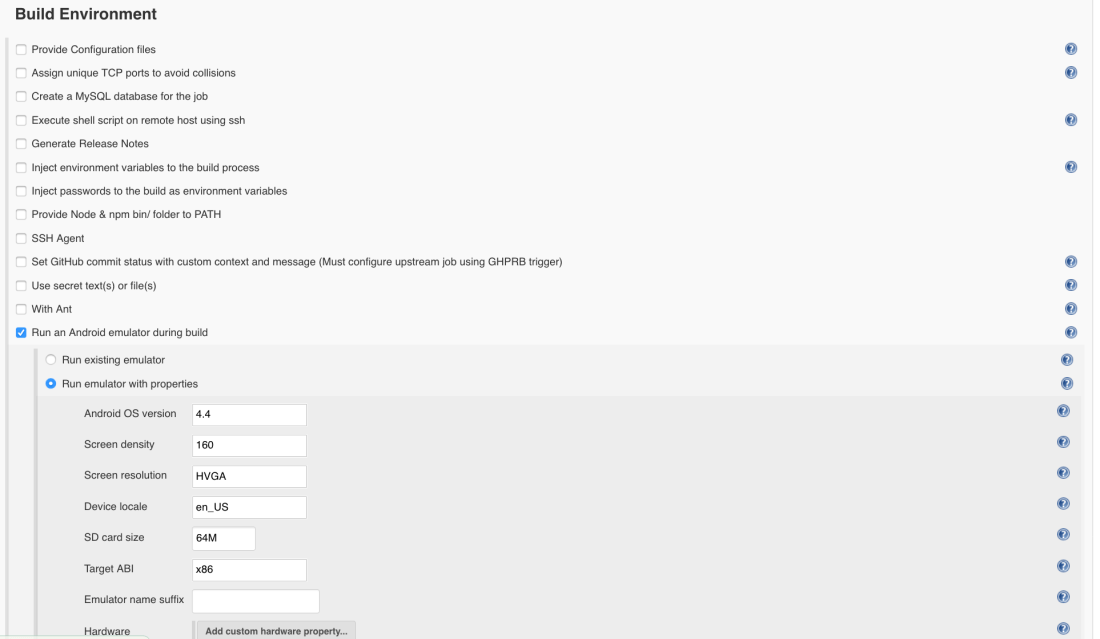
On the Build Environment session of your job, configure the emulator, like this:
On the Common emulator options session: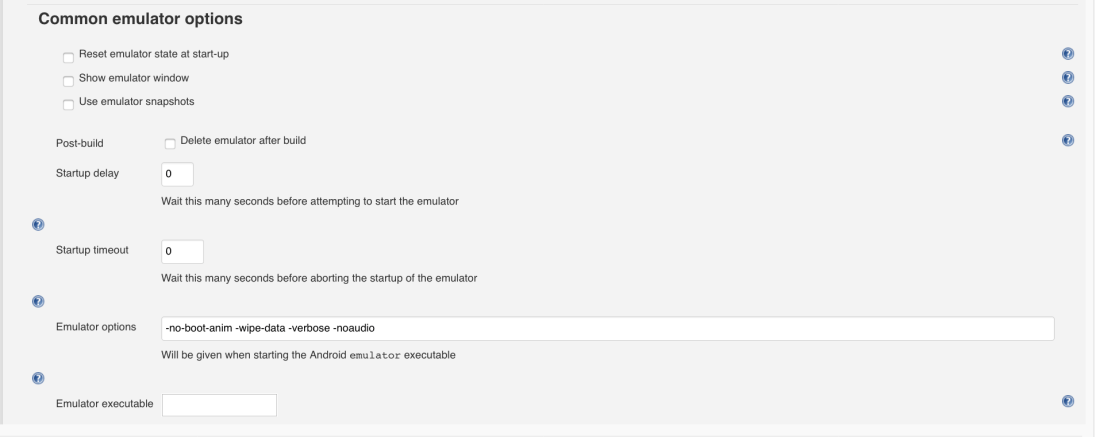
The -verbose is more for you to have full logs when running it. I was having some problems with timeout, jenkins was able to start the emulator, but was waiting to be ready forever until I got timeout again.
So, I had to remove the boot animation, clean the data and remove the audio and everything was fine as you can see.
Thank you guys !
 Rafaela Azevedo
Hey Rafaela,
The instructions are great but seems like Emulator plugin has evolved and there are few challenges which I believe not to exist in 2017. I’d really appreciate if you could update this document with latest plugin setup.
Hello Huzaif, thanks for the update. I am just going to add it to my pipeline. If you managed to run the emulator on your Jenkins before it, just share with me and I can update the post with credits to you 🙂
Dear Sir,
Here can we create emulator ?
Can we run appium programe in headless mode as well here ?
yes, it creates a new emulator. Yes, def 🙂