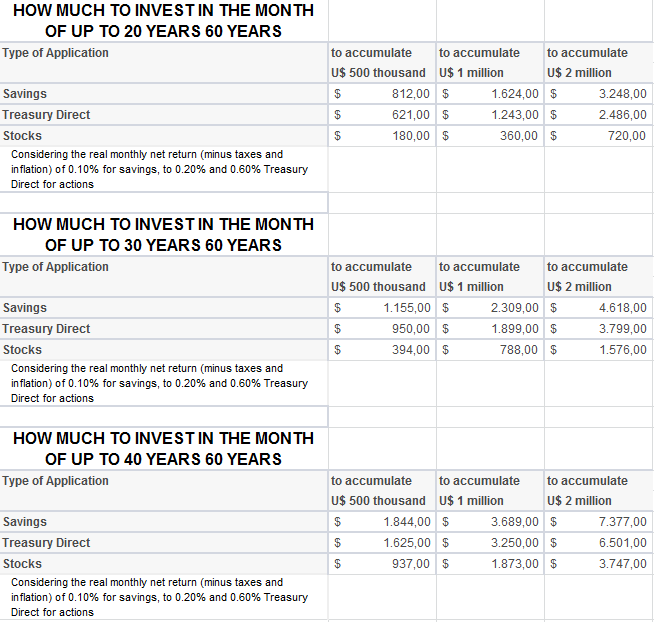
The later planning is done, the greater the effort

The later make this plan, however, more monthly effort need be increased. About to start making applications in savings at age 30 will only be able to achieve the goal of 60 million to applying a monthly amount of R $ 2,309. For those who begin to think about the 50, you must deposit U.S. $ 7,847 in the account each month.

“The mark of US $ 1 million is a symbolic challenge because this is a sum that most people never possess as a financial reserve,” said Mark Sylvester.

‘Liquidity risk is the savings for retirement, “says economist

Still thinking about retirement, Silvestre believes it is better to invest in pension plans than in applications with high liquidity, such as savings (allowing the looting of values at any time).

To make the calculations, the economist considered an actual net profit, minus taxes, fees and inflation of 0.10% for savings accounts. This return is similar, he says, that achieved in a conservative pension plan (whose portfolio contains less than 10% of investments in shares).

For applications in Treasury Direct, was considered a real net return of 0.20% per month (also recorded by private pension plans, moderate risk, with somewhere between 10% and 20% of stocks in the portfolio) and for the actions, a yield of 0.60% per month. In this case, he considered a forecast for shares of major companies, pension plans or higher risk (up to 49% of stocks in the portfolio).

Font: http://economia.uol.com.br/ultimas-noticias/redacao/2012/03/05/como-juntar-r-1-milhao-com-r-360-por-mes.jht

m

How to calculate your financial independence?

How much is necessary to join? How to calculate the magic number? It basically is a function of two variables: the level ofreal interest and personal expenses. The first is exogenous to the investor. He has no control. However, the second is a function of the chosen standard of living. It’s a personal decision.

If the investor is more conservative, wanting to consume only the income and not the principal equity needed to ensure financial independence is given by:

  
This way, the investor has an average monthly expenditure of $10,000 and the expected real interest rates are 3%, the equity necessary to ensure the independence will be $ 4 million (U.S. $ 10,000 x 12 / 0.03) . This equation is very sensitive to changes in interest rates. If they are 4%, the equity would be25% lower – $ 3 million. This shows the importance to seek more profitable investments.

This heritage should consider only the assets that generate some income. Not worth taking into account the property used as residence or vacation.

If you are having some difficult to understand the formula, ask for me, because the picture is in portuguese.

Font: http://www.valor.com.br/valor-investe/o-estrategista/2579362/como-calcular-sua-independencia-financeira

Create instance for what ?

Hello friends !

This time, we will talk about a subject that I have ever difficulty to learn, because I didn’t urderstand very well for what the instance is used.

Classes are declared by using the keyword class followed by the class name and a set of class members surrounded by curly braces. Everyclass has a constructor, which is called automatically any time an instance of a class is created. The purpose of constructors is to initialize classmembers when an instance of the class is created. Constructors do not have return values and always have the same name as the class. 

Example:

// Namespace Declaration
using System;

// helper class
class OutputClass
{
    string myString;

    // Constructor
    public OutputClass(string inputString)
{
myString = inputString;
}

    // Instance Method
    public void printString()
{
Console.WriteLine(“{0}”, myString);
}

    // Destructor
    ~OutputClass()
{
        // Some resource cleanup routines
    }
}

// Program start class
class ExampleClass
{
    // Main begins program execution.
    public static void Main()
{
        // Instance of OutputClass
        OutputClass outCl = new OutputClass(“This is printed by the output class.”);

       // Call Output class’ method
        outCl.printString();
}
}

In C#, there are two types of class members, instance and static. Instance class members belong to a specific occurrence of a class. Every time you declare an object of a certain class, you create a new instance of that class. The ExampleClass Main() method creates an instance of theOutputClass named outCl. You can create multiple instances of OutputClass with different names. Each of these instances are separate and stand alone. For example, if you create two OutputClass instances as follows:

    OutputClass oc1 = new OutputClass(“OutputClass1”);
OutputClass oc2 = 
new OutputClass(“OutputClass2”);

You create two separate instances of OutputClass with separate myString fields and separate printString() methods. On the other hand, if aclass member is static, you can access it simply by using the syntax <classname>.<static class member>. The instance names are oc1 and oc2.

Suppose OutputClass had the following static method:

    public static void staticPrinter()
{
Console.WriteLine(“There is only one of me.”);
}

Then you could call that function from Main() like this:

OutputClass.staticPrinter();

You must call static class members through their class name and not their instance name. This means that you don’t need to instantiate a class to use its static members. There is only ever one copy of a static class member. A good use of static members is when there is a function to be performed and no intermediate state is required, such as math calculations. Matter of fact, the .NET Frameworks Base Class Library includes a Math class that makes extensive use of static members.

Do you understand ? So, let’s practice !


Font: http://www.csharp-station.com/Tutorials/Lesson07.aspx

Insert data in your DataBase

Hello, after you have created your database and connected in it, you can input some data in the middle of the programming.

Like this example:

1: public class Program
2: {
3: static Person GetPerson()
4: {
5: Person person = new Person();
6: Console.WriteLine(“Name”);
7: person.Name = Console.ReadLine();
8: Console.WriteLine(“Email “);
9: person.Email = Console.ReadLine();
10: Console.WriteLine(“Gender (M ou F) “);
11: person.Gender= Convert.ToChar(Console.ReadLine());
12: Console.WriteLine(“Date of Born”);
13: person.DateofBorn= Convert.ToDateTime(Console.ReadLine());
14: return person;
15: }
16:
17: static void Main(string[] args)
18: {
19: //
20: //calls a method that will fill out a object Person with users input
21: //
22: Person newPerson = GetPerson();
23:
24: //
25: //string of connection that reports datas of DataBase that I will connect
26: //
27: string connectionString = @”Data Source=.\SQL;Initial Catalog=EstudyBlog;Integrated Security=True;Pooling=False”;
28:
29: //
30: // Query TSQL with command that I will realize in DataBase
31: //
32: string query = “INSERT INTO Person (name, dateBorn, gender, email) values (@name, @dateBorn, @gender, @email)”;
33:
34: SqlConnection conn = null;
35: try
36: {
37: //
38: //instance of connection
39: //
40: conn = new SqlConnection(connectionString);
41:
42: //
43: //look for if the connection is close, if it is so it will open.
44: //
45: if (conn.State == ConnectionState.Closed)
46: {
47: //
48: //open connection
49: //
50: conn.Open();
51: }
52:
53: //
54: // Creat of object command , that receives a query that will used in operation and the connection with tha DataBase.
55: //
56: SqlCommand cmd = new SqlCommand(query, conn);
57:
58: //
59: // Add parameters in command
60: //
61: cmd.Parameters.Add(new SqlParameter(“name”, newPerson.Name));
62: cmd.Parameters.Add(new SqlParameter(“dateBorn”, newPerson.DateBorn));
63: cmd.Parameters.Add(new SqlParameter(“gender”, newPerson.Gender));
64: cmd.Parameters.Add(new SqlParameter(“email”, newPerson.Email));
65:
66: //
67: // Execute command
68: //
69: cmd.ExecuteNonQuery();
70:
71: //
72: // Close the connection with DataBase
73: //
74: conn.Close();
75:
76: Console.WriteLine(“Person registered with success!!!”);
77: }
78: catch (Exception ex)
79: {
80: Console.WriteLine(ex.Message);
81: }
82: finally
83: {
84: //
85: // Ensures that the connection will be closed also that ocorres some error.
86: // Don’t exist problem in close a connection two times.
87: // The problem is in open a connection two times.
88: //
89: if (conn != null)
90: {
91: conn.Close();
92: }
93: }
94: }
95: }

Good studys for us !

Font: http://fpimentel88.wordpress.com/2009/01/18/aprendendo-c-parte-1-acessando-um-banco-sql-server-2005-com-adonet/

Debugging Techniques in C#

Debugging GUI applications for me mostly consists of printing out debug statements in the form of a dialog box with some text. While this technique was helpful for small to medium size apps I find writing large apps with a dialog box popping up after every other statement is counterproductive. With this in mind, I set out to find a better method for displaying debug statements during runtime. Enter C#.

C# solves three problems I faced when designing the useful and scalable debugging system. These problems exist either in Java, C/C++, or both (my main programming languages).

  1. Not having very much meta-information (e.g. line number, method name, etc.)
  2. Having to add and remove debug statements whenever the debug focus shifts
  3. Having the debug statements compiled into the program affecting performance

Ok, discussing the solution for these problems in order we’ll start with number one. Basically a few classes from the System.Reflection and System.Diagnostics namespaces solve this problem. Using the System.Diagnostics.StackFrame class the call stack can be explored and stack details such as what is on the stack level above the current one, what line is a function being called from, etc. And with the System.Reflection classes the names of functions, namespaces, variable types, etc., can be ascertained. Applying all this to the problem at hand here’s some code that retrieves the file name, line number, and method name of the function that called it.

// create the stack frame for the function that called this function

StackFrame sf = new StackFrame( 1, true );


// save the method name

string methodName = sf.GetMethod().ToString();


// save the file name

string fileName = sf.GetFileName();


// save the line number

int lineNumber = sf.GetFileLineNumber();


Font: http://www.csharp-station.com/Articles/DebuggingTechniques.aspx