The Retirement Savings Move Tax Pros Love

This is a small part of the Bloomberg’s new. Take a look !

When it comes to saving for his own retirement, certified public accountant Barry Picker takes advantage of a tax strategy ignored by most Americans. Each year he stashes some of his retirement savings in a Roth 401(k), rather than putting all his savings into a traditional 401(k).

While that means he misses out on the immediate tax break that comes from contributing to a traditional 401(k), Picker has something else in mind — a less taxing retirement. By paying taxes now, he wonโ€™t have to worry about paying taxes when he withdraws money from his Roth 401(k) later. Money withdrawn from a traditional 401(k), of course, will be taxed as ordinary income.

ย The big question investors have to grapple with, of course, is why they would rather pay taxes now instead of later — especially when there is no way to know where tax rates will be in the future. โ€œItโ€™s a compromise,โ€ says Picker, who is also a certified financial planner. โ€œI am giving up some control over managing my tax bracket today for being able to manage it in retirement. Thatโ€™s going to be valuable to me later.โ€


Social Security and Medicare

While Picker is thinking about keeping his taxes down in retirement, a Roth 401(k) also provides more flexibility when it comes to managing income and some less obvious payoffs as well.ย A traditional 401(k) requires you to begin taking distributions in the year your turn age 70ยฝ (or if later, the year you retire) — and then you pay taxes on that income. With the Roth 401(k), there is no required minimum distribution (if you roll the Roth 401(k) into a Roth IRA). That means you can choose to leave your funds invested and reduce your gross income.

To continue reading, click on the link below.

Font:ย http://www.bloomberg.com/news/2012-06-04/the-retirement-savings-move-tax-pros-love.html

The later planning is done, the greater the effort

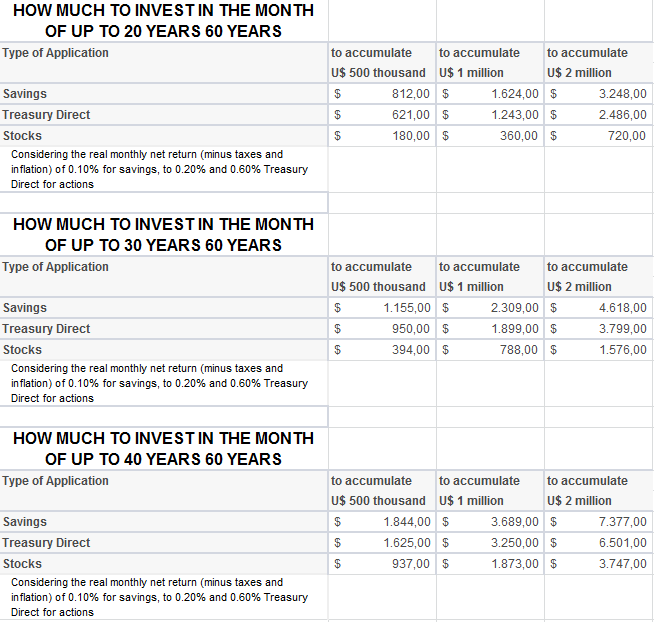
The later make this plan, however, more monthly effort need be increased. About to start making applications in savings at age 30 will only be able to achieve the goal of 60 million to applying a monthly amount of R $ 2,309. For those who begin to think about the 50, you must deposit U.S. $ 7,847 in the account each month.

“The mark of US $ 1 million is a symbolic challenge because this is a sum that most people never possess as a financial reserve,” said Mark Sylvester.

‘Liquidity risk is the savings for retirement, “says economist

Still thinking about retirement, Silvestre believes it is better to invest in pension plans than in applications with high liquidity, such as savings (allowing the looting of values at any time).

To make the calculations, the economist considered an actual net profit, minus taxes, fees and inflation of 0.10% for savings accounts. This return is similar, he says, that achieved in a conservative pension plan (whose portfolio contains less than 10% of investments in shares).

For applications in Treasury Direct, was considered a real net return of 0.20% per month (also recorded by private pension plans, moderate risk, with somewhere between 10% and 20% of stocks in the portfolio) and for the actions, a yield of 0.60% per month. In this case, he considered a forecast for shares of major companies, pension plans or higher risk (up to 49% of stocks in the portfolio).

Font: http://economia.uol.com.br/ultimas-noticias/redacao/2012/03/05/como-juntar-r-1-milhao-com-r-360-por-mes.jht

m

How to calculate your financial independence?

How much isย necessary to join?ย How to calculateย theย magic number?ย Itย basicallyย is a functionย of two variables: theย level ofreal interestย andย personal expenses.ย Theย firstย is exogenousย to the investor.ย Heย has no control.ย However, the secondย is a functionย of theย chosenย standard of living.ย It’sย aย personal decision.

Ifย the investor isย more conservative, wanting toย consumeย only the incomeย and not theย principalย equityย needed to ensure financial independence isย given by:

 ย 
This way,ย the investor hasย anย average monthly expenditureย of $10,000ย and theย expectedย real interest ratesย areย 3%, the equity necessary to ensureย the independenceย will be $ย 4 millionย (U.S. $ย 10,000ย xย 12ย /ย 0.03)ย .ย This equationย is very sensitiveย to changesย in interest rates.ย Ifย they areย 4%, the equityย wouldย be25% lowerย –ย $ 3ย million.ย This showsย the importanceย to seek more profitable investments.

Thisย heritageย should considerย only the assetsย that generate some income.ย Not worthย taking into accountย the propertyย used asย residence orย vacation.

If you are having some difficult to understand the formula, ask for me, because the picture is in portuguese.

Font:ย http://www.valor.com.br/valor-investe/o-estrategista/2579362/como-calcular-sua-independencia-financeira

Create instance for what ?

Hello friends !

This time, we will talk about a subject that I have ever difficulty to learn, because I didn’t urderstand very well for what the instance is used.

Classes are declared by using the keywordย classย followed by theย classย name and a set ofย classย members surrounded by curly braces. Everyclassย has a constructor, which is called automatically any time an instance of aย classย is created. The purpose of constructors is to initializeย classmembers when an instance of theย classย is created. Constructors do not have return values and always have the same name as theย class.ย 

Example:

// Namespace Declaration
usingย System;

// helper class
classย OutputClass
{
ย ย ย  stringย myString;

ย ย ย  // Constructor
ย ย ย  publicย OutputClass(stringย inputString)
{
myString = inputString;
}

ย ย ย  // Instance Method
ย ย ย  publicย voidย printString()
{
Console.WriteLine(“{0}”, myString);
}

ย ย ย  // Destructor
ย ย ย  ~OutputClass()
{
ย ย ย ย ย ย ย  // Some resource cleanup routines
ย ย ย  }
}

// Program start class
classย ExampleClass
{
ย ย ย  // Main begins program execution.
ย ย ย  publicย staticย voidย Main()
{
ย ย ย ย ย ย ย  // Instance of OutputClass
ย ย ย ย ย ย ย  OutputClass outCl =ย newย OutputClass(“This is printed by the output class.”);

ย ย ย ย ย ย  // Call Output class’ method
ย ย ย ย ย ย ย  outCl.printString();
}
}

In C#, there are two types ofย classย members, instance andย static. Instanceย classย members belong to a specific occurrence of aย class. Every time you declare an object of a certainย class, you create a new instance of thatย class. Theย ExampleClassย Main()ย method creates an instance of theOutputClassย namedย outCl. You can create multiple instances ofย OutputClassย with different names. Each of these instances are separate and stand alone. For example, if you create twoย OutputClassย instances as follows:

ย ย ย  OutputClass oc1 =ย newย OutputClass(“OutputClass1”);
OutputClass oc2 =ย 
newย OutputClass(“OutputClass2”);

You create two separate instances ofย OutputClassย with separateย myStringย fields and separateย printString()ย methods. On the other hand, if aclassย member isย static, you can access it simply by using the syntaxย <classname>.<static class member>. The instance names areย oc1ย andย oc2.

Supposeย OutputClassย had the followingย staticย method:

ย ย ย  publicย staticย voidย staticPrinter()
{
Console.WriteLine(“There is only one of me.”);
}

Then you could call that function fromย Main()ย like this:

OutputClass.staticPrinter();

You must callย staticย class members through theirย classย name and not their instance name. This means that you don’t need to instantiate a class to use itsย staticย members. There is only ever one copy of aย staticย class member. A good use ofย staticย members is when there is a function to be performed and no intermediate state is required, such as math calculations. Matter of fact, the .NET Frameworks Base Class Library includes aย Mathย classย that makes extensive use ofย staticย members.

Do you understandย ? So, let’s practice !


Font:ย http://www.csharp-station.com/Tutorials/Lesson07.aspx

Insert data in your DataBase

Hello, after you have created your database and connected in it, you can input some data in the middle of the programming.

Like this example:

1: public class Program
2: {
3: static Personย GetPerson()
4: {
5: Person personย = new Person();
6: Console.WriteLine(“Name”);
7: person.Name = Console.ReadLine();
8: Console.WriteLine(“Email “);
9: person.Email = Console.ReadLine();
10: Console.WriteLine(“Gender (M ou F) “);
11: person.Gender= Convert.ToChar(Console.ReadLine());
12: Console.WriteLine(“Date of Born”);
13: person.DateofBorn= Convert.ToDateTime(Console.ReadLine());
14: return person;
15: }
16:
17: static void Main(string[] args)
18: {
19: //
20: //calls a method that will fill out a object Person with users input
21: //
22: Personย newPerson = GetPerson();
23:
24: //
25: //string of connection that reports datas of DataBase that I will connect
26: //
27: string connectionString = @”Data Source=.\SQL;Initial Catalog=EstudyBlog;Integrated Security=True;Pooling=False”;
28:
29: //
30: // Query TSQL with command that I will realize in DataBase
31: //
32: string query = “INSERT INTO Person (name, dateBorn, gender, email) values (@name, @dateBorn, @gender, @email)”;
33:
34: SqlConnection conn = null;
35: try
36: {
37: //
38: //instance of connection
39: //
40: conn = new SqlConnection(connectionString);
41:
42: //
43: //look for if the connection is close, if it is so it will open.
44: //
45: if (conn.State == ConnectionState.Closed)
46: {
47: //
48: //open connection
49: //
50: conn.Open();
51: }
52:
53: //
54: // Creat of object command , that receives a query that will used in operation and the connection with tha DataBase.
55: //
56: SqlCommand cmd = new SqlCommand(query, conn);
57:
58: //
59: // Add parameters in command
60: //
61: cmd.Parameters.Add(new SqlParameter(“name”, newPerson.Name));
62: cmd.Parameters.Add(new SqlParameter(“dateBorn”, newPerson.DateBorn));
63: cmd.Parameters.Add(new SqlParameter(“gender”, newPerson.Gender));
64: cmd.Parameters.Add(new SqlParameter(“email”, newPerson.Email));
65:
66: //
67: // Execute command
68: //
69: cmd.ExecuteNonQuery();
70:
71: //
72: // Close the connection with DataBase
73: //
74: conn.Close();
75:
76: Console.WriteLine(“Person registered with success!!!”);
77: }
78: catch (Exception ex)
79: {
80: Console.WriteLine(ex.Message);
81: }
82: finally
83: {
84: //
85: // Ensures that the connection will be closed also that ocorres some error.
86: // Don’t exist problem in close a connection two times.
87: // The problem is in open a connection two times.
88: //
89: if (conn != null)
90: {
91: conn.Close();
92: }
93: }
94: }
95: }

Good studys for us !

Font:ย http://fpimentel88.wordpress.com/2009/01/18/aprendendo-c-parte-1-acessando-um-banco-sql-server-2005-com-adonet/

Debugging Techniques in C#

Debugging GUI applications for me mostly consists of printing out debug statements in the form of a dialog box with some text. While this technique was helpful for small to medium size apps I find writing large apps with a dialog box popping up after every other statement is counterproductive. With this in mind, I set out to find a better method for displaying debug statements during runtime. Enter C#.

C# solves three problems I faced when designing the useful and scalable debugging system. These problems exist either in Java, C/C++, or both (my main programming languages).

  1. Not having very much meta-information (e.g. line number, method name, etc.)
  2. Having to add and remove debug statements whenever the debug focus shifts
  3. Having the debug statements compiled into the program affecting performance

Ok, discussing the solution for these problems in order weโ€™ll start with number one. Basically a few classes from the System.Reflection and System.Diagnostics namespaces solve this problem. Using the System.Diagnostics.StackFrame class the call stack can be explored and stack details such as what is on the stack level above the current one, what line is a function being called from, etc. And with the System.Reflection classes the names of functions, namespaces, variable types, etc., can be ascertained. Applying all this to the problem at hand hereโ€™s some code that retrieves the file name, line number, and method name of the function that called it.

// create the stack frame for the function that called this function

StackFrame sf =ย newย StackFrame( 1,ย trueย );


// save the method name

stringย methodName = sf.GetMethod().ToString();


// save the file name

stringย fileName = sf.GetFileName();


// save the line number

intย lineNumber = sf.GetFileLineNumber();


Font:ย http://www.csharp-station.com/Articles/DebuggingTechniques.aspx