How to setup Protractor + Cucumber

Hello guys, I will post about how to install protractor and cucumber to test an AngularJS and how to import this project on your Eclipse.

You need JDK and Node.js installed:

– Install node in your mac

brew install node
node --version

– Check the version of you java

java -version

– Git clone this project as an example:

https://github.com/AndrewKeig/protractor-cucumber.git

– Install protractor and cucumber through npm, update and start the webdriver server

npm install -g protractor
npm install -g cucumber
protractor --version
webdriver-manager update
webdriver-manager start

– You will see a message like this on your console:

11:13:08.586 INFO - Selenium Server is up and running

– Run cucumber.js on the protractor-cucumber’s project folder

– If you have the error below, move the features folder to outside the examples folder and open the /features/step_definitions/steps.js and remove one of the “../”:

  return binding.lstat(pathModule._makeLong(path));

                 ^

Error: ENOENT: no such file or directory, lstat '/Users/Documents/workspace/protractor-cucumber/features'

    at Error (native)

    at Object.fs.lstatSync (fs.js:887:18)

    at Object.realpathSync (fs.js:1518:21)

    at Object.expandPathWithExtensions (/usr/local/lib/node_modules/cucumber/lib/cucumber/cli/path_expander.js:14:23)

    at /usr/local/lib/node_modules/cucumber/lib/cucumber/cli/path_expander.js:8:27

    at Array.map (native)

    at Object.expandPathsWithExtensions (/usr/local/lib/node_modules/cucumber/lib/cucumber/cli/path_expander.js:7:31)

    at Object.expandPaths (/usr/local/lib/node_modules/cucumber/lib/cucumber/cli/feature_path_expander.js:9:38)

    at Function.Configuration (/usr/local/lib/node_modules/cucumber/lib/cucumber/cli/configuration.js:21:63)

    at getConfiguration (/usr/local/lib/node_modules/cucumber/lib/cucumber/cli.js:46:38)

Rafaelas-MBP-2:protractor-cucumber rafaelasouza$ cucumber.js

module.js:341


If you want to run on Eclipse:
– Install nodeclipse, a Node.js plugin for Eclipse

npm install -g nodeclipse

nodeclipse -g

– Import this project into your workspace and install Enide on your eclipse.

Thank you guys ! See you tomorrow !

How to get a random number from a list on Jmeter

Hey folks,

So for today I will post the code I am using on Jmeter to get a random index from a list. So, if you have a json with several ids, for example, and you want to choose one of them to use on the next request, you need:

1 – Create a post processor to get the id node from your json response request. As you may know when you use this plugin, jmeter creates automatically the list of variables with the prefix you have chosen and the suffix “__index”. You can see how to use this plugin on my previous post.

2 – Create a Beanshell Sample

3 – Get a random index from this list of ids or you could use this method to get the random id directly. I found easiest get the index r at least it was the first thing which came into my mind.

import java.util.Random;
String idSize = vars.get("ids_matchNr");
int max = Integer.parseInt(idSize);
int min = 1;
int idx =  min + (int) (Math.random() * ((max - min) + 1));
String id = vars.get("ids_" + Integer.toString(idx));
Thank you guys ! See you next week or before 🙂

Getting Test Automation right in a DevOps World

Hi guys, today I am here just to share a webinar about Test Automation for Devops. Looks it will be a good one 🙂


Presenter: Danny Crone, Test Practitioner and Technical Director, nFocus

Time: 14 April, 12:30 BST

Background:

DevOps aims to reduce delivery times and achieve greater production stability and reliability, so automated testing is naturally seen as being key to this. While this may be true, just having automated tests is not enough. This webinar will discuss some of the challenges of automating deployment pipelines such as test environments, test data, deployment tools and success/failure metrics.

Presenter:

Danny Crone is a Test Practitioner and Technical Director at the multi-award winning testing consultancy, nFocus. Danny has been in Software engineering for over 20 years and although he is a developer at heart, most of his IT career has been spent in Quality Assurance. He is a regular speaker at Testing events and has a real passion for Automated Testing.

Danny is a thought leader in the field of automated testing and has setup automated frameworks and approaches for many different clients. He has worked extensively with Visual Studio throughout the years and this includes being a Microsoft ALM Ranger, collaborating with other Rangers to produce “out of band” solutions for missing features and guidance in Visual Studio.

He loves challenges and helping others with their challenges, testing is always tough and he enjoys driving efficiencies into the test process to help build better software.

Register here

Setting Webdriver to run tests in a remote computer

Hey guys,  today I will post about how can you setup your webdriver project to run in a remote machine.

So, first you need set a machine running the selenium server:

java -jar selenium-server-standalone-2.x.x.jar

You will see a message like this:

15:43:07.541 INFO - RemoteWebDriver instances should connect to: 
http://127.0.0.1:4444/wd/hub


Then in your code, point webdriver.chrome.driver to the location of chromedriver on the remote machine, like the chrome driver. Also, make sure to start up chromedriver there. If you want to run on your local machine point to: 127.0.0.1:4444/wd/hub


 String remoteURL = "http://localhost:9515"; 
 System.setProperty("webdriver.chrome.driver", "/Users/xxxxx/chromedriver");
 WebDriver driver = new RemoteWebDriver(new URL(remoteURL), DesiredCapabi
lities.chrome());
 driver.get("http://www.google.com");
 WebElement element = driver.findElement(By.id("lst-ib"));
 element.sendKeys("Azevedo Rafaela!");
 element.submit();
 driver.quit();


Summarising: You have to install a Selenium Server (a Hub), and register your remote WebDriver to it. Then, your client will talk to the Hub which will find a matching webdriver to execute your test.

Hope this helps, a long time that I don’t code using Selenium!


Resources:

http://stackoverflow.com/questions/8837875/setting-remote-webdriver-to-run-tests-in-a-remote-computer-using-java

http://stackoverflow.com/questions/9542020/using-selenium-2-remotewebdriver-with-chromedriver

http://selenium-python.readthedocs.org/getting-started.html

https://github.com/SeleniumHQ/selenium/wiki/RemoteWebDriver

Mock or don’t mock the server ?


Why mock the server

  • When you want isolate the system under test to ensure tests run reliably and only fail when there is a genuine error, this avoids tests failing due to irrelevant external changes such as network failure or a server being rebooted / redeployed.
  • Allows the full range of responses and scenarios to be tested without having to set up and manage a complex test infrastructure. For example increased response delay or dropped connections can increase as load increases on a dependant system. To simulate these types of performance related degradation can be extremely difficult without with out generating a large volume of traffic. If the dependent system is mocked the mock can control the exact response delay or any other characteristics of each response.
  • Each test can then independently encapsulate the data and logic used for mock services, ensuring each test runs independently. In addition such an approach also reduces the time for a suite of test to complete because tests can run in parallel and do not share data.
  • Allows development teams to isolated from an unstable, unreliable or volatile web service. This is particularly critical during the initial development phases when the APIs / services are changing frequently and cause development and testing to be blocked


Why not mock the server

  •  Tests can be harder to understand. Instead of just a straightforward usage of your code (e.g. pass in some values to the method under test and check the return result), you need to include extra code to tell the mocks how to behave. Having this extra code detracts from the actual intent of what you’re trying to test, and very often this code is hard to understand if you’re not familiar with the implementation of the production code.
  • Tests can be harder to maintain. When you tell a mock how to behave, you’re leaking implementation details of your code into your test. When implementation details in your production code change, you’ll need to update your tests to reflect these changes. Tests should typically know little about the code’s implementation, and should focus on testing the code’s public interface.
  • Tests can provide less assurance that your code is working properly. When you tell a mock how to behave, the only assurance you get with your tests is that your code will work if your mocks behave exactly like your real implementations. This can be very hard to guarantee, and the problem gets worse as your code changes over time, as the behavior of the real implementations is likely to get out of sync with your mocks.


Anti-pattern

  • Record and replay real dependent service responses, these recordings are typically complex and shared between multiple tests. This, however, introduces unnecessary coupling between tests and breaks the Single responsibility principle, which, states that every context (class, function, variable, etc.) should define a single responsibility, and that responsibility should be entirely encapsulated by the context.


So, my advice is mock the server, you can mock the server and test the integration in the end of the project (End-to-End tests). Sometimes you can’t use a real dependency in a test (e.g. if it’s too slow or talks over the network), but there may better options than using mocks, such as a hermetic local server (e.g. a credit card server that you start up on your machine specifically for the test) or a fake implementation (e.g. an in-memory credit card server)

Thanks guys, see you next week 🙂


Resources:

http://googletesting.blogspot.co.uk/2013/05/testing-on-toilet-dont-overuse-mocks.html

https://blog.8thlight.com/uncle-bob/2014/05/10/WhenToMock.html

http://www.mock-server.com/#why-use-mockserver

https://en.wikipedia.org/wiki/MockServer


How to get specific value/node from a json with Jmeter

Hi guys, today I will post about how to get a value from a json response with Jmeter.

First we need Jmeter with all plugins installed:

brew install jmeter –with-plugins


Let’s use this response for instance. Look that we have a token which is dynamically generated and we need get this value to use in the next request.

Response:

{
   "status": "success",
   "message": "success registering this user",
   "data":    {
      "date": "2015-04-06",
      "id": "1",
      "user": "Rafa",
      "token": "30154dbe350991cf316ec52b8743137b"
   }
}


You can use this site to find the json path and get the expression to use on jmeter:
https://jsonpath.curiousconcept.com

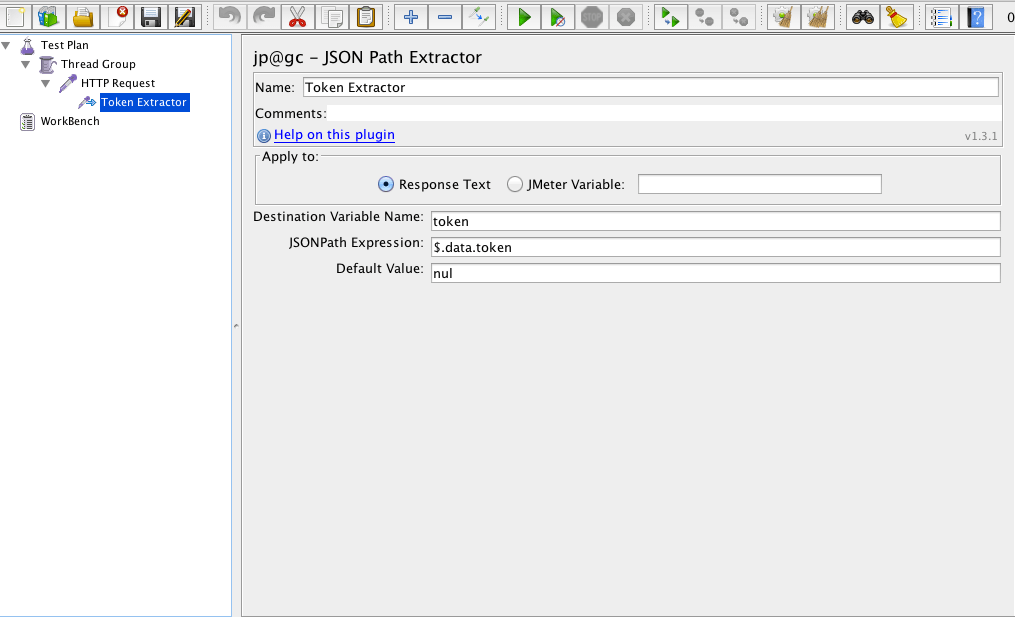
So, we got the expression: $.data.token and now we can create the json path extractor with a default value (when jmeter doesn’t find the expression), jsonpath and the variable (which will contain the value of the expression). See:

Screen Shot 2016-03-02 at 22.38.38

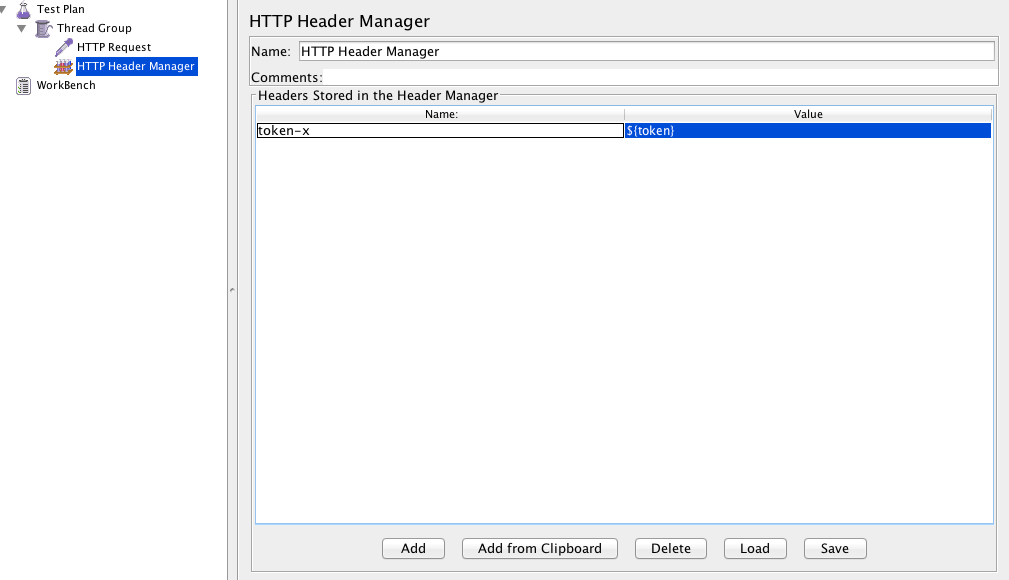
Now, we can use the variable on a header or another request:

Screen Shot 2016-03-02 at 22.44.46


As always, feel free to add any comments !

Cheers. See you next week 🙂

Exploratory tests as a complement of regression pack

Hey guys, today I will post about a technique to test new/old features when you don’t have a proper regression pack, or when the product is not stable, or the time is really limited.

Why should we perform exploratory tests combined to regression tests when the product is not stable ?

  • Because testers will be involved in minimum planning and maximum test execution (Allowing to find more bugs than just following the regression pack)
  • It will find different approach to test the same scenario, allowing to have a better coverage about the software, so it will have a higher possibility to find a trick bug
  • This is an approach that is most useful when there are no or poor specifications and when time is severely limited


How to perform the exploratory tests ?

The test design and test execution activities are performed in parallel typically without formally documenting the test conditions, test cases or test scripts. This does not mean that other, more formal testing techniques will not be used.

There is too much evidence to test, tools are often expensive, so investigators must exercise judgment. The investigator must pick what to study, and how in order to reveal how, in order to reveal the most needed information. This takes time and you need a huge knowledge of the software, until there you are gaining experience doing exploratory tests on te software.


[When my boss asks how the tests are going]


In this case it’s serving to complement the regression pack, which is a more formal testing, helping to establish greater confidence in the software. Exploratory testing can be used as a check on the formal test process by helping to ensure that the most serious/tricks defects have been found.

Programs fail in many ways:

Screen Shot 2016-02-24 at 23.14.00


Why should you not automate exploratory tests?

  • With a script, you miss the same things every time
  • Automated scripts are completely blind by design, this is more about a human interaction and different approaches
  • Different programmers tend to make different errors. (This is a key part of the rationale behind the PSP). A generic test suite that ignores authorship will overemphasize some potential errors while underemphasizing others
  • The environment in which the software will run ( platform, competition, user expectations, new exploits) changes over time


So, if is not stable what are the types of the defects I am finding?

  • A manufacturing defect appears in an individual instance of the product. This is the type of the defect you are finding on non stable softwares and what you try to find doing exploratory tests.
  • A design defect appears in every instance of the product. The challenge is to find new design errors, not to look over and over and over again for the same design error


To end this post, Exploratory testing is called when you want to go beyond the obvious or when I don’t trust the software, which is most of the time.


Resources:

http://istqbexamcertification.com/what-is-exploratory-testing-in-software-testing/

http://www.kaner.com/pdfs/QAIExploring.pdf

http://www.satisfice.com/articles/what_is_et.shtml

QA Metrics

Hey guys, today I am going to post some metrics for the automation projects. So, let’s start with the percentage automatable, which means how many test cases you can automate and how many you need to test manually.

  • Percent automatable

PA (%) = ATC/TC

PA = Percent automatable
ATC = Number of test cases automatable
TC = Total number of test cases

As part of an AST effort, the project is either basing its automation on existing manual test procedures, or starting a new automation effort from scratch, some combination, or even just maintaining an AST effort. Whatever the case, a percent automatable metric or the automation index can be determined.


  • Automation Progress

AP (%) = AA/ATC


AP = Automation progress
AA = Number of test cases automated
ATC = Number of test cases automatable

Automation progress refers to the number of tests that have been automated as a percentage of all automatable test cases. Basically, how well are you doing against the goal of automated testing? The ultimate goal is to automate 100% of the “automatable” test cases. It is useful to track this metric during the various stages of automated testing development.


  • Test Progress (Manual or automated)

TP = TC/T


TP = Test progress
TC = Number of test cases executed
T = Total number of test cases

ast2

A common metric closely associated with the progress of automation, yet not exclusive to automation, is test progress. Test progress can simply be defined as the number of test cases (manual and automated) executed over time.


  • Percent of Automated Test Coverage

PTC (%) = AC/C

PTC = Percent of automated test coverage
AC = Automation coverage
C = Total coverage (i.e., requirements, units/components, or code coverage)

This metric determines what percentage of test coverage the automated testing is actually achieving. Various degrees of test coverage can be achieved, depending on the project and defined goals. Together with manual test coverage, this metric measures the completeness of the test coverage and can measure how much automation is being executed relative to the total number of tests. Percent of automated test coverage does not indicate anything about the effectiveness of the testing taking place; it is a metric that measures its dimension.


  • Defect Density

DD = D/SS

DD = Defect density
D = Number of known defects
SS = Size of software entity

Defect density is another well-known metric that can be used for determining an area to automate. If a component requires a lot of retesting because the defect density is very high, it might lend itself perfectly to automated testing. Defect density is a measure of the total known defects divided by the size of the software entity being measured. For example, if there is a high defect density in a specific functionality, it is important to conduct a causal analysis. Is this functionality very complex, and therefore is it to be expected that the defect density would be high? Is there a problem with the design or implementation of the functionality? Were the wrong (or not enough) resources assigned to the functionality, because an inaccurate risk had been assigned to it and the complexity was not understood?


  • Defect Trend Analysis

DTA = D/TPE

DTA = Defect trend analysis
D = Number of known defects
TPE = Number of test procedures executed over time

Another useful testing metric in general is defect trend analysis.


  • Defect Removal Efficiency

DRE (%) = DT/DT+DA

DRE = Defect removal efficiency
DT = Number of defects found during testing
DA = Number of defects found after delivery

DRE is used to determine the effectiveness of defect removal efforts. It is also an indirect measurement of product quality. The higher the percentage, the greater the potential positive impact on the quality of the product. This is because it represents the timely identification and removal of defects at any particular phase.


  •  Automation Development
    Number (or %) of test cases feasible to automate out of all selected test cases – You can even replace test cases by steps or expected results for a more granular analysis.
    Number (or %) of test cases automated out of all test cases feasible to automate – As above, you can replace test cases by steps or expected results.
    Average effort spent to automate one test case – You can create a trend of this average effort over the duration of the automation exercise.
    % Defects discovered in unit testing/ reviews/ integration of all discovered defects in the automated test scripts


  • Automation Execution
    Number (or %) of automated test scripts executed out of all automated test scripts
    Number (or %) of automated test scripts that passed of all executed scripts
    Average time to execute an automated test script – Alternately, you can map test cases to automated test scripts and use the Average time to execute one test case.
    Average time to analyze automated testing results per script
    Defects discovered by automated test execution – As common, you can divide this by severity/ priority/ component and so on.


References:

http://www.methodsandtools.com/archive/archive.php?id=94

Testing Mobile Apps under Real User Conditions

Hey guys, so the first post of 2016 will be this webinar that I’ve watched last week about the different conditions (possibilities) you can find when testing mobile apps.

It will help you to create about more scenarios when testing on mobile platform, below the slides:


But if you want to watch the video the link is here.


Thank you !
See you next week 🙂