Understanding encapsulation

This technique is used to hide an idea, when you don’t want expose the inter details to the users.

As a more technical example we can describe what happens in a sales system, where we have records of employees, users, managers, clients, and other products. If happens a problem in the user, only this sector will be fixed and does not affect the others.

In a process of encapsulating the attributes of the classes are kind of private. To access these types of modifiers, you must create getters and setters methods.

The methods setters are used to change the information of a property of an object, and getters to return the value of this property.

See an example of encapsulation, in Listing 2 creates the attributes private (private) and is carried out the process of generating getters and setters methods.
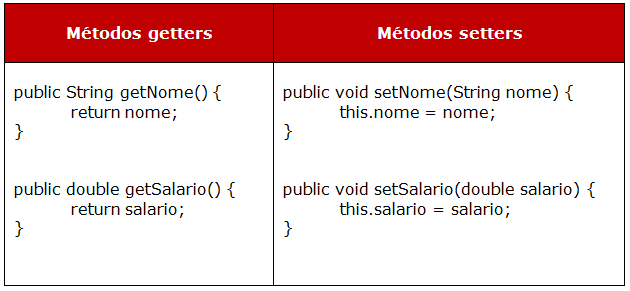
Image

Code:

public class Funcionario {
    private double salario;
    private String nome;
    public String getNome() {
        return nome;
    }
    public void setNome(String nome) {
        this.nome = nome;
    }
    
    public void setSalario(double salario) {
        this.salario = salario;
    }
    
    public double getSalario() {
        return salario;
    }
}

So, is instantiated class “Employee”, where the variable reference is used to invoke methods setters, reporting any data. In the end, the getters is used within the “System.out.println” to output the results that were passed in the methods setters.

Code:

public class TestaFuncionario {
    public static void main(String[] args) {
        Funcionario funcionario = new Funcionario();
        funcionario.setNome("Thiago");
        funcionario.setSalario(2500);
        
        System.out.println(funcionario.getNome());
        System.out.println(funcionario.getSalario());
    }
}

This is easy and helps you avoid pass a lot of parameters in methods, classes and functions.

Introducing a BDD

Hello, my friends ! Look what I’ve found. A simple text about tests in BDD (Behavior Driven Development). It is very interesting and usefully.


“[…]

Test method names should be sentences

My first “Aha!” moment occurred as I was being shown a deceptively simple utility called agiledox, written by my colleague, Chris Stevenson. It takes a JUnit test class and prints out the method names as plain sentences, so a test case that looks like this:

public class CustomerLookupTest extends TestCase {
    testFindsCustomerById() {
        ...
    }
    testFailsForDuplicateCustomers() {
        ...
    }
    ...
}

renders something like this:

CustomerLookup
- finds customer by id
- fails for duplicate customers
- ...

The word “test” is stripped from both the class name and the method names, and the camel-case method name is converted into regular text. That’s all it does, but its effect is amazing.

Developers discovered it could do at least some of their documentation for them, so they started to write test methods that were real sentences. What’s more, they found that when they wrote the method name in the language of the business domain,the generated documents made sense to business users, analysts, and testers.”


Font: http://dannorth.net/introducing-bdd/

Adding and deleting a cookie with Selenium

It’s simple 🙂

// Now set the cookie. This one’s valid for the entire domain
Cookie cookie = new Cookie(“key”, “value”);
driver.manage().addCookie(cookie);

// And now output all the available cookies for the current URL
Set<Cookie> allCookies = driver.manage().getCookies();
for (Cookie loadedCookie : allCookies) {
System.out.println(String.format(“%s -> %s”, loadedCookie.getName(), loadedCookie.getValue()));
}

// You can delete cookies in 3 ways
// By name
driver.manage().deleteCookieNamed(“CookieName”);
// By Cookie
driver.manage().deleteCookie(loadedCookie);
// Or all of them
driver.manage().deleteAllCookies();

I’ve found this in the selenium site

Font: http://docs.seleniumhq.org/docs/03_webdriver.jsp

Open saved profiles in Firefox – Selenium (WebDriver)

Hello, I will put the code that you need for open some saved profile in Firefox with Selenium.

ProfilesIni profilesIni = new ProfilesIni();
FirefoxProfile profile = profilesIni.getProfile(“default“); //This is the name of profile, you can find this in the folder of firefox profiles.
WebDriver driver = new FirefoxDriver(profile);
 
DesiredCapabilities capabilities = new DesiredCapabilities();
capabilities.setCapability(CapabilityType.ACCEPT_SSL_CERTS, true); // Only necessary if you have invalid certificates in the page
                
profile.setPreference(“network.proxy.type”, 0); // open without proxy
profile.setAcceptUntrustedCertificates(true); // Only necessary if you have invalid certificates in the page
profile.setAssumeUntrustedCertificateIssuer(false); // Only necessary if you have invalid certificates in the page
 
I use this way for open a saved profile that contains a personal certificate. I needed open 
a page with this certificate installed.
 
Bye bye 🙂

Investing in federal securities, the basic

Hello guys, today I will talk about federal securities, just the basic for you begin invest.

Here in Brazil we have federal securities pos-fixed and pre-fixed, this means that some federal securities, have the % of profitability already fixed and you knows how much you will gain in the final of maturity. The pos-fixed federal security don’t have the % of profitability and you will gain according some index in the month.

The federal securities in Brazil are:

  • LTN: This federal securities is pre-fixed and you know how much is the profitability in the buy moment. It is very simple, you will gain the value of the face (money invested + profitability money) in the maturity date.
  • NTN-F: This federal securities is pre-fixed, with profitability in the buy moment. The profitability is received every half year (profitability money) and in the maturity date (money invested + profitability money in the month). 
  • NTN-B main: This federal securities is pre-fixed and depends of the variation of IPCA (Index of consumer prices) with profitability in he buy moment. Keeps the value of the buy and protect him of fluctuations of the prices. You will gain the value of the face (money invested + profitability money) in the maturity date.
  • NTN-B: This federal securities is pre-fixed and depends of the variation of IPCA (Index of consumer prices) with profitability in he buy moment. Keeps the value of the buy and protect him of fluctuations of the prices.The profitability is received every half year (profitability money) and in the maturity date (money invested + profitability money in the month). 
  • LFT: This federal securities is pos-fixed and depends Selic index (interest rate). Your profitability usually is less than others federal securities, because has low volatility, avoiding loss in the case of early sales. You will gain the value of the face (money invested + profitability money) in the maturity date.
  • NTN-C: This federal securities is pos-fixed and depends IGP-M index (general market prices). The profitability is received every half year (profitability money) and in the maturity date (money invested + profitability money in the month). Nowadays, this federal securities are sold only in the Wednesday.

This is the basic for you about how invest in federal securities of Brazil.

Bye 🙂

Font: https://www.tesouro.fazenda.gov.br/pt/caracteristicas-dos-titulos-publicos

Using hashtable for include many values in an array – Webdriver (Java)

Hello again,

I had this new thing that I have learned and use almost every days.

You can use this when you need return many values of some table.This code will return a list of things with a column and theirs line. So, here go the code:

Hashtable valores = new Hashtable<String, String>();

int qtdLinesTblSimAcu = 0;

if(tableSimPresent)

{

String[] cTabelSim = new String[10];

cTabelSim[1] = “ID”;

cTabelSim[2] = “Buyer.Firm”;

cTabelSim[3] = “Buyer.Account”;

cTabelSim[4] = “Buyer.Qty”;

cTabelSim[5] = “Seller.Firm”;

cTabelSim[6] = “Seller.Account”;

cTabelSim[7] = “Seller.Qty”;

cTabelSim[8] = “Price”;

cTabelSim[9] = “Traded.Qty”;

//LET CATCH ALL THE LINES AND PUT IN HASHTABLE

int qtdLinhasTblSim = (Integer) selenium.getXpathCount(//html/tbody/table/tr“)); // CHANGE FOR THE CORRECT XPATH ONLY UNTIL THE TR TAG.

qtdLinesTblSimAcu += qtdLinesTblSim;

if(qtdLinesTblSim > 0)

{

//NAVIGATE FOR LINES AND COLUMNS

for(int l = 2; l <= qtdLinhasTblSim; l++)

{

//NAVIGATE FOR COLUMNS

for(int c = 1 ;c < 10;c++) //CHANGE FOR THE NUMBER OF COLUMNS

{

String val  = selenium.getText(String.format(“xpath=//html/tbody/tr[%s]/td[%s]“),l,c)); /*CHANGE FOR THE XPATH CORRECT, IN THE %s YOU WILL SUBSTITUTE RESPECTIVELY FOR VALUE OF L AND C, LIKE LINE AND COLUMN. */

values.put(cTabelSim[c] + “:” + ((l + qtdLinesTblSimAcu) -1),val);

}

}

}

/* THIS IS THE END OF THE RETURN, IF YOU HAVE CATCH VALUES OF ANOTHER TABLE, PUT THE FOR FOR CATCH THE VALUES OF THIS TABLE, AND THE CODE BELOW IN THE END OF THIS LAST FOR   */

String[][] returnE = new String[values.size()][2];

Enumeration e = values.keys();

int index = -1;

while(e.hasMoreElements())

{

index++;

String k = (String) e.nextElement();

returnE[index][0] = k;

returnE[index][1] = values.get(k).toString();

}

return returnE ;

}

The return will be something like this:

columnA:1 valueA1

columnA:2 valueA2

columnB:1 valueB1

columnC:1 valueC1

columnC:2 valueC2

columnC:3 valueC3

Bye bye, guys !!

Desired capabilities Webdriver – Ignore security in browser

Hello again, I had some codes to show you !

Like this one, when you have some problem with the certificate page, or proxy, or another security problem, you can put this code for initialise the webdriver. Before you code anything, you have to start the webdriver and config this one, you can use this config for start the webdriver with the config of all security is off.

In this example I use the IE 9 and platform windows like the default browser:

DesiredCapabilities capabilities = new DesiredCapabilities(“Internet Explorer”, “9”, Platform.WINDOWS);
capabilities.setJavascriptEnabled(true);
capabilities.setCapability(“ignoreProtectedModeSettings”, true);
capabilities.setCapability(“ensureCleanSession”, true);
capabilities.setCapability(InternetExplorerDriver.INTRODUCE_FLAKINESS_BY_IGNORING_SECURITY_DOMAINS, true);
WebDriver driver = new InternetExplorerDriver(capabilities);


Bye bye !!

One solution for: Error in execution of Webdriver

Good night,

When you have errors in a execution of webdriver, and for some reason appears a message told that selenium is closed and your selenium doesn’t really closed.

Put this code for initialize the execution:

String Servidor = “http://127.0.0.1:4444/wd/hub“;
DesiredCapabilities capabilities = DesiredCapabilities.internetExplorer();
WebDriver driver = new RemoteWebDriver(new URL(Servidor),capabilities);

This way you will execute the test in your local machine and force this.