
Guys , I summarized this video to you understand how we can initialize with Jmeter.
The flow of our first performance script:
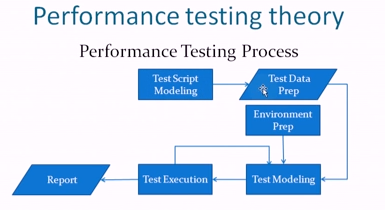
Performance Test Preparation:

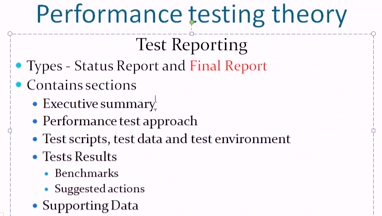
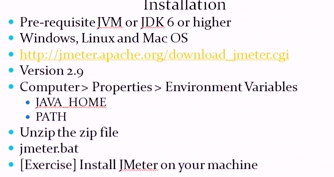
Installation:
Video: http://youtu.be/4mfFSrxpl0Y?t=52m43s
Bye 🙂
Guys , I summarized this video to you understand how we can initialize with Jmeter.
The flow of our first performance script:
Performance Test Preparation:
Installation:
Video: http://youtu.be/4mfFSrxpl0Y?t=52m43s
Bye 🙂
Good morning/afternoon/evening for everyone !
Today I will talk about one thing that every tester must to know: How do you know when you should stop testing?
Everyone want to test everything, but we know that it is impossible. So, what we can do ? This is some guidelines that you can follow:
Set Time Guidelines
Provide a block of time to perform the initial tests. Then review the test results to determine next testing steps based upon the requirements and what you learned by performing the initial tests. Continue this process until testing has been completed. By going through this process will help train you how to think through the requirements, testing results, risks, identifying new testing ideas, and determining when to stop testing.
Sometimes the initial testing assignments are small enough to be completed in one or two testing sessions. As the assignments become larger it is beneficial to test in a continual feedback mode with a more experience tester.
Experience and Time
It is important to ask questions about what you are testing because this will help you understand
how much time to spend testing.
Diminishing Returns and Use of time
Spending more time performing additional tests does not necessarily equate to added test value. There becomes a point where sufficient information and value has been gathered through testing and spending additional time testing will not necessary produce more valuable information. Instead, spending this additional testing time on a different testing problem could be a better use of time. When thinking about what is the best use of my testing time, a tester needs to consider time constraints and what testing problems are still outstanding. For example you have to test problem A and B. You have already spent a lot of time testing problem A and have gathered a lot of valuable information. At this point, is it better to spend more time performing additional tests or should I move on to test problem B?
Risk Level of the Testing Issue
The higher the risk typically means you will spend more time testing. However, that needs to be balanced with the scope of the problem. For example, a high risk change that touches many areas of the product will require more testing time than a high risk change that touches a very small, isolated part of the product.
Bye guys !
Hello guys !
Today I will write about the benefits of using Robotium to automate the tests in apps of Android Cellphones. I hope that this list help you to decide what is the better tool to you use.
Robotium is an Android test automation framework that has full support for native and hybrid applications. Robotium makes it easy to write powerful and robust automatic black-box UI tests for Android applications. With the support of Robotium, test case developers can write function, system and user acceptance test scenarios, spanning multiple Android activities.
Bye 🙂
Continuous Integration (CI) is a development practice that requires developers to integrate code into a shared repository several times a day. Each check-in is then verified by an automated build, allowing teams to detect problems early.
By integrating regularly, you can detect errors quickly, and locate them more easily.
Because you’re integrating so frequently, there is significantly less back-tracking to discover where things went wrong, so you can spend more time building features.
Continuous Integration is cheap. Not continuously integrating is costly. If you don’t follow a continuous approach, you’ll have longer periods between integrations. This makes it exponentially more difficult to find and fix problems. Such integration problems can easily knock a project off-schedule, or cause it to fail altogether.
Continuous Integration brings multiple benefits to your organization:
Continuous Integration is backed by several important principles and practices.
Many teams develop rituals around these policies, meaning the teams effectively manage themselves, removing the need to enforce policies from on high.
Continuous Deployment is closely related to Continuous Integration and refers to the release into production of software that passes the automated tests.
Essentially, “it is the practice of releasing every good build to users,” explains Jez Humble, author of Continuous Delivery.
By adopting both Continuous Integration and Continuous Deployment, you not only reduce risks and catch bugs quickly, but also move rapidly to working software.
With low-risk releases, you can quickly adapt to business requirements and user needs. This allows for greater collaboration between ops and delivery, fuelling real change in your organisation, and turning your release process into a business advantage.
Nowadays we talk a lot about Continuous Delivery (CD), and there is a good reason for that. In the same way that developing code driven by tests was a defining change in the past few years, the practice of releasing new versions of a system continually is becoming the next big thing.
However, though there are a lot of tools to help you implement CD, it is no simple task. In this post I’ll walk you through how the team I’m on is implementing CD using automation as the first step to our goal.
The Problem
Initially, the deployment process on the project was basically manual. Although we had a document with the task details, almost every time the deployment failed, it was necessary to have some experienced person identify issues and solve them. Besides that, the document changed at each iteration, to accommodate modifications to scripts that had to be run to fix issues. This made the process even more chaotic.
Another big issue was that by being super fragile, the process was very time consuming and the deployment had to happen during a low system utilization period. Which meant that the team had to update the system with the new features at night. Final straw! The team decided to invest in improving this process. And when I say “the team” I really mean across all project roles, and not only the group of developers. We collectively researched what could be improved and how to implement the fixes. Working together with the project managers and the client was critical to providing senior management with visibility of the problem. It then stopped being a team issue and became a company-wide issue.
To give a little bit of context about the project, the codebase is about 6 or 7 years old and was started with one of the first versions of the Rails framework. Today we are using Ruby 1.8 and Rails 2.3. The production environment is located in a private data center and has more than 20 boxes dedicated to run the web server, database and so on. All configuration changes are made by Puppet, which is run at every deployment. The team has a 3-week iteration and we deploy at the end of each iteration.
Solution: Take 1
The first step of improvements was to try to automate the deployment process. Depending on a manual process that is constantly changing was the biggest problem. We set off making the deployment to be as simple as running a one-line script. The automation started right from getting the Git tag for the correct version to be deployed to triggering specific scripts that had to be run at every iteration transparently. At the end of the first improvement phase, the team had a deploy script that with a simple command line would do all the system state validations, update the code and database and verify that it was in a consistent state. However, even with an automated script, the process was still unreliable. We often had to complete the deployment manually due to failures in the run.
Solution: Take 2
Then we started the second phase of improvements – we changed the entire deploy script, splitting the process into steps, where every step was atomic. Thus, in case of a failure we didn’t have to restart the whole process, just from the failed step onwards. This change helped reduce the complexity and made it a lot faster. We also investigated the common deployment issues and fixed them for good.
Result?
The deployments that usually averaged 5 to 6 hours, with a maximum of 10 hours, were down to 2 hours at the end of the two improvement phases. The project and company management were thrilled and this further boosted the team’s morale.
The next steps on our Continuous Delivery journey, will be to split code, data and infrastructure changes, so it will be possible to release new versions with no system downtime. There are a lot of techniques to help with that, and right now we are investigating the context so that we can chose the solution that will be the best fit for us. Stay tuned for more…
Font: http://www.thoughtworks.com/insights/blog/automacao-como-pontape-inicial-para-entrega-continua
What is: Singleton is a design pattern that restricts the instantiation of a class to one object. The concept is sometimes generalized to systems that operate more efficiently when only one object exists, or that restrict the instantiation to a certain number of objects.
When to use: This is useful when exactly one object is needed to coordinate actions across the system.
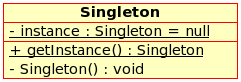
How to use in JAVA:
public class SingletonDemo {
    private static SingletonDemo instance = null;
    private SingletonDemo() { }
    public static synchronized SingletonDemo getInstance() {
        if (instance == null) {
            instance = new SingletonDemo();
        }
        return instance;
    }
}
Or (I prefer this last one, it is more simple and easy to understand):
public class Singleton {
    private static final Singleton INSTANCE = new Singleton();

    private Singleton() {}

    public static Singleton getInstance() {
        return INSTANCE;
    }
}
This method has a number of advantages:
synchronize the getInstance() method, meaning all threads will see the same instance and no (expensive) locking is required.final keyword means that the instance cannot be redefined, ensuring that one (and only one) instance ever exists.This is a very simple explanation, but helped me a lot. If you have some question, just write in the comments.
See you in the next post !
Hey guys !
Today I will post this video that I saw and help me a lot when I started to learn about Jmeter. I hope this video helps you too ! It is a little tutorial about how use Jmeter with Firefox and a plugin called Firebug to make a script of login page.
Hi guys, I found this video to help in customising our report in LoadRunner. I hope that it helps. There is no sound in the video.
HP LoadRunner Analysis 11.00 enhancements include:
* Fully customizable report templates that allow you to control the content and format of a report.
* Ability to exports the report to different formats, such as Word, Excel, PDF, or HTML for any reporting purpose.
* Use of Analysis Session templates, to associate multiple report templates, each in a different time range.
* Automatic report generation upon creation of Analysis data via standalone Analysis.
Hello guys,
Today I will show how identify all the tasks that are common in most of the test cases you automate in QTP.
I will use the example of login in Gmail:
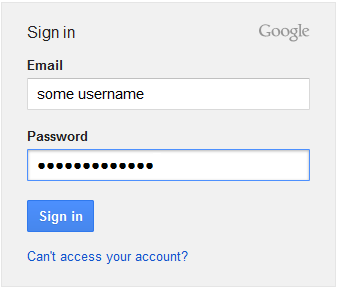
So, we have these actions and these fields/buttons:
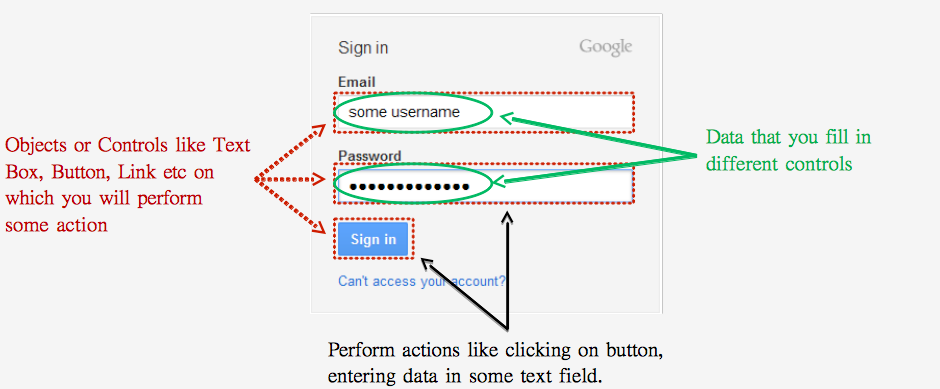
Like in Selenium, you have to identify the objects as unique, before entering the email id, you should know that which of the two text boxes in the Gmail Login screen is the ‘Email’ field. Once you correctly identify the email field, you can then enter email id in that field. Consequently, you should try to find out the unique properties which are available with that object only.
QTP provides a unique mechanism using which you can identify the unique properties of the objects. This mechanism is called Object Spy. Along with this, QTP also provides a storehouse called Object Repository where you can store these objects together with their properties.
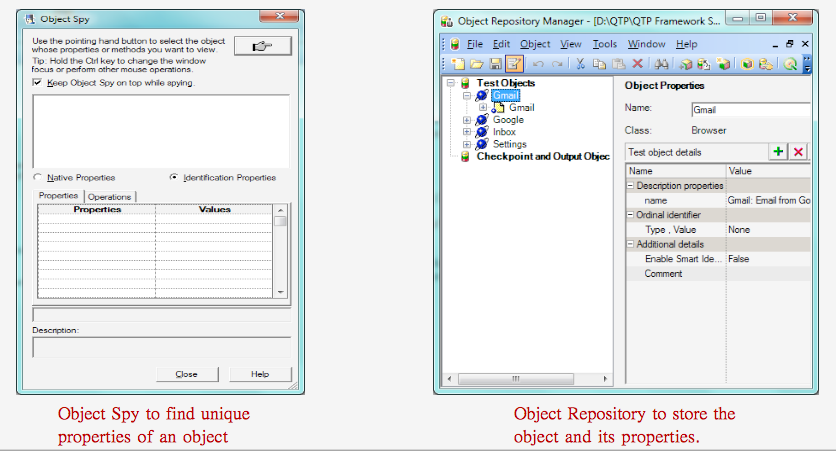
Now, you can perform some actions in each control, like a button you can click and each control has your action. But if the field is a textbox or combobox ? So, you can click in the control and choose if you want to put some text/data or if you can choose the data in a list.
QTP has its own set of pre-defined function libraries that contain all the operations associated with different objects. QTP also provides an intelli-sense option where when you write an object in your code, QTP will automatically show all the functions and properties associated with that object.

QTP has its own inbuilt mechanism called Data Table where you can save the test data and later use it in the test scripts. QTP provides its own set of functions using which you can retrieve data from the Data Table.
Even if your data is stored in some external files such as Excel sheets or XML files, QTP provides you with many methods using which you can fetch data from these external sources.

Like any language, you should need to combine all individual operations together and execute them.
QTP also provides many methods which you can use to store your reusable and non-reusable code. These mechanisms are –
– Actions: Actions are one of the most common ways in which you can save code in QTP. You can save both reusable and non-reusable code in Actions.
– Function Libraries: Function Library is another very popular method that you would use in almost all your QTP projects. Function Library is primarily used to store reusable code.
– Business/Scripted Components: Though used less frequently, this is one more place where you can store your code.
Very easy, isn’t it ? This is the basic to introduce QTP. If you have some doubt, you can to write below !
Thank you 🙂
Hello guys !
I will explain a simple tutorial of “How can you use BDD with Selenium and PHP.”
– First thing you have to install Behat:
– Install Composer
– Create a composer.json file in your root directory
| 1 2 3 4 5 6 7 8 9 |
{
“require”: {
“behat/behat”: “2.4.*@stable”,
“behat/mink”: “1.5.*@stable”,
“behat/mink-goutte-driver”: “*”,
“behat/mink-extension”: “*”,
“behat/mink-selenium2-driver”: “*”
}
}
|
– Run composer install
– Create a behat.yml file
| 1 2 3 4 5 6 7 8 |
default:
paths:
features: features
bootstrap: %behat.paths.features%/bootstrap
extensions:
Behat\MinkExtension\Extension:
goutte: ~
selenium2: ~
|
– Initialize your Behat project with vendor/bin/behat –init. Note: bin directories are configurable in composer.json. If your composer file has a bin directory, use that path instead of vendor/bin.
| 1 2 3 4 5 6 7 8 9 10 |
Feature: Drupal.org search
In order to find modules on Drupal.org
As a Drupal user
I need to be able to use Drupal.org search
@javascript
Scenario: Searching for “behat”
When I search for “behat“
Then I should see “Behat Drupal Extension“
|
– Edit FeatureContext.php to extend from MinkContext. Note: You will need to add the use statement, use Behat\MinkExtension\Context\MinkContext. Run vendor/bin/behat
– Second Step: Adding Selenium as an optional driver
– Download Selenium Server
– Run java -jar /path/to/selenium-server-standalone-2.37.0.jar
– Add selenium2: ~ to your behat.yml
– Add a @javascript tag above your scenario
– Run vendor/bin/behat
– Third Step: Adding new step definitions
– Add the step you want to create in your scenario, e.g.
– When I search for “behat” Run vendor/bin/behat
– Copy the step definition template to FeatureContext.php and replace the PendingException with your code.
| 1 2 3 4 5 6 7 8 |
/**
* @When /^I search for “([^”]*)”$/
*/
public function iSearchFor($arg1)
{
$this->fillField(‘Search Drupal.org’, $arg1);
$this->pressButton(‘Search’);
}
|
Resources: http://lin-clark.com/blog/2013/11/26/quickstart-testing-with-behat-mink-selenium/
 Rafaela Azevedo