API tests with newman and postman


API is the most important part of your software because it has the highest security risks. What if someone were to hack your API? They could get production data, they could Bitcoin ransom the servers or they could hide on the machine until something interesting happens. The bottom line is, the stakes when using an API are much higher than if there is just a bug in the UI of your application — your data could be at risk and, by proxy, all of your users’ data.

API testing is not only the most vital testing to be done against your application, but it is also the easiest and quickest to execute

With your API tests and having a Continuous integration process, you can:

  • Test all of your endpoints no matter where they are hosted
  • Quickly ensure all of your services are running as expected
  • Confirm that all of your endpoints are secured from unauthorized AND unauthenticated users


Postman

Download postman for free

Now you need to have an API to test, you can select one from any-api or qa-symphony for this tutorial. In this example we are going to use this Oxford Dictionaries. Now on postman, you can create a collection and start to feed with your tests. Also, you can create an environment with environment variables and also global variables that can be used across the requests, for example a token.


Login with Token on Postman

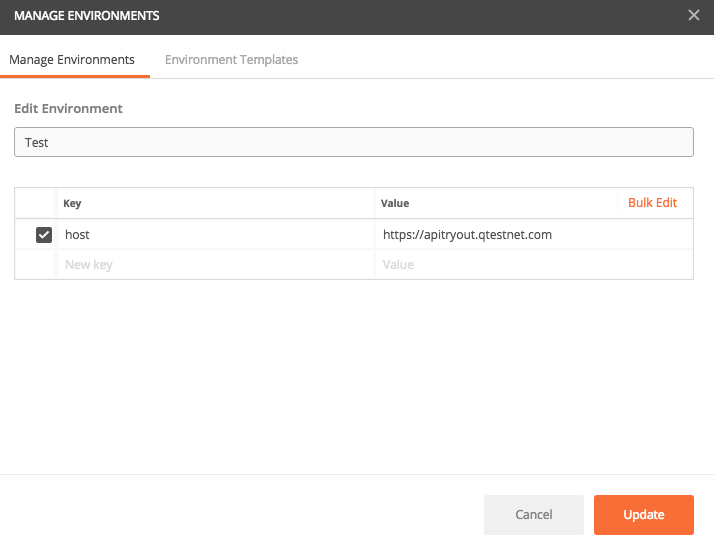
  • Click on Manage Environments


  • Set the host

  • Type the request URL, change the host to the variable {{host}}
  • Select POST request and type the headers


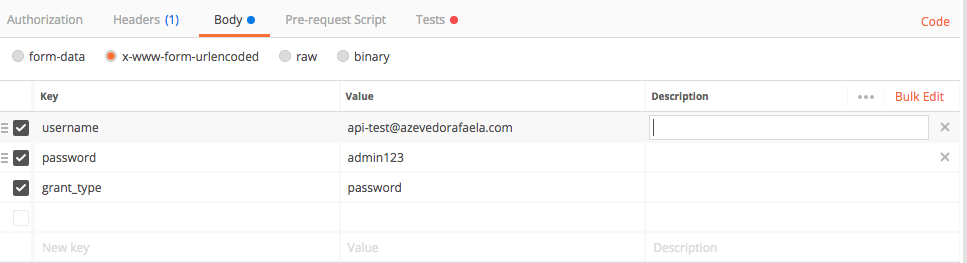
  • Type the Body with the credentials for your site.
 

  • Open the Tests tab and write the tests to validate the request and set the access_token as an environment variable. You will need to use this variable in the header of all of your next requests.

var jsonData = JSON.parse(responseBody);

tests["Status code is 200"] = responseCode.code === 200;
tests["Access Token is not blank"] = jsonData.access_token !== "";
tests["Message success"] = jsonData.scope.indexOf("success") !== -1;

postman.setEnvironmentVariable ("access_token", jsonData.access_token);


  • Hit Send and if the status code is 200, it means the credentials are correct. Save the request in your collection.


  • Now you can create all the other requests and tests needed, just remember to add the {{access_token}} in your header and save the requests in your collection


Running your API automated tests

  • Now that you have a collection with all your tests, click on Runner and select your collection, environment. Type the number of interactions and delays in case you want to simulate more than multiple interactions.

  • You can also import a CSV file with data and substitute for variables in the body or header of the request.


  • The results report will be like this one:


Newman


To run your tests from the command line you need to have Newman, open your terminal and run npm install -g newman

  • Export your collection from Postman (Collection_v2) and download your environment (go to “Manage Environments” and click the download button) from Postman


  • Open your terminal an type the command to run the API tests: newman run /local/path_to_your_postman_collection.json


  • The result will be something like this:


  • To run the script on Jenkins you need to add the parameters  –reporters junit,json and the results should be created under a folder called “Newman” in your working directory, so: newman run -reporters junit,json /local/path_to_your_postman_collection.json


Resources: https://www.qasymphony.com/blog/automated-api-testing-tutorial/
https://api.qasymphony.com/#/login/postAccessToken

Usability Testing

Hello guys,

Today I am going to write about some usability tests techniques that you can use in your day-to-day tests. Usability tests is where you can figure out if your design is working or not, what can be improved and what is not straight forward.

Jakob Nielsen created the 10 usability heuristics, which includes:

  • Visibility of system status
  • Match between system and the real world
  • User control and freedom
  • Consistency and standards
  • Error prevention
  • Recognition rather than recall
  • Flexibility and efficiency of use
  • Aesthetic and minimalist design
  • Help users recognize, diagnose, and recover from errors
  • Help and documentation


Know your user

When you know your users, you can focus on their goals, the characteristics that they have and the attitudes that they display. You should also examine what the user expects from the product.

User personas are created from other forms of user research and thus offer an real life portrait that is easy for the team to keep in mind when designing the products. User personas have a name and a story.


Simplify

We need to start with the idea of a user in your worst case scenario when doing UX testing, someone who knows nothing about your product, is distracted when they use the system, has bad cell reception, etc. By watching that person use and fumble through your product, you can quickly identify areas where the app is not simple, clear or fast enough.


Trust your intuition

It’s important to remember what specific problem you’re setting out to solve. Trust your guts: early on, it’s especially important when larger decisions are so fragile. Remember that you can’t build something that pleases everyone: trying to do so normally results in a weak release. Stay focused on the use-case you want to nail and avoid trying to solve all the use cases at once. The smallest details can be the difference between a product that has a good experience for the user and one that has not.


Efficiency

It lies in the time taken by the user to do a task. For instance, if you are an E-commerce site, the efficiency of your site depends on the time and the number of steps that the users take to complete the basic tasks like buying a product.


Recall

This is one of the most important aspects to examine the person’s memory concerning the browsing process and the interface they used a while ago. If your design is simple and straight forward it will be easier to remember how to complete a task.


Emotional response

This helps to analyze the user’s feelings after they have used the product. Some might feel happy while others might feel down and there are others who are so deeply impressed that they recommend the product to their friend.


Resources:

https://uxmastery.com/beginners-guide-to-usability-testing/

https://www.nngroup.com/articles/how-many-test-users/

https://thenextweb.com/dd/2013/08/10/13-ways-to-master-ux-testing-for-your-startup/#.tnw_3ngxAqEM

https://www.invisionapp.com/blog/ux-usability-research-testing/

https://www.interaction-design.org/literature/article/7-great-tried-and-tested-ux-research-techniques

https://uxdesign.cc/ux-tools-for-user-research-and-user-testing-a720131552e1

https://www.cso.com.au/article/626752/data-breach-notification-just-it-business/

Hiring QAs, Headless vs Real Browsers, Automated tests, Consumer contracting tests

Hi guys, I went to the #18 Agile Roundabout meetup here in London and I found really interesting to share. The first video is a talk about some of the challenges that we have when hiring QAs and about automation on headless browsers vs real browsers. The second is about some of the challenges that we have when implementing automated tests in a company and the third one is about how to do consumer contracting tests with Pact.

I do recommend everyone to watch the videos since it was really interesting to hear these experiences and you might be facing one of these situations.

Common mistakes when you hire QAs


Automated Tests


Consumer Contract Testing


Thank you guys for this great meetup !

Testability protractor error when your site redirects to another page

Have you ever had this issue when running your protractor automation tests ?

Error: Error while waiting for Protractor to sync with the page: "Cannot
read property '$$testability' of undefined"
at runWaitForAngularScript.then (/node_modules/protractor/lib/browser.
ts:653:19)
at ManagedPromise.invokeCallback_ (/node_modules/selenium-webdriver/
lib/promise.js:1366:14)
at TaskQueue.execute_ (/node_modules/selenium-webdriver/lib/promise.
js:2970:14)
at TaskQueue.executeNext_ (/node_modules/selenium-webdriver/lib/promise
.js:2953:27)
at asyncRun (/node_modules/selenium-webdriver/lib/promise.js:2813:27)
at /node_modules/selenium-webdriver/lib/promise.js:676:7
at (anonymous)
at process._tickDomainCallback (internal/process/next_tick.js:228:7)

It happens sometimes because you have a redirection when running your tests, so for example, you are redirected to a login page when you try to get your site and you are not authenticated yet.

You will need to get an about:blank page just after the action that calls this redirection.

Like this:

element.click();
browser.driver.get('about:blank');
return browser.get(browser.baseUrl);


See you guys soon !

How to configure your jenkins to run android emulator

Install the emulator plugin:

https://wiki.jenkins.io/display/JENKINS/Android+Emulator+Plugin

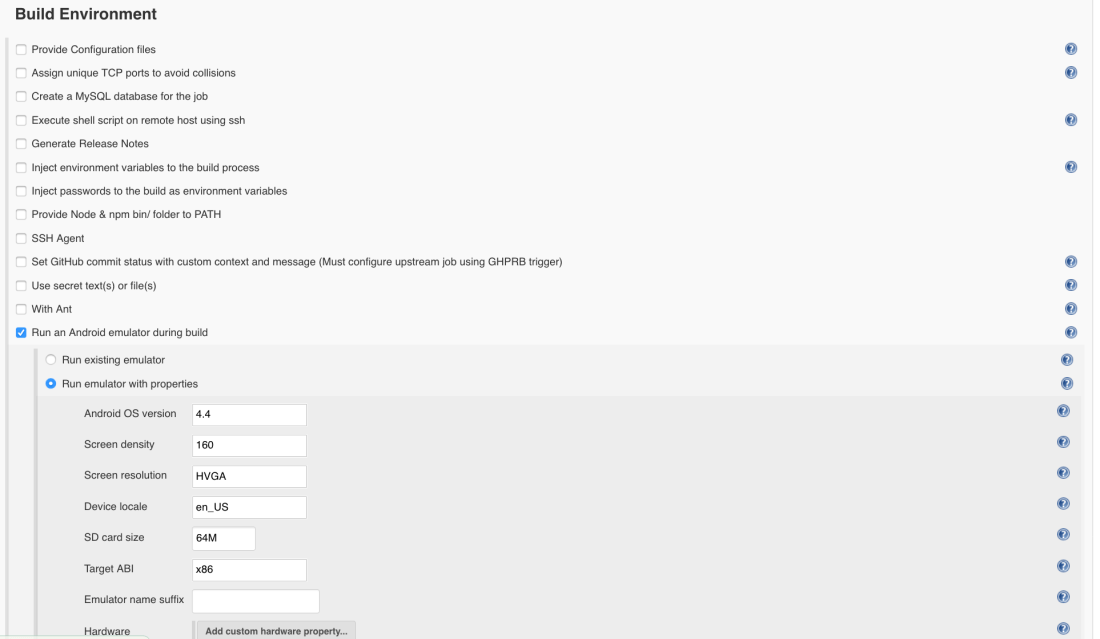
On the Build Environment session of your job, configure the emulator, like this:

Screen Shot 2017-08-23 at 12.21.28

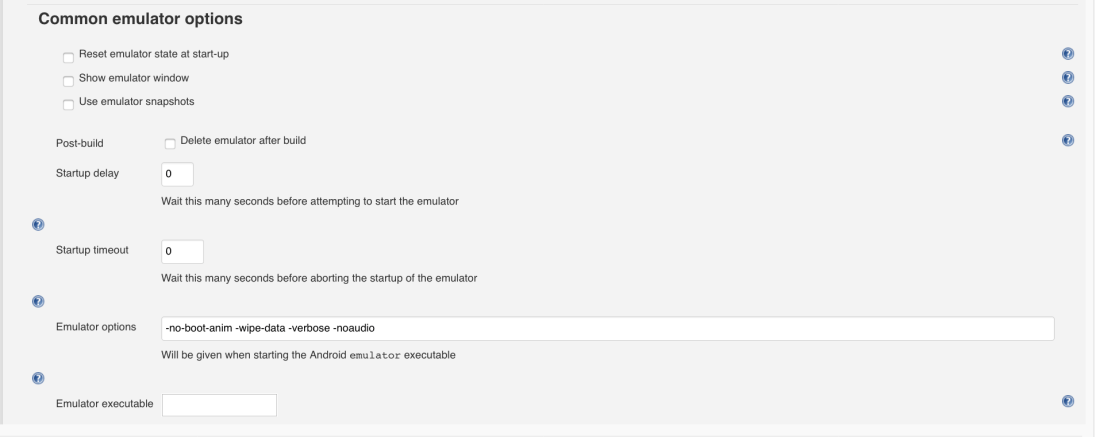
On the Common emulator options session:Screen Shot 2017-08-23 at 12.21.36

The -verbose is more for you to have full logs when running it. I was having some problems with timeout, jenkins was able to start the emulator, but was waiting to be ready forever until I got timeout again.

So,  I had to remove the boot animation, clean the data and remove the audio and everything was fine as you can see.

Thank you guys !

How to deal with common situations in QA area

I know you are probably thinking, why do you need to talk about it ? Unfortunately, I can spend hours here talking about the situations that a big part of QAs go through everyday. Maybe you are not a QA, but you have to deal with one of these problems as well.

So, I will talk about the most common problems and how you can deal with them:


When you have been telling management about a problem for weeks and now you’re just like


This is a classical problem, QAs should raise their concerns about some issue that they see it is coming. As a QA you know how the end user uses the product and you can see some upfront failures, scalability issues, etc.

Your job is to point the issue and raise the concern. Now, it is up to your manager to act on the problem or not.


When you hear about “small last-minute changes”


This is completely common in agile (personally, I don’t think this is a major issue), we just need to be aware of the risks. If we keep this in mind, it is okay. In the end we are not machines, and most of people don’t perform well when working under pressure compared to a normal day.

My advice is to be cold blooded when you have these last minute demands, just go to a place where you can focus and ignore any outside distractions, put some music on if you think it is better to concentrate.


When a new feature comes to QA in the last day of the sprint


Be realistic, as a QA you probably already know the percentage of the bugs you will find for each developer’s ticket in the first round of tests. This experience improves according to the time you stay in the company and know the quality of the work of each developer.

When this feature arrives to QA, be realistic and raise the point that it has good chances to be back in development and not finished until the end of the sprint.


When a bug slips through to the production environment


Don’t cry ! haha This is completely common, and this is not always QA’s fault. QA is just the tip of the iceberg and for this reason you need to know the feature not only on the technical, but also on the business point of view. For this reason the kickoff meetings and all the details are important.
When a bug slips to production it is a series of mistakes, this means that maybe the development team was not aware of some scenario, or the PO was not aware of what the users really wanted, and consequently QA didn’t know about some edge cases since they were not involved in the technical and business discussions. You know when you missed something and you know when you didn’t test something because you were not aware of the implications/impact.


When no one recognizes QA


This is really sad, but after some years you get used to it. I mean, it is not ideal, most of the recognition comes from the developers themselves or  the QAs that work with you.
Learn to motivate yourself without waiting for any recognition from your managers. I mean, if you love what you do, you don’t need anybody to say how good you are at it. If you have a feedback about your work, take the positive and constructive criticism to improve yourself, ditch the negative ones. Do what you like, as long as you are learning and you are happy, it is okay.

SQL Injection Automation Tool

Hello guys,

Today I will share this tool that will help you to perform some SQL Injection tests on your website.

What is SQL Injection tests ? It is a type of security tests that you can perform on your web application. You need to be sure that your website is preventing users and hackers to access your database through SQL injection.

To test if your web page has a SQL injection vulnerability, you need to check if it accepts dynamic user-provided values via GET, POST or Cookie parameters or via the HTTP User-Agent request header. You need to explore them to retrieve as much information as possible from the back-end database management system, or even be able to access the underlying file system and operating system.

This tool, sqlmap, can automate the process of identifying and exploiting this type of vulnerability. I will give you some tips here:

  • First you need to download the file or git clone:
git clone --depth 1 https://github.com/sqlmapproject/sqlmap.git sqlmap-dev
  • Run the command below to check the available options:
    python sqlmap.py -hh 
  • If you want to test, you need to pass the url:
python sqlmap.py -u "http://localhost:8000/test?id=1" --batch
  • To increase the level of the tests you can use –level or –risk options and specify the level (1-5) or the risk (1-3) of the scope of the tests:
python sqlmap.py -u "http://localhost:8000/test?id=1" --level=5 

These options above are used to customize the detection phase, the default is 1.

If you have authentication, you can send the --cookies of an already logged session or, --auth-type and --auth-cred to authenticate before the tests.

I suggest to you to test on your localhost with a copy of your database so you don’t mess your data.

Resources:

http://sqlmap.org/

https://github.com/sqlmapproject/sqlmap

Build a docker image for your protractor automation

Hey guys, today I will post about an example of Docker file where you can run your protractor automation in a Docker container on firefox and chrome.

You will need to have the known hosts and the public key from github to be able to clone the repository and run the automation. Also you need to install java to be able to run the selenium server in your docker container.

Create an empty file in your project and paste these instructions:

Docker file

FROM node

WORKDIR /tmp

#Install required applications

RUN echo 'deb http://httpredir.debian.org/debian jessie-backports main' >> /etc/apt/sources.list.d/jessie-backports.list

RUN apt-get update && \
apt install -y -t jessie-backports openjdk-8-jre-headless ca-certificates-java && \
apt-get install -y xvfb wget openjdk-8-jre && \
wget https://dl.google.com/linux/direct/google-chrome-stable_current_amd64.deb && \
dpkg --unpack google-chrome-stable_current_amd64.deb && \
apt-get install -f -y && \
apt-get clean && \
rm google-chrome-stable_current_amd64.deb && \
apt-get install -y pkg-mozilla-archive-keyring

ENV JAVA_HOME /usr/lib/jvm/java-8-openjdk-amd64/
RUN export JAVA_HOME

#Install Firefox on Linux
RUN touch /etc/apt/sources.list.d/debian-mozilla.list
RUN echo "deb http://mozilla.debian.net/ jessie-backports firefox-release" >> /etc/apt/sources.list.d/debian-mozilla.list
RUN wget mozilla.debian.net/pkg-mozilla-archive-keyring_1.1_all.deb
RUN dpkg -i pkg-mozilla-archive-keyring_1.1_all.deb
RUN apt-get update && apt-get install -y -t jessie-backports firefox

#Creating user
RUN useradd -ms /bin/bash admin

# Copy key for github for user admin
ADD id_rsa /home/ci_box/.ssh/id_rsa
ADD known_hosts /home/ci_box/.ssh/known_hosts

ADD id_rsa /home/ci_box/.ssh/id_rsa
RUN chmod 700 /home/ci_box/.ssh/id_rsa; chown -R admin:staff /home/ci_box/.ssh
ADD known_hosts /home/ci_box/.ssh/known_hosts

#Changing user
USER admin

#To avoid conflicts with host machine dbus
ENV DBUS_SESSION_BUS_ADDRESS=/dev/null

#Copying script which will clone repository
WORKDIR /home/admin/workspace
ADD docker.sh ./docker.sh

#Open the bash
CMD ["/bin/bash"]


Script to clone the branch

#!/bin/bash

#Branch and repository
BRANCH=$1
REPOSITORY
=$2

#Clone the repository

git clone -b ${BRANCH} rsouza@github.com:azevedorafaela/${REPOSITORY}.git
cd ${REPOSITORY}

#Script to run your automation

./tests.sh ${BRANCH}


Script to run the tests

#!/bin/bash
set -e

#Starting dbus daemon and exporting related environmental variables
export $(dbus-launch)

#Starting X server to be able to run firefox
Xvfb :1 -screen 0 1200x800x24 &

# Clean the target with reports
rm -rf target

# Install all dependencies
npm install

# Run tests
DISPLAY=:1.0 npm run regression


Build the image in the folder that contains the docker file

docker build -t rafazzevedo/test .


Push the image to your account

docker login
docker push rafazzevedo/test


Run the automation in the container:

docker run --name=test rafazzevedo/test:latest /home/admin/docker.sh master regression


See you guys soon !