How to update a xml with shell script ?

Hey guys, do you remember the script to create xml with shell script ?

Today I will post an example of shell script to update tags in xml file. I used the script in the bottom link as base.


This is the xml that I used as example:


<?xml version="1.0" encoding="ISO-8859-1"?>
<goodnews>
 
 <to>Rafaela</to>
 <from>Br Bank</from>
 <date>04/01/2007</date>
 <amount>$1000,000.00</amount>
 <account>0024549Y48K3-843</account>
 <message>We are pleased to inform you that the above amount was transferred 
to your bank account</message>
 
</goodnews>  


And this is the script:

# !/bin/bash
# Written by rafazzevedo
# http://www.azevedorafaela.wordpress.com

# Uncomment this if you want to use parameters given by #the user and change the variables for the parameters #position like: $1 is the first parameter, $2 is the #second. Instead of tag, xml_file...
# if [ $# -ne 3 ]; then
# echo 1>&2 "Please, use the parameters file, tag and new value."
# exit 127
# fi

xml_file="goodnews.xml"
tag="amount"
new_value="\$1000,000.00"

# We will create a temporary file, just to not modify directly the original one.
temporary="temp_file.temp"

# This space is just to identify the end of the xml.
echo " ">> $xml_file

# Extracting the value from the <$tag> element
tag_value=$(grep "<$tag>.*<.$tag>" $xml_file | sed -e "s/^.*<$tag/<$tag/" | cut -f2 -d">"| cut -f1 -d"<")

echo "Found tag value $tag_value..."

# Replacing element value with $new_value
sed -e "s/<$tag>$tag_value<\/$tag>/<$tag>$new_value<\/$tag>/g" $xml_file > $temporary

echo "Changing $tag to $new_value..."

# Updating the changes to the original file ($xml_file)
chmod 666 $xml_file
mv $temporary $xml_file

Thank you guys ! See you soon 🙂

Source: http://www.dotkam.com/2007/04/04/sed-to-parse-and-modify-xml-element-nodes/

http://stackoverflow.com/questions/19951369/how-to-store-grep-command-result-in-some-variable-in-shell

Gherkin BDD comparison

Hi guys, I will post a research about the BDD engines, it is a bit old (2012), but despite this I found very interesting. I have summarised the relevant informations. The actual language to write tests with BDD is called Gherkin. And it has different implementations adopted to different programming language, the most famous:

Cucumber for Ruby

JBehave for Java

NBehave and SpecFlow for C#

Freshen for Python Behat for PHP

All of them have some common set of supported features but there’re some restrictions and abilities specific to the actual engine. So, we will collect useful features for each listed above engine and present it in some comparable form. Key features to be mentioned are:

  • Documentation availability
  • Flexibility in passing parameters
  • Auto-complete
  • Steps, scenario and feature scoping
  • Complex steps
  • Hooks and pre-conditions
  • Binding to code
  • Formatting flexibility
  • Built-in reports
  • Input data sources support
Grade Criteria
0 No support at all
1 Functionality exists but with serious restrictions
2 Major functionality exists
3 Full-featured support

Documentation Availability

  • Cucumber:
    • Cucumber group on LinkedIn – quite populated place with big number of active discussions
    • Cukes Tutorial Site
  • Freshen – honestly speaking I didn’t find any specialized resourse dedicated to freshen only. Most likely it can be discussed in the more general forums dedicated to BDD in general.
  • JBehave:
  • SpecFlow:
  • Behat:


With this sources to look the documentation of each engine, we can evaluate the criteria and the grades:

GRADE CRITERIA
1 Documentation is available in general (it makes grade 1 at once)
2 Every feature is described and has examples (if it fits it makes grade 2)
3 There’re additional well-grown resources (forums, blogs, user groups) where we can find additional information about the engine

At the end we have:

Engine Documentation availability
Cucumber 3
Freshen 2
JBehave 3
NBehave 1
SpecFlow 3
Behat 3

Other grades:

Flexibility in passing parameters:

Engine Regular expressions support Tables support Multi-line input support Extra features
Cucumber 3 3 3 0
Freshen 3 3 3 0
JBehave 2 3 0 3
NBehave 2 3 0 2
SpecFlow 2 3 3 2
Behat 3 3 3 0

Auto-Complete:

Engine Auto-complete support
Cucumber 1
Freshen 1
JBehave 1
NBehave 1
SpecFlow 3
Behat 1

Step Scenario and feature scoping:

Engine Tagging support Scoped steps support
Cucumber 3 0
Freshen 3 0
JBehave 3 1
NBehave 0 0
SpecFlow 3 3
Behat 3 0

Complex Steps:

Engine Composite steps
Cucumber 3
Freshen 3
JBehave 3
NBehave 2
SpecFlow 2
Behat 3

Hooks and pre-conditions:

Engine Backgrounds Hooks
Cucumber 3 3
Freshen 3 3
JBehave 1 1
NBehave 0 1
SpecFlow 3 3
Behat 3 3

Binding Code:

Engine Binding to code
Cucumber 2
Freshen 3
JBehave 3
NBehave 3
SpecFlow 3
Behat 2

Formatting Flexibility:

Engine Formatting
Cucumber 3
Freshen 3
JBehave 1
NBehave 3
SpecFlow 3
Behat 3

Reports:

Engine Built-in reports
Cucumber 3
Freshen 2
JBehave 2
NBehave 2
SpecFlow 2
Behat 3

Input data sources support:

Engine External Data Inclusions
Cucumber 0 0
Freshen 2 3
JBehave 3 2
NBehave 0 0
SpecFlow 0 0
Behat 0 0

Conclusion:

Table


Source
http://mkolisnyk.blogspot.co.uk/2012/06/gherkin-bdd-engines-comparison.html

Sublime and BDD

A simple guide about how to write formatted BDD features in Sublime. – Download what you want in Package Control. If you don’t have the package control in your sublime, follow these steps: – Open the console:

ctrl ` shortcut

– If your sublime is 2:

import urllib2,os,hashlib; h = 'eb2297e1a458f27d836c04bb0cbaf282' + 'd0e7a3098092775ccb37ca9d6b2e4b7d'; pf = 'Package Control.sublime-package'; ipp = sublime.installed_packages_path(); os.makedirs( ipp ) if not os.path.exists(ipp) else None; urllib2.install_opener( urllib2.build_opener( urllib2.ProxyHandler()) ); by = urllib2.urlopen( 'http://packagecontrol.io/' + pf.replace(' ', '%20')).read(); dh = hashlib.sha256(by).hexdigest(); open( os.path.join( ipp, pf), 'wb' ).write(by) if dh == h else None; print('Error validating download (got %s instead of %s), please try manual install' % (dh, h) if dh != h else 'Please restart Sublime Text to finish installation')

– If your sublime is 3:

import urllib.request,os,hashlib; h = 'eb2297e1a458f27d836c04bb0cbaf282' + 'd0e7a3098092775ccb37ca9d6b2e4b7d'; pf = 'Package Control.sublime-package'; ipp = sublime.installed_packages_path(); urllib.request.install_opener( urllib.request.build_opener( urllib.request.ProxyHandler()) ); by = urllib.request.urlopen( 'http://packagecontrol.io/' + pf.replace(' ', '%20')).read(); dh = hashlib.sha256(by).hexdigest(); print('Error validating download (got %s instead of %s), please try manual install' % (dh, h)) if dh != h else open(os.path.join( ipp, pf), 'wb' ).write(by)

– Hit Enter and restart the sublime after downloaded the package.

  How to install Packages from Package Control ?

– ‘Command+Shift+P’ – Type ‘Install Package’ and enter

– Choose the package as :

Cucumber

Gherkin[Cucumber] Formatter

Behat

Behat Snippets

How to use ?

You can try any of these commands to generate respective file.

– ‘Command+Shift+P’ – Type: ‘Gherkin’

– ‘Command+Shift+P’ – Type: ‘Feature’

– ‘Command+Shift+P’ – Type: ‘Scenario’ or ‘Scenario Outline’

– ‘Command+Shift+P’ – Type: ‘Example’

  If you want some snippet of Given/When/Then/etc, you can use the command  ‘Command+Shift+P’ – Type: ‘Given’

Screen Shot 2015-04-01 at 21.46.24

Easy and very useful, for this reason I like Sublime ! lol Thank you guys 🙂

Sourceshttp://shashikantjagtap.net/speed-up-your-bdd-with-sublime-text-2/ https://packagecontrol.io/installation

What is Waterfall model ?

It was the first model of tests, is simple to understand and linear-sequential. You can use the waterfall model when the requirements are very well known, clear and fixed; Product definition is stable; No changes in the scope; You understood the technology; There are no ambiguous requirements; Resources with required expertise are available freely; Project is short.

In Royce’s original waterfall model, the following phases are followed in order:

1- Requirements specification resulting in the product requirements document
2- Design resulting in the software architecture
3- Construction (implementation or coding) resulting in the actual software
4- Integration
5- Testing and debugging
6- Installation
7- Maintenance

Model:


Iterative vs. waterfall
One of the differences between agile and waterfall is that testing of the software is conducted at different stages during the software development life-cycle. In the Waterfall model, there is always a separate testing phase near the completion of an implementation phase. However, in agile development and especially extreme programming, testing is usually done concurrently with coding, or at least, testing jobs start in the early days of iteration.

Advantages?

– This model is simple and easy to understand and use.
– It is easy to manage due to the rigidity of the model – each phase has specific deliverables and a review process.
– In this model phases are processed and completed one at a time. Phases do not overlap.
– Waterfall model works well for smaller projects where requirements are very well understood.

Disadvantages?

– Once an application is in the testing stage, it is very difficult to go back and change something that was not well-thought out in the concept stage.
– No working software is produced until late during the life cycle.
– High amounts of risk and uncertainty.
– Not a good model for complex and object-oriented projects.
– Poor model for long and ongoing projects.
– Not suitable for the projects where requirements are at a moderate to high risk of changing.

Sources: http://istqbexamcertification.com/what-is-waterfall-model-advantages-disadvantages-and-when-to-use-it/

http://en.wikipedia.org/wiki/Agile_software_development#Iterative_vs._waterfall

http://en.wikipedia.org/wiki/Waterfall_model

http://www.agilenutshell.com/agile_vs_waterfall

Create xml with shell script

Hi guys,

Today I will post a shell script that I am using to test a webservice. If you need a xml to test the performance of the server/webservice with Jmeter or if you just need generate a lot of xmls to make any type of test, this example can be useful.

In this code you can generate xmls and change some tags as id, date, etc…

#!/bin/bash
# Written by rafazzevedo
# http://www.azevedorafaela.wordpress.com

defaultpath="/User/" #Change this for the path where you want the files stay

echo "What do you want generate ?"
read element

echo "How many files ?"
read filescount
#Creating the subdirectory for each element and removing the existing folder
if [ ! -d $element ]
then
mkdir "$element"
else
rm -r "$element"
mkdir "$element"
fi

defaultpath=$defaultpath$element/

dateformat=$(date +"%m/%d/%YT%H:%M:%S")

for (( i=0;i<$filescount;i++ )) do

exec 3>temp.xml #Creating temporary file

#HEADER (Common for all xmls)
echo '&3'
echo ' xmlns:cpi="http://xml.wordpress.co.uk/types" >' >&3
echo " http://localhost:9999/$element$i" >&3
echo ' Title' >&3
echo " $dateformat" >&3
echo ' ' >&3
echo ' Rafaela Azevedo' >&3
echo ' http://wordpress.com/img.png' >&3
echo ' rafazzevedo@gmail.co.uk' >&3
echo " " >&3

#SPECIFIC TAGS OF EACH ELEMENT
case $element in

'article')
echo ' Content Test' >&3
echo ' ' >&3
;;

'image')
echo '' >&3
echo ' http://weather.gov/images/xml_logo.gif' >&3
echo ' NOAAs National Weather Service' >&3
echo ' http://weather.gov' >&3
echo '' >&3
;;

esac

echo '' >&3
cp ./temp.xml ${element}/$element-$i.xml #Copying the temporary files
rm ./temp.xml #Removing the temp files

done

echo "Created xml files"


It is helping me a lot lately , I do not need spend a lot of time doing some complex code or generate these files manually. I hope this helps you too .

If you have any suggestion or question, write a comment bellow 🙂

Thank you guys !

Java Reflection – Brief Tutorial

Hi guys, I will write simplified about Java reflection and how you can access with constructors, interfaces, super class, etc…

Java reflection it is useful to instantiate new objects, invoke methods and get/set field values without knowing the names of the classes/methods… and when you want to inspect classes, interfaces, fields and methods at runtime. It is used to examine and modify the structure and code in the same system at runtime.

For example, say you have an object of an unknown type in Java, and you would like to call a ‘doSomething’ method on it if one exists. Java’s static typing system isn’t really designed to support this unless the object conforms to a known interface, but using reflection, your code can look at the object and find out if it has a method called ‘doSomething’ and then call it if you want to.

   Method[] methods = MyObject.class.getMethods();

   for(Method method : methods){
      System.out.println("method = " + method.getName());
   }

What is happening here? It is obtaining the Class object from the class called MyObject, it is using the class object to get a list of methods in this class and print out their names.

From the classes you can obtain information about

  • Class Name
  • Class Modifies (public, private, synchronized etc.)
  • Package Info
  • Superclass
  • Implemented Interfaces
  • Constructors
  • Methods
  • Fields
  • Annotations

For a full list you should consult the JavaDoc for java.lang.Class.

Class Object

First you need obtain the object. If you know the name:

    Class myObjectClass = MyObject.class

If you don’t know the name at compile time:

    String className = ... //obtain class name as string at runtime Class class = Class.forName(className);

Class Name

To obtain the class name, you can try both:

    Class aClass = ... //obtain Class object, as above
    String className = aClass.getName();

If you want only the name without the package:

    Class  aClass          = ... //obtain Class object. See prev. section
    String simpleClassName = aClass.getSimpleName();

Modifiers

To obtain the class modifiers:

 Class  aClass = ... //obtain Class object, as above
 int modifiers = aClass.getModifiers();

The modifiers are packed into an int, you can use the methods with java.lang.reflect.Modifier:

    Modifier.isAbstract(int modifiers)
    Modifier.isFinal(int modifiers)
    Modifier.isInterface(int modifiers)
    Modifier.isNative(int modifiers)
    Modifier.isPrivate(int modifiers)
    Modifier.isProtected(int modifiers)
    Modifier.isPublic(int modifiers)
    Modifier.isStatic(int modifiers)
    Modifier.isStrict(int modifiers)
    Modifier.isSynchronized(int modifiers)
    Modifier.isTransient(int modifiers)
    Modifier.isVolatile(int modifiers)

Package Info

With the package you can have a look in the Manifest of the JAR and others.

   Class  aClass = ... //obtain Class object, as above
   Package package = aClass.getPackage();

Superclass

You can use:

  Class superclass = aClass.getSuperclass();

Interfaces

To get a list of interfaces you can use:

   Class  aClass = ... //obtain Class object, as above
   Class[] interfaces = aClass.getInterfaces();

If you need the complete list of interfaces, you will need to consult both class and superclasses recursively.

Constructors

To access constructors:

 Constructor[] constructors = aClass.getConstructors();

Methods

To access methods:

 Method[] method = aClass.getMethods();

Fields

 Field[] method = aClass.getFields();

Annotations

 Annotation[] annotations = aClass.getAnnotations();


You can find more details about the reflection in each constructor, annotations. fields in this tutorial. This was only a brief post to get start to use.

Examples of java reflection: http://docs.oracle.com/javase/tutorial/reflect/index.html


Source: http://tutorials.jenkov.com/java-reflection/classes.html

http://stackoverflow.com/questions/37628/what-is-reflection-and-why-is-it-useful

V-model tests – When use, Pros, Cons and Criticism

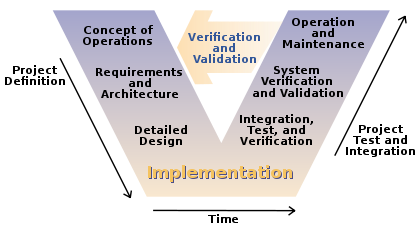
V model is one of the most used software development process. Introduction of V model has proved the implementation of testing right from the requirement phase. V model is also called as verification and validation model.

test

V model is applicable when:

  • Requirement is well defined and not ambiguous
  • Acceptance criteria are well defined.
  • Project is short to medium in size.
  • Technology and tools used are not dynamic.

Pros and Cons of using V model:

PROS

CONS

– Development and progress is very organized and systematic– Works well for smaller to medium sized projects.– Testing starts from beginning so ambiguities are identified from the beginning.

– Easy to manage as each phase has well defined objectives and goals.

– Not suitable for bigger and complex projects– Not suitable if the requirements are not consistent.– No working software is produced in the intermediate stage.

– No provision for doing risk analysis so uncertainty and risks are there.

Criticism
The V-Model has been criticized by Agile advocates and others as an inadequate model of software development for numerous reasons. Including:
  • It is too simple to accurately reflect the software development process, and can lead managers into a false sense of security.
  • Fits the needs of project managers, accountants and lawyers rather than software developers or users. Although it is easily understood by novices
  • If practitioners persist with their naive view of the V-Model they will have great difficulty applying it successfully.
  •   Is inflexible and encourages a rigid and linear view of software development and has no inherent ability to respond to change.
  • Provides only a slight variant on the waterfall model and is therefore subject to the same criticisms as that model.
  • Implicitly promotes writing test scripts in advance rather than exploratory testing.
  • Encourages testers to look for what they expect to find, rather than discover what is truly there.
  • Also encourages a rigid link between the equivalent levels of either leg, rather than encouraging testers to select the most effective and efficient way to plan and execute testing.
  • It lacks coherence and precision.
V-model has the same idea of BDD, you need to share knowledge since the beginning of the project (kick-off), providing greater emphasis on testing, and particularly the importance of early test planning.

Do you want to test/learn how to do automation in Hybrid apps ?

Hello again,

Today I will post 2 projects ios and android, a sample of Hybrid app.

I found this sample project to you download and start do test calabash with them.

Example Hybrid Apphttps://github.com/moovweb-demos/igadget-phonegap

– After download them, you can follow some instructions to install:

https://azevedorafaela.wordpress.com/2013/12/19/cucumber-and-calabash-ios-automation/

&

https://azevedorafaela.wordpress.com/2014/07/09/calabash-android-install-example-project/

– And to find elements inside the webviews:

https://azevedorafaela.wordpress.com/2014/07/28/summary-of-calabash-ios-ruby-api-query/

Just download them and start do/learn automation in hybrid apps 🙂

Thank you, see you next week guys !

Using different emulators with Chrome in C#

Hi guys, Today I will post a sample code that you can use to test different screens/mobile devices/browsers using Google Chrome browser with C#. You will need change the bold words for the devices and sizes that you want to simulate.

private static ChromeOpt SetCapabilities()
{
Map chromeOptions = new HashMap();

DesiredCapabilities capabilities = DesiredCapabilities.chrome();  capabilities.setCapability(ChromeOptions.CAPABILITY, chromeOptions);


switch (whichCase) {


case "byDevice":
Map mobileEmulation = new HashMap();
mobileEmulation.put("deviceName", "Apple iPhone 4"); //Should be the same name showing in the Chrome Device Emulator
chromeOptions.put("mobileEmulation", mobileEmulation);
break;

case "CustomScreen":
Map deviceMetrics = new HashMap();
deviceMetrics.put("width", 900);
deviceMetrics.put("height", 600);
deviceMetrics.put("pixelRatio", 3.0);


Map mobileEmulation = new HashMap();
mobileEmulation.put("deviceMetrics", deviceMetrics);
mobileEmulation.put("userAgent", "Mozilla/5.0 (Linux; Android 4.2.1; en-us; Nexus 5 Build/JOP40D) AppleWebKit/535.19 (KHTML, like Gecko) Chrome/18.0.1025.166 Mobile Safari/535.19");
chromeOptions.put("mobileEmulation", mobileEmulation);


break;

}

}
IWebDriver driver =new ChromeDriver(capabilities);
return driver;
}

You can look the list of user agents here:

http://www.useragentstring.com/pages/useragentstring.php

If you have any thoughts/suggestions please leave your comment here 🙂

Thank you guys !

How to install SafariLauncher to run appium ?

Hi guys,

I am going to write about “How you can install the framework of safari to run appium tests”. If you need run tests in safari of real devices with Appium, you can use this framework for ios devices (Android it is more easier as always). So, you need to have an apple developer account.

-> Plug your device

-> Git clone this project: https://github.com/budhash/SafariLauncher

-> Add your device in your developer apple register.

https://developer.apple.com/account/ios/device/deviceList.action

-> Download your certificate and your mobile provisioning profile after

https://developer.apple.com/account/ios/certificate/certificateList.action

&

https://developer.apple.com/account/ios/profile/profileList.action

-> Install your mobile provision in your device (or double touch on the file)

-> Put in blundle id com.safariLauncher.safariLauncher -> inside of the general properties of the project

-> Check if you are deploying in the right version of ios.

-> Run the project

-> Don’t forget to set the capabilities in your automation project:

DesiredCapabilities capabilities = new DesiredCapabilities();
capabilities.setCapability("appium-version", "1.3.1");
capabilities.setCapability("platformName", "iOS");
capabilities.setCapability("deviceName", "Tahir's iPhone");
capabilities.setCapability("udid", "your_udid");
capabilities.setCapability("bundleId", bundle);
capabilities.setCapability("browserName", "safari");
driver = new AppiumDriver(new URL("http://127.0.0.1:4723/wd/hub"), capabilities);    

driver.get("http://www.google.com");
Thread.sleep(20000);

Once you have deployed the safari launcher to the device, everything should be configured correctly so that the next time you run ./reset.sh on appium, the installation of the safari launcher app should succeed.

See you next week !