Test your app and raise your chances to keep in the market

Hi guys, today I will summarise and translate a slide of Elias Nogueira, who is a Tester Consultancy in Brazil.

– Only in android there are 18,798 devices and it is growing…

– You can see the most used android devices of your country in 2014 on this link: http://opensignal.com/reports/2014/android-fragmentation/

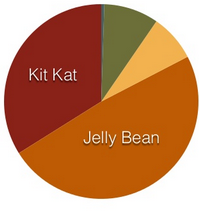
– 7 different platforms (android only): 
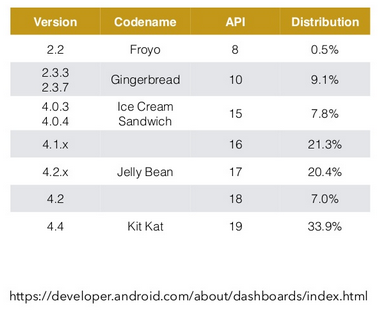
graph table


CHALLENGES ?

Simulators: Many apps can be test in simulators without need spend money buying real devices. Most of them are free, but this is the most far option from the real environment. Examples: Genymotion, Developer tools inside Chrome, XCode Simulator.

Cloud Testing: You can test the apps thought the web. The application can be tested, managed and installed. They are safer for the tests and you can simulate in real devices, but normally they are expensive. Examples: Xamarin, Testdroid, Appthwack.

Real Devices: It will bring realistic results and you can manage the device physically if you need, but you will spend lots of money if you need test in many devices and versions of Android. (It is impossible you test all devices)


WHAT TEST ?

– Compatibility: all restrictions of the device

– Operational: installation, update, backup, access to the resources

– Functional: business rules and input of data

– Usability: locale, navigation off/on line, navigation of tables

– Performance: network, exchange files, battery usage

– Available: restrictions in the utilization of resources


SOME IDEAS
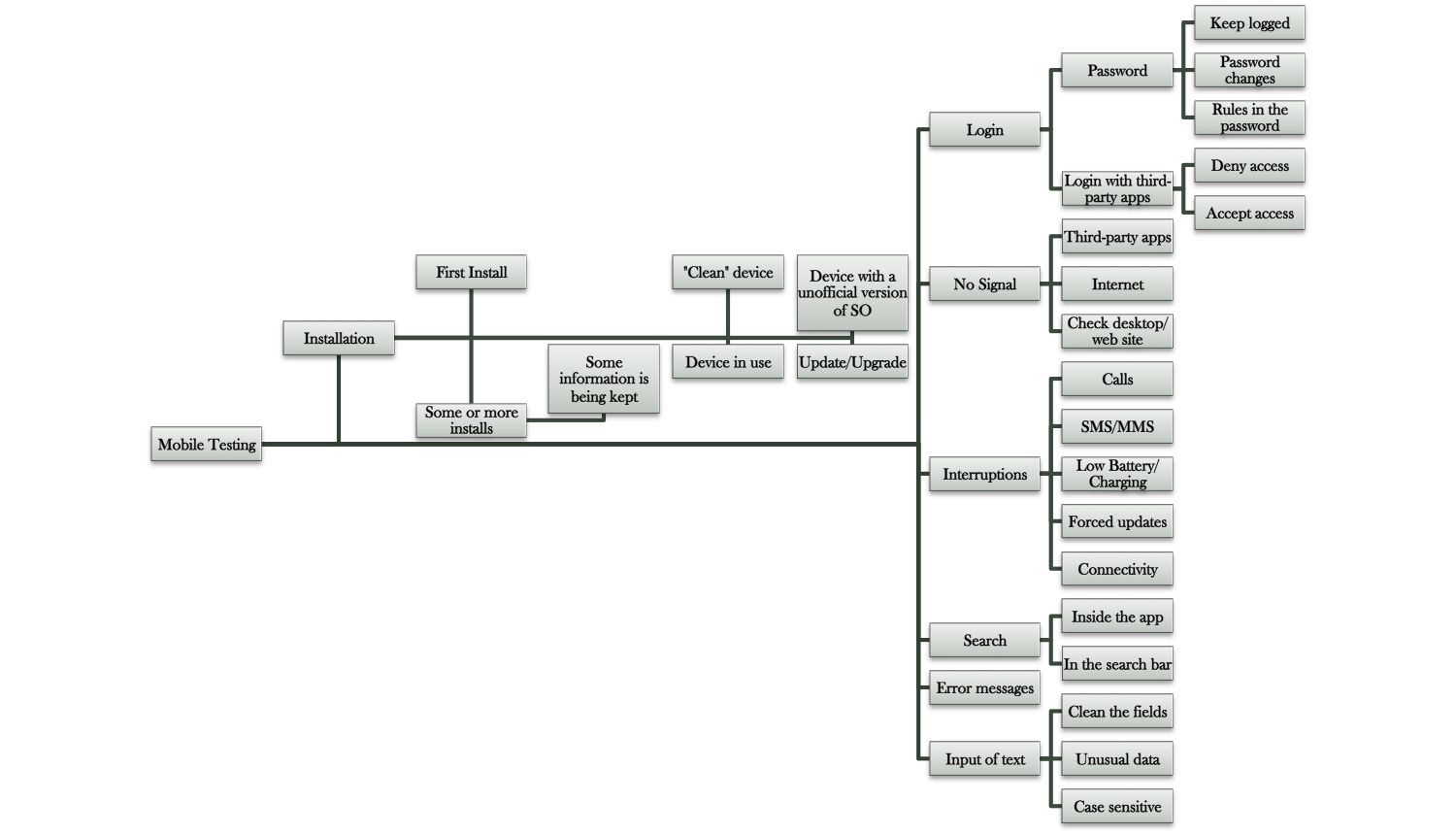
graph

HOW TEST?

– Manual: Straight on devices, simulators and Crowdtest.

– Automated: Straight on devices, simulators and the cloud.


TECHNOLOGIES

– Appium, Calabash, Robotium, Selendroid, MonkeyRunner, MonkeyTalk, UIAutomator, Espresso


Thank you 🙂


Resourceshttp://www.slideshare.net/elias.nogueira/teste-sua-app-e-aumente-as-chances-de-mantla-no-mercado

http://opensignal.com/reports/2014/android-fragmentation/

Why I should do UAT (User Acceptance Testing) ?

UAT is the client view (end-user), so the most important tests will be here. I know that you can be a developer that started in QA automation area and you probably don’t like to do these tests and you don’t see the value of them, but as a professional of QA you should be concerned with the client point of view and his expectations with the quality of the product. Remember QA is the area of the quality and it is not only about a pattern and it is about testing as a client.

Reduce chances of error in LIVE Environment: Some scenarios you only discover in the phase UAT. Maximum possible scenarios are identified and tested before software moved to LIVE environment.

Increase User Satisfaction: You can test usability and real performance only in this type of test, because here you can test according with the device, real environment, etc. UAT provides full-fledge access of software to user, which gives him a lot of confidence as well as satisfaction to allow him to test the software that soon he will be using in a LIVE environment.

Reduce risk of regulatory & other compliance: You want to be sure that any mistakes even the most simple not will be forgotten. Some scenarios are discovered only in this phase (Don’t forget that you are working with humans, so if you want to have absolutely sure that nothing was forgotten, it is better test). As in UAT, the system is tested on maximum business scenarios; the risk of regulatory and other compliances that may bring penalties in term of financial impact, opportunity loss or customer dissatisfaction can be minimized.

Reduce Time: You can reduce the time of the teste in this phase, because you will have more knowledge to know if some scenarios are duplicated or not. In new/automated system, there is a chance that the system has automated some business processes along with some changes in existing processes, which might have increased some process steps found to be unnecessary or wasting time in the LIVE environment, UAT allows users to identify those unnecessary steps before going into the LIVE environment, it allows organizations to save time by reducing process steps that may take time in the LIVE environment and incur extra costs.

Business reputation: Quality is reputation, if your client discover a small bug in your application, the client confiability will fall together with the quality of your product. For this reason the client point of view is the most important test. If due to software solution, organization is unable to provide the services to its customer or provide the services with delay or somehow impact customer by giving wrong figures or showing wrong transaction in customer’s account, this may blow the business reputation and definitely results in customer dissatisfaction, and with this, the company may lose a good amount of business that was successfully in hand having the legacy system in place.

Bye guys 🙂

Sources:

http://www.batimes.com/articles/uat-tips-and-templates.html
https://www.develop.com/training-course/user-acceptance-testing-for-business-analysts

How choose the order of the browsers that I will be testing ?

By testing your web application using a variety of web browser types, you better emulate the UI experience of your users who may run different browsers. For example, your application might include a control or code in Internet Explorer that is not compatible with other web browsers. By running your coded UI tests across other browsers, you can discover and correct any issue before it impacts your customers.

To discover what is the priority that you should test the browsers is simple, but you have a lot of points to worry.

– Hardware differences

– Monitor resolution settings

– Browser and computer preferences

Usage of each browser 

What is the time that you have ?

When you will be the release ?


top 10 browsers to test?

  1. Chrome 39
  2. Internet Explorer 11
  3. Firefox 35
  4. Internet Explorer 10
  5. Chrome 38


Usage share of desktop browsers for December 2014
Source Chrome Internet
Explorer
Firefox Safari Opera Other
Stat Counter 49.7% 24.6% 18.0% 4.7% 1.5% 1.6%
W3Counter 42.5% 17.6% 15.6% 14.6% 3.2% 6.5%
Wikimedia 48.1% 17.5% 16.7% 4.8% 1.5% 11.4%
Net Applications 22.7% 59.1% 11.9% 5.0% 0.9% 0.4%


How to measure the order of the browsers ?

The ideal is you focus in the most usage browser first and after you can think about the others. So, let’s imagine that you have 4 weeks to test all browsers and you take 1 week to test all the scenarios in one browser. You need to choose the first week to test in the most used browser for your end user, and the second week for the second most used and so on.

This is the ideal in the most of cases, but of course everything depends of how many people you have to help you with the tests, the date of the release, and the other points I already told.

 StatCounter-browser-ww-monthly-200807-201412


Tips: 

– Don’t Overestimate neither Underestimate a browser version.

– If you are looking for just mainstream use, StatCounter has a really nice graph to show you what browser you should test.


Tools & emulators that you can use:

  • The Browser Sandbox
  • BrowserShots.org
  • CrossBrowserTesting.com
  • SauseLabs


Thank you guys ! See you next week 🙂


Source
http://crossbrowsertesting.com/browsers-to-test/

http://en.wikipedia.org/wiki/Usage_share_of_web_browsers

https://msdn.microsoft.com/en-us/library/jj835758.aspx

http://www.digitalfamily.com/tutorials/test-your-website-in-differen-web-browsers/

http://gs.statcounter.com/#desktop-browser-ww-monthly-200807-201412

Basics gestures for calabash-android

Hi guys, today I will post just some basics and very basics commands from the Calabash android API (0.5.5):

– tap_mark(“query”)

– touch(“query”)

– double_tap(“query”)

– perform_action(“touch_coordinate”, center_x, center_y)

– perform_action(“double_tap_coordinate”, center_x, center_y)

– long_press(“query”, options)

– drag (“query”)

– pan_left(options)

– pan_right(options)

– pan_up(options)

– pan_down(options)

– pan (“query”)

– flick_left (options)

– flick_right (options)

– flick_up (options)

– flick_down (options)

– flick (“query”)

– flash(“query”)

– pinch_out (options)

– pinch_in (options)

– pinch (“query”)

– find_coordinate (“query”)

– tap_when_element_exists (“query”)

– long_press_when_element_exists (“query”)

– query_result? (“query”)


See you on Wednesday !

Font: https://github.com/calabash/calabash-android/blob/master/ruby-gem/lib/calabash-android/touch_helpers.rb

What is the difference between an interface and abstract class?

Hi guys, I am without internet in my house until 19th 😦
Because of this, I will post some interesting things, but nothing that I wrote. (Because I am without time/internet). Sorry, for this !

Interface

An interface is a contract: the guy writing the interface says, “hey, I accept things looking that way“, and the guy using the interface says “OK, the class I write looks that way“.

An interface is an empty shell, there are only the signatures (name / params / return type) of the methods. The methods do not contain anything. The interface can’t do anything. It’s just a pattern.

E.G (pseudo code):

// I say all motor vehicles should look like this:
interface MotorVehicle
{
void run();


int getFuel();
}

// my team mate complies and writes vehicle looking that way
class Car implements MotorVehicle
{


int fuel;


void run()
{


print("Wrroooooooom");
}


int getFuel()
{
return this.fuel;
}
}

Implementing an interface consumes very little CPU, because it’s not a class, just a bunch of names, and therefore there is no expensive look-up to do. It’s great when it matters such as in embedded devices.

Abstract classes

Abstract classes, unlike interfaces, are classes. They are more expensive to use because there is a look-up to do when you inherit from them.

Abstract classes look a lot like interfaces, but they have something more : you can define a behavior for them. It’s more about a guy saying, “these classes should look like that, and they have that in common, so fill in the blanks!”.

e.g:

// I say all motor vehicles should look like this :
abstract class MotorVehicle
{

int fuel;

// they ALL have fuel, so why not let others implement this?
// let's make it for everybody


int getFuel()
{

return this.fuel;
}


// that can be very different, force them to provide their
// implementation
abstract void run();

}

// my team mate complies and writes vehicle looking that way
class Car extends MotorVehicle
{
void run()
{
print("Wrroooooooom");
}
}

Implementation

While abstract classes and interfaces are supposed to be different concepts, the implementations make that statement sometimes untrue. Sometimes, they are not even what you think they are.

In Java, this rule is strongly enforced.

See you next week !

Font: http://stackoverflow.com/questions/1913098/what-is-the-difference-between-an-interface-and-abstract-class

Definition of User Acceptance Testing (UAT)

UAT directly involves the intended users of the software. UAT can be implemented by making software available for a free beta trial on the Internet or through an in-house testing team comprised of actual software users.

Following are the steps involved in in-house UAT:

  • Planning: The UAT strategy is outlined during the planning step.
  • Designing test cases: Test cases are designed to cover all the functional scenarios of the software in real-world usage. They are designed in a simple language and manner to make the test process easier for the testers.
  • Selection of testing team: The testing team is comprised of real world end-users.
  • Executing test cases and documenting: The testing team executes the designed test cases. Sometimes it also executes some relevant random tests. All bugs are logged in a testing document with relevant comments.
  • Bug fixing: Responding to the bugs found by the testing team, the software development team makes final adjustments to the code to make the software bug-free.
  • Sign-off: When all bugs have been fixed, the testing team indicates acceptance of the software application. This shows that the application meets user requirements and is ready to be rolled out in the market.

UAT is important because it helps demonstrate that required business functions are operating in a manner suited to real-world circumstances and usage.


Fonts: http://www.techopedia.com/definition/3887/user-acceptance-testing-uat

Filtering an element using its property in arrays – calabash

Hello again,

More one tip about filtering the element in an array, using some of the properties that you want (text content, position, id, class, html, etc…). In this example, I am finding the array of elements with the specific CSS and after I am returning the element where the property “TextContent” equals a Login.

menu = query("WebView index:0 css:'div li span'").find { |x|
x["textContent"] == "Login" }

Or:

menu = query("WebView index:0 css:'div li span'", :textContent).find { |x| 
x == "Login" }

In this other example, I am returning the element which contains specific text inside of the property “html“.

menu_figure = query("WebView index:0 css:'div li span'").find { |x| 
x["html"].include? ("figure") }

Or:

menu_figure = query("WebView index:0 css:'div li span'", :html).find { |x| 
x.include? ("figure") }


If you have any question/suggestion, just let me know.

Thank you guys ! See you next week 🙂

Double_Tap issue -> Calabash-android 0.5.4

Hello folks,

I updated my calabash-android to the new version 0.5.4 and I noticed that my double tap function stopped work on devices.

Seems that now, you need to write query before the element address, like this > double_tap(query(“WebView index:2 css:’xxxxxx'”))

Before I was using double_tap(“WebView index:2 css:’xxxxxx'”) and was working properly.
>> Guys, after I update to calabash-android 0.5.5 I had to remove the query again, and now it is working this way again:

double_tap(query(“WebView index:2 css:’xxxxxx'”))

Just a fast note about this issue that I had.

See you guys 🙂

BDD – Summarized in 13 questions/tips and 1 example

Hi guys, today I will post a summary of a meet up that I went about BDD. It was very interesting and more clear than the others texts/posts that I found about.

1 –  Communication with all teams (business, developers, tests since beginning) is the key – Everyone should participate.

2 – What is the value of the scenario ?

3 – Could you write in another way/different steps ?

4 – Could you use the same steps ?

5 – Could you join some steps in other scenario to spend less time when you run the feature ?

6 – Your flow is decreasing the possible points of misunderstood gaps ?

7 – Are you doing the scenarios with participation of everyone in the beginning of the project ? When everyone is understanding the same thing and you starts to worry about tests in the beginning of the project, you spend less time/money than write test cases after development. Pay attention in your flow.

8 – Be curious ! Ask !

9 – Everything should be automated ? Remember that the effort spent when you automate something can be less valuable than manual testing.

10 – How many steps are you using in the scenarios, try don’t use more than 4 or 5. Make it simple.

11 – Use page object model – Better structure

12 – Be clear and objective when write the steps

13 – The feature is your documentation for end users, testers, developers. Following one of the Scrum rules, you don’t need more than this in your documentation process. Less time spent, more clear than huge documents (Because it uses examples), keeps the documentation together with the test.

14 – Use 4 layers – Example :

bdd

Thanks John F. Smart !