Using Spoon with Cucumber

Hi guys,

Today I will post about Spoon which is a framework that I’ve been learning. I hope this helps someone too, because spoon is quite new and doesn’t have too much support if you want to run with Cucumber.

Spoon is a framework to run android reports and Cucumber is a BDD framework.

  • If you are using gradle, you need to open your build.gradle and add:
 classpath('com.stanfy.spoon:spoon-gradle-plugin:1.0.3') {
  exclude module: 'guava'
  }

  • In your app-build.gradle:
plugin 'spoon'

dependencies{
 androidTestCompile 'com.squareup.spoon:spoon-client:1.2.0'
 androidTestCompile 'info.cukes:cucumber-android:1.2.4'
 androidTestCompile 'info.cukes:cucumber-picocontainer:1.2.4'
 } 
  • Create Spoon task in the same file:

spoon {
 debug = true
 if (project.hasProperty('spoonFailNoConnectedDevice')) {
    failIfNoDeviceConnected = true
 }

 if (project.hasProperty('cucumberOptions')) {
    instrumentationArgs = ["cucumberOptions=" + "'${project.cucumberOptions}'"]
 }

}
  • The instrumentation runner:
public class Instrumentation extends CucumberInstrumentation {
@Override
public void onStart() {
    runOnMainSync(new Runnable() {
        @Override
        public void run() {
            Application app = (Application) getTargetContext().
getApplicationContext();
            String simpleName = Instrumentation.class.getSimpleName();

            // Unlock the device so that the tests can input keystrokes.
            ((KeyguardManager) app.getSystemService(KEYGUARD_SERVICE)) //
                .newKeyguardLock(simpleName) //
                .disableKeyguard();
            // Wake up the screen.
            ((PowerManager) app.getSystemService(POWER_SERVICE)) //
                .newWakeLock(FULL_WAKE_LOCK | ACQUIRE_CAUSES_WAKEUP 
| ON_AFTER_RELEASE, simpleName) //
                .acquire();
        }
    });

    super.onStart();
}

}
  • Now you can use gradle command line with spoon task and pass Cucumber arguments. Like this one:
gradle spoon -PspoonFailNoConnectedDevice -PcucumberOptions='--tags @smoke'
      • Or you can use adb command line – without spoon report generation:
adb shell am instrument -w -e cucumberOptions "'--tags @smoke'" 
com.rsouza.test/com.rsouza.test.Instrumentation
  • Instrument arguments
am instrument argument Description
-e count true Count the number of tests (scenarios)
-e debug true Wait for a debugger to attach before starting to execute the tests.
-e log true Enable Cucumber dry-run (same as –e dryRun true)
-e coverage true Enable EMMA code coverage
-e coverageFile “/path/coverage.ec Set the file name and path of the EMMA coverage report
  • Cucumber arguments

https://cucumber.io/docs/reference/jvm#third-party-runners

  • Example: Use Cucumber and adb arguments
adb shell am instrument -w -e log true -e cucumberOptions "'--tags @debug'"
 com.rsouza.test/com.rsouza.test.Instrumentation

Thank you guys ! See you next week 🙂
Choose the right test framework for mobile


Today I will post more about my experiences in developing the automation project from scratch. I developed 2 test mobile automation from scratch until now: one was with Calabash and Cucumber and the other one was with Robotium and Cucumber.

  • Support – Be sure that you will have a lot of support from the framework team. If it’s an open source you could have fast support or not, depends of how the developers are busy. So, make sure that you will have a good support when you start to use the framework, go to the github of the project and look for the open issues and what is the frequency they reply and when it was the last bug fixed. Pay attention the frequency of the answers in forums on google groups/linkedin groups/stackoverflow, etc.


  • Stability – Is stable enough ? How long this framework is in the market ? Really, you don’t want to start your automation with a lot of problems because the framework that you are using is still in beta phase or is still improving a lot of things. You need to be sure that your choice will depend more in you and your code than the framework you’ve chosen.


  • Your app – Yes, you need to know first if your app is stable, with good performance and what are the objectives of your automation. Some frameworks work very well with stable apps, but when you need to test an app with memory leaks or performance problems you won’t be able to even start a scenario. I worked with Calabash most of my mobile automation experience and to be honest I didn’t have any problems to test some unstable apps, but when I did a POC with Espresso, the first simple scenario couldn’t even go further the first step, just because the app was not stable enough (and this it wasn’t the first priority of the automation – of course if you know that you have performance issues and they are not relevant enough you should be able to carry on the automation).


  • Developers – Again, I will use the experience that I had with Espresso. The developers are from Google, which is a famous company. You could think, of course I will choose this one, because google is taking care of it. No, to be honest, I don’t really care about the company, I may consider the fact of the framework being developed from a good company, but in first place I see all the priorities above. In this example: Espresso is relative new if you compare with robotium or calabash, it takes serious about the performance of the app, so it won’t go further the automation if you have performance problems, the support is really fast and you can find a lot of people who already started use it.


  • Pressure – You need to consider this, probably you will have a developer who will need to push you to use the framework he thinks it is really good (OMG Espresso is being developed by Google, we need to use it, because reasons and stuffs). I think all of us already worked with people like this, I am not saying that you need to ignore them, but just pay attention about what is more important and WHAT IT WILL WORK FOR YOUR COMPANY/APP. Please, not all the apps or companies work in the same way, you don’t need to follow the crowd, just follow a single tip to figure out which framework is better: POC.


  • POC (Proof of concept) – The last tip and probably the most important one. If you want to know which framework will work better with your app it’s easy, take one scenario, a basic one, and automate it for the frameworks that you are in doubt 🙂


I hope this helps someone as well. If you have any suggestions/questions, please fell free to comment below. See you next week 🙂

How to install Espresso and Cucumber in Android Studio

You can download a sample project that is already configured and try first: https://github.com/cucumber/cucumber-jvm/tree/master/examples/android/android-studio/Cukeulator

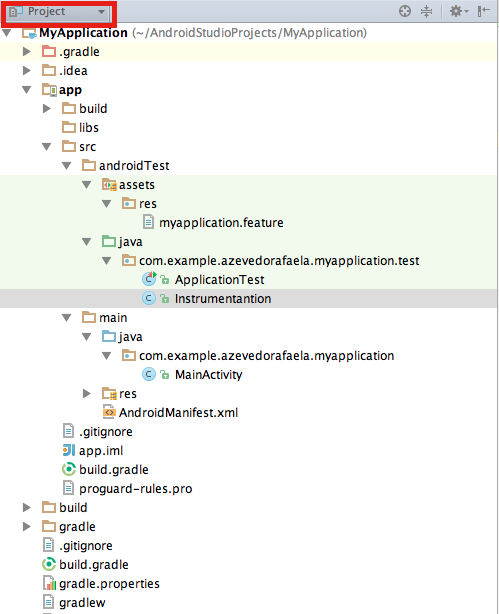
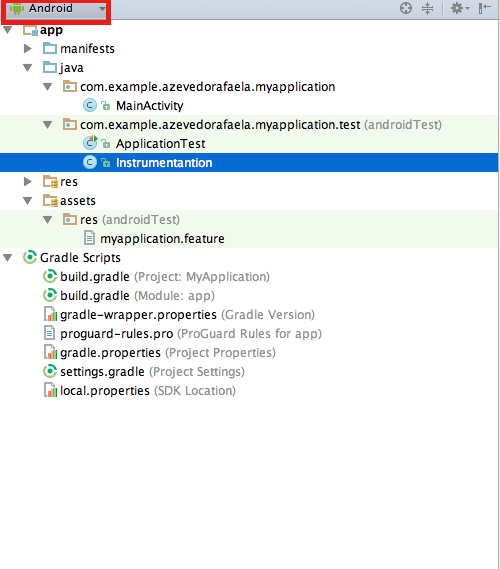
  • The structure of your project should be like this:

On Android View:

Screen Shot 2015-09-12 at 15.14.59

On Project View:

Screen Shot 2015-09-12 at 15.14.46


  • Now, open the build.gradle of your app and write these dependencies:
dependencies {
 androidTestCompile 'com.android.support.test.espresso:espresso-core:2.2'
 androidTestCompile 'com.android.support.test:testing-support-lib:0.1'
 androidTestCompile 'info.cukes:cucumber-android:1.2.4'
 androidTestCompile 'info.cukes:cucumber-picocontainer:1.2.4'
}
  • I had some problems with the version of java, if you have the same problem just update your java or downgrade/upgrade the version of the plugin which is incompatible.
  • In your build.gradle you will need to write more these configs. Change the name of your application and the package of the runner, following the structure of your project and sync your build.gradle file.
android {
 defaultConfig {
 testApplicationId "com.example.azevedorafaela.myapplication"
 testInstrumentationRunner "com.example.azevedorafaela.myapplication.test.
Instrumentation"
 }
   sourceSets {
     androidTest {
        assets.srcDirs = ['src/androidTest/assets']
     }
   }
} 
  • In your Feature file you an write your scenario like this:
Feature: Test

Scenario: Espresso with cucumber test
Given I have my app configured
When something happens
Then I should see xx on the display
  • In your Instrumentation class:
package com.example.azevedorafaela.myapplication.test;
import android.os.Bundle;
import android.support.test.runner.MonitoringInstrumentation;
import cucumber.api.android.CucumberInstrumentationCore;
public class Instrumentation extends MonitoringInstrumentation {
private final CucumberInstrumentationCore instrumentationCore = new 
CucumberInstrumentationCore(this);
@Override
 public void onCreate(final Bundle bundle) {
 super.onCreate(bundle);
 instrumentationCore.create(bundle);
 start();
 }
@Override
 public void onStart() {
 waitForIdleSync();
 instrumentationCore.start();
 }
}
  • In your Steps file:
package com.example.azevedorafaela.myapplication.test;

import android.test.ActivityInstrumentationTestCase2;

import com.example.azevedorafaela.myapplication.MainActivity;

import cucumber.api.CucumberOptions;
import cucumber.api.java.en.Given;
import cucumber.api.java.en.Then;
import cucumber.api.java.en.When;
import com.example.azevedorafaela.myapplication.R;
import static android.support.test.espresso.Espresso.onView;
import static android.support.test.espresso.action.ViewActions.click;
import static android.support.test.espresso.assertion.ViewAssertions.
matches;
import static android.support.test.espresso.matcher.ViewMatchers.withId;
import static android.support.test.espresso.matcher.ViewMatchers.withText;

@CucumberOptions(features = "features")
public class MainActivitySteps extends ActivityInstrumentationTestCase2
<MainActivity> {

    public MainActivitySteps(){
        super(MainActivity.class);
        assertNotNull(getActivity());
    }

    @Given("^I have my app configured$")
    public void I_have_my_app_configured() {
    }

    @When("^something happens$")
    public void something_happens(final char op) {

    }

    @Then("^I should see xx on the display$")
    public void I_should_see_xx_on_the_display(final String s) {
    }
}


Now you can start write your espresso code inside of each step. To run your test you need to:

  • In your terminal, open your project folder and run:
gradle --parallel :app:assembleDebugTest
  •  Now you need istall the apk in your device/simulator:
adb install -r app/build/outputs/apk/app-debug.apk
  • Check if your app is installed. Should display the instrumentation of your app
adb shell pm list instrumentation
  • To run the tests with gradle:
gradle connectedCheck
  • To run the tests with adb:
adb shell am instrument -w com.example.azevedorafaela.myapp
lication/com.example.azevedorafaela.myapplication.test.Instrum
entation
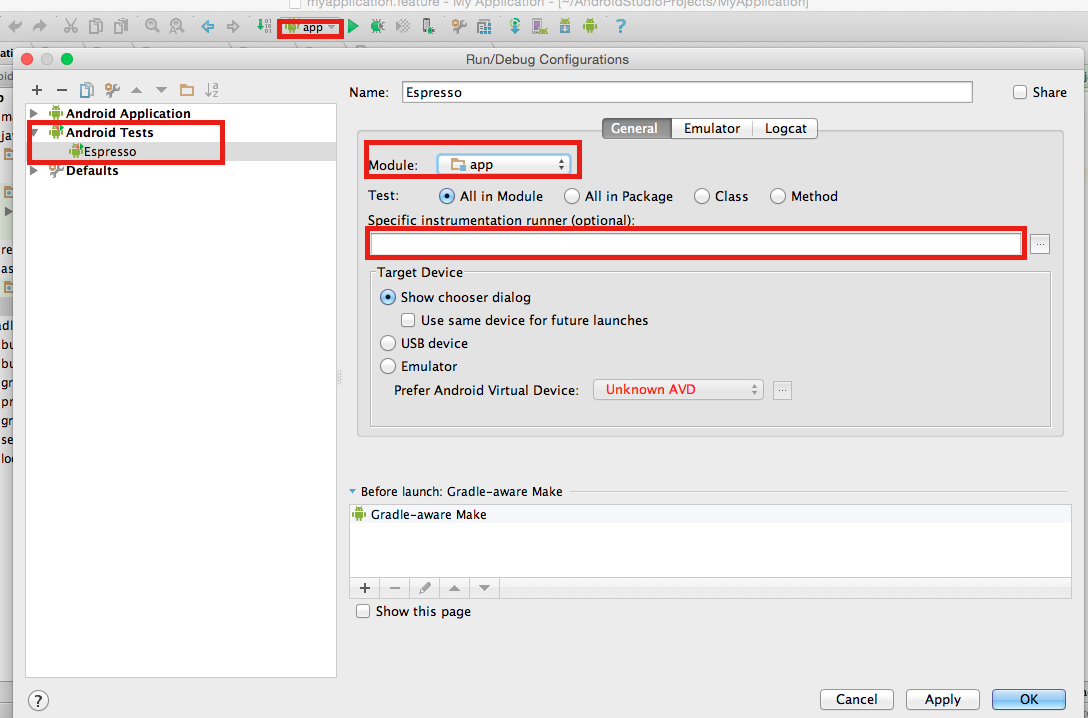
  • To run your tests via android configurations:
    1. Open your run configurations
    2. Create an androidTests
    3. Give a name to this config
    4. Select your module
    5. Don’t write anything on the instrumentation field. (We already configured this in our build.gradle)
    6. Ok.

Screen Shot 2015-09-12 at 15.39.22


Now you can run your cucumber with espresso tests. I hope this “tutorial” helps you as helped me to install everything on my project.

Thank you guys ! See you next week 🙂
10 Steps to setting up the QA Area

Hello guys, today I will post about some steps that you can follow to create the QA area from the scratch.

1 – Make questions like:

  • Do you have any written scenarios ?
  • Who is writing the scenarios and in what phase ?
  • QA team will need create its own scenarios, what phase may the team do that ?
  • Who will need to look the scenarios, just QA and dev area ?
  • Who will run the tests DEV and QA only ?
  • How the application is working ?
  • What are the critical scenarios ? Like, what are the scenarios which will crash the functions/app/process ?
  • What are the most used scenarios (Like create an account…) ?
  • What are the scenarios which are more unstable, like if you change a simple thing you will need to test this scenario every time ?
    • What are the most repetitive tests ?
  • Do you need run the regression everyday ? before every release ? (regression tests, exploratory tests, monkey tests, stress tests, performance tests) every time after a push ? (smoke tests)
  • Do you have a QA environment ?
  • If you are in a mobile/web project, remember to make these questions:
    • What are the most used devices/browsers/OS ?
    • What are the most unstable devices/browsers/OS ?
    • What are the most used versions on these browsers/OS ?
    • What are the most unstable versions on these browsers/OS ?
  • If you are in a mobile project:
    • The app is hybrid, native or web app ?
  • If you are in a web project:
    • Is this site responsive ?
  • Do you have a process of QA, like SCRUM, Kanban ?
  • If you find a bug in a task, do you return the task or create the bug to be fix separately ?

2 – Understand what will be first priority and until where you will reach (Like performance tests, integration ui tests, etc…), so you can have a big picture of the project

3 – Remember that if you are using BDD, it is just 3 layers (Don’t expose your code)

4 – Decide what are the scenarios that must be in the regression (Priority).  What are the most repetitive tests ?

5 – Use tags for all the type of scenarios, like smoke, regression, iOS, android, manual. Even manual tests should be in the features inside the automation project

6 – Don’t use too many complex steps in your scenarios

7 – Try to re-use steps so you don’t need waste time

8 – Use examples

9 – Regression tests – Automated tests

  • Choose the tool, do a POC with different frameworks
    • On this POC, choose the most simple and important scenario (E.g. Create an account)
  • Considerate the language which the developers are using (You never know when you will need help)
  • Distribute the right level of tests between unit (70%), integration (20%) and manual tests (10%) – new functions
  • Include the Automation in your development
  • Decide if you need to create the automation project in the same or separated project
  • Use CI since the beginning
  • Decide what must to have in the report
  • Choose a good report from the beginning
  • Structure of Scripts. Create or follow a Code Style Guideline

10 – Form a team of automation and equality the level of knowledge. Make some meetings to prepare people in your team to use the tool with wisdom.

I think it’s pretty much this. Sorry guys if I forgot something… If I remember anything else I will update here. Thank you ! Feel free for comments and your opinion always ! See you next week !

Orthogonal Array Test

What is ?
It’s used for small number of inputs, but with exhaustive number of possibilities. It’s a black box testing with systematic and statistics techniques so, you don’t need to have the knowledge of the implementation of the system. The main aim is maximize the coverage by comparatively lesser number of test cases

Orthogonal arrays can be applied in user interface testing, system testing, regression testing, configuration testing and performance testing.


What are the benefits ?

Remember Pairwise? So, the benefits are the same, you will have a precisely test. 100% of Orthogonal Tests implies 100% of Pairwise.

  • Precise tests
  • Generate TestCases more quickly and cheaply
  • Increase coordination among the team
  • Easy for managers measure the team’s performance
  • Make the analysis simple
  • Isolate defects


Why don’t use it ?

Well, as any other technique we can find some negative points:

  • Testing will fail if you fail to identify the good pairs
  • Probability of not identifying the most important combination which can result in losing a defect
  • This technique will fail if you do not know the interactions between the pairs
  • Applying only this technique will not ensure the complete coverage
  • It can find only those defects which arise due to pairs, as input parameters

So, you need to choose wisely because not all the applications will suit in this technique, this depends of the behaviour of your application. You need to measure the priority points of the project as well, like if you want to cover 100% of the tests of cover a good part of the tests and save a lot of time…


How to use it ?

  1. Identify the independent variables. These will be referred to as “Parameter x”
  2. Identify the values which each variable will take. These will be referred as “Test Case x”
  3. Search for an orthogonal array that has all the factors from step 1 and all the levels from step 2
  4. Map the factors and levels with your requirement
  5. Translate them into the suitable test cases
  6. Look out for the left over or special test cases (if any)


Examples:

If we have 3 parameters, each can have 3 values then the possible Number 
of tests using conventional method is 3^3 = 27
While the same using OAT, it boils down to 9 test cases.

Screen Shot 2015-08-19 at 18.14.37

The array is orthogonal, because all possible pair-wise combinations 
between parameters occurs only once.
The given L9 Orthogonal Array assess result of test cases as follows:

Single Mode Faults - Single mode faults occur only due to one parameter. 
For example, in above Orthogonal array if test cases 7, 8 and 9 show error
, we can expect that value 3 of parameter 1 is causing the error. 
Likewise we can detect as well as isolate the error.

Double Mode Fault - Double mode fault is caused by the two specific 
parameters values interacting together. Such an interaction is a 
harmful interaction between interacting parameters.

Multimode Faults - If more than two interacting components produce the 
consistent erroneous output, then it is a multimode fault. 
Orthogonal array detects the multimode faults.


As always, if you have any suggestion or question please feel free to comment below.

Thank you ! See you next week 🙂


References:

http://www.tutorialspoint.com/software_testing_dictionary/orthogonal_array_testing.htm

http://www.softwaretestinghelp.com/combinational-test-technique/

https://en.wikipedia.org/wiki/Orthogonal_array_testing

Configure Thucydides (Report for JBehave) – BDD

What is ?

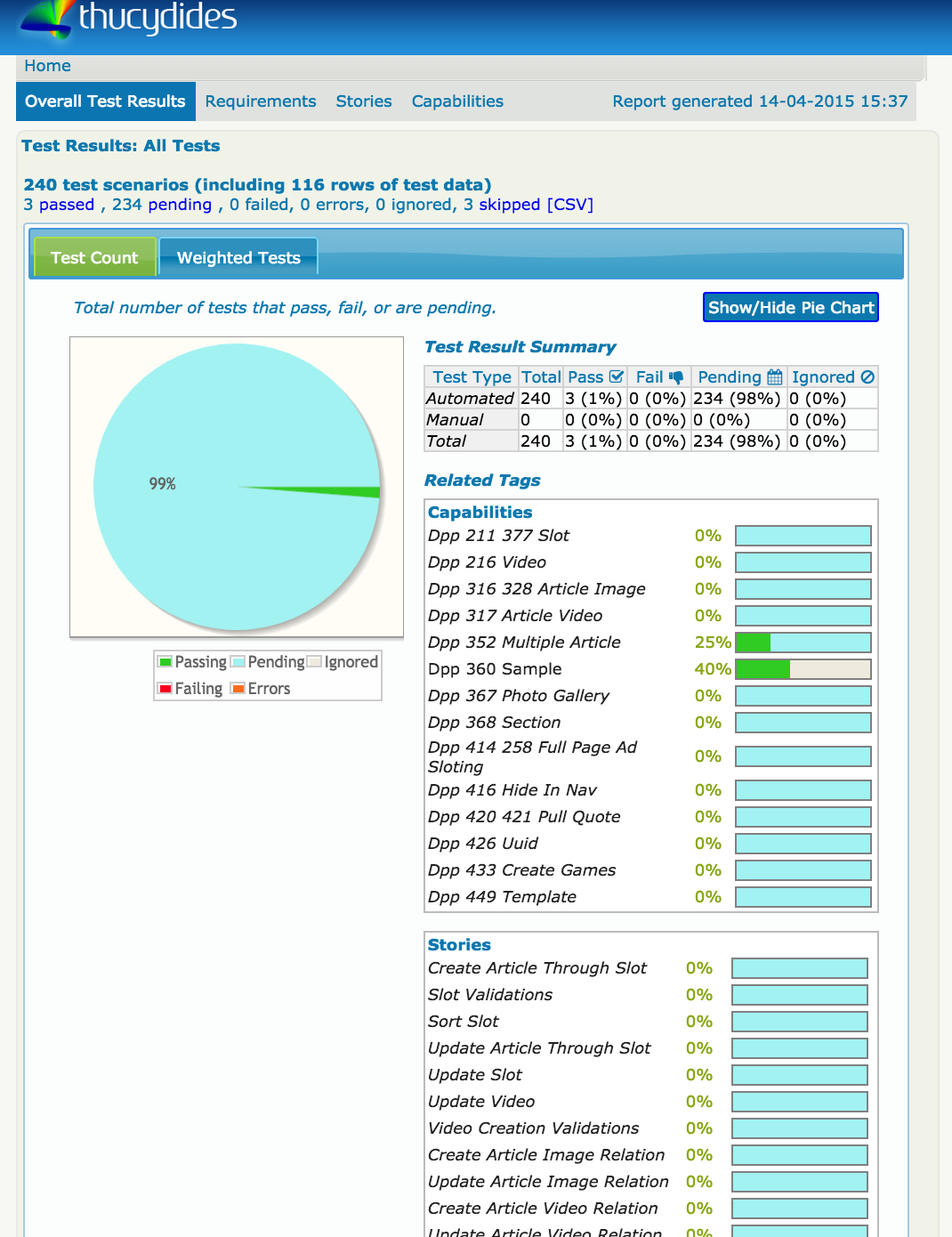
Basically, this report of your scenarios/features:

Screen Shot 2015-06-17 at 12.34.50


Project Structure

+ src
   + main
      + java
         + com.mycompany.pages
            - HomePage.java   

   + test
      + java
         + com.mycompany.pages
            + requirements
               - Application.java
            + steps
               - EndUserSteps.java
            - SearchByKeywordStoryTest.java 

      + stories
         + com.wakaleo.webtests.wikipedia
            - SearchingForCats.story


Starting

If you have maven installed, go to the terminal or IDE and:

– Create a new project:

mvn archetype:generate -Dfilter=thucydides

– Open your settings.xml and write:

<?xml version="1.0" encoding="UTF-8"?>
<settings>
   <pluginGroups>
       <pluginGroup>net.thucydides.maven.plugins</pluginGroup>
  </pluginGroups>
</settings>

– In the pom.xml file, update the default JUnit dependency to at least 4.11

– Add a dependency to hamcrest-all and thucydides-junit. Thucydides uses SLF4J for its logging, so add an SLF4J implementation (e.g. slf4j-simple) as well.

– If you are not using Maven 3, make sure you configure the Maven compiler plugin to use Java 5.

– Finally, add the thucydides-maven-plugin, which provides the Thucydides reporting services. The resulting pom.xml file should look something like this:


  <groupId>com.wakaleo.webtests.wikipedia</groupId>
  <artifactId>wikipediawebtests</artifactId>
  <version>1.0-SNAPSHOT</version>
  <packaging>jar</packaging>

  <name>wikipediawebtests</name>
  <url>http://maven.apache.org</url>

    <properties>
        <project.build.sourceEncoding>UTF-8</project.build.sourceEncoding>
        <thucydides.version>0.9.228</thucydides.version>
    </properties>

    <dependencies>
        <dependency>
            <groupId>junit</groupId>
            <artifactId>junit</artifactId>
            <version>4.11</version>
        </dependency>
        <dependency>
            <groupId>org.hamcrest</groupId>
            <artifactId>hamcrest-all</artifactId>
            <version>1.1</version>
        </dependency>
        <dependency>
            <groupId>net.thucydides</groupId>
            <artifactId>thucydides-junit</artifactId>
            <version>${thucydides.version}</version>
        </dependency>
        <dependency>
            <groupId>org.slf4j</groupId>
            <artifactId>slf4j-simple</artifactId>
            <version>1.6.1</version>
            <type>pom</type>
        </dependency>
    </dependencies>
    <build>
        <plugins>
            <plugin>
                <groupId>org.apache.maven.plugins</groupId>
                <artifactId>maven-compiler-plugin</artifactId>
                <version>2.3.2</version>
                <configuration>
                    <source>1.5</source>
                    <target>1.5</target>
                </configuration>
            </plugin>
            <plugin>
                <groupId>net.thucydides.maven.plugins</groupId>
                <artifactId>maven-thucydides-plugin</artifactId>
                <version>${thucydides.version}</version>
            </plugin>
        </plugins>
    </build>
</project>                      


– Run this command to be sure that everything it is running correctly: mvn package

– Create a new class contains the list of “features” that make up the application, and stories related to each feature. These stories are not the tests themselves – rather they are used to model the application requirements.

– Writing your first test:

public class Application {
	    @Feature
	    public class Search {
	        public class SearchByKeyword {}
	        public class SearchByAnimalRelatedKeyword {}
	        public class SearchByFoodRelatedKeyword {}
	        public class SearchByMultipleKeywords {}
	        public class SearchForQuote{}
	    }

	    @Feature
	    public class Backend {
	        public class ProcessSales {}
	        public class ProcessSubscriptions {}
	    }

	    @Feature
	    public class Contribute {
	        public class AddNewArticle {}
	        public class EditExistingArticle {}
	    }
	}


– Create a new test class in a package of your choice calledSearchByKeywordStoryTest.java

@Story(SearchBySingleKeyword.class)
@RunWith(ThucydidesRunner.class)
public class SearchByKeywordStoryTest {

    @Managed(uniqueSession = true)
    public WebDriver webdriver;

    @ManagedPages(defaultUrl = "http://www.wikipedia.com")
    public Pages pages;

    @Steps
    public EndUserSteps endUser;

    @Test
    public void should_display_article_about_cats() {
        endUser.is_on_the_wikipedia_home_page();
        endUser.searches_by_keyword("cats");
        endUser.should_see_article_with_title("Cat - Wikipedia, the free
 encyclopedia");


PS: @Managed and  @ManagedPages are required to take care of our page objects.


– Create a step library called EndUserSteps:

public class EndUserSteps extends ScenarioSteps {

    public EndUserSteps(Pages pages) {
	super(pages);
    }

    @Step
    public void searches_by_keyword(String keyword) {
        enters(keyword);
        performs_search();
    }

    @Step
    public void enters(String keyword) {
    }

    @Step
    public void performs_search() {
    }

    @Step
    public void should_see_article_with_title(String title) {
    }

    @Step
    public void is_on_the_wikipedia_home_page() {
    }
}


– You will need create your own classes inside of each Step.

– Run the command to generate your report: mvn verify thucydides:aggregate

– Your report will be in target/thucydides directory, open the home.html


If you want to see a complete model, go to this link.

If you want to learn more about maven commands, go to this link.

If you want to see the post of John Smart with his complete example, go to this link.


Thank you guys  🙂


Sources:

https://github.com/thucydides-webtests/thucydides/wiki/Getting-Started

https://weblogs.java.net/blog/johnsmart/archive/2011/10/31/getting-started-thucydides-%E2%80%93-using-thucydides-maven-archetypes

http://stackoverflow.com/questions/23297718/thucydides-install-from-scratch-archetype-all-tests-are-skipped

http://maven.apache.org/guides/introduction/introduction-to-the-lifecycle.html

https://github.com/thucydides-webtests/thucydides-demos

Getting Started with Mobile Test Automation & Appium

Hi guys, today I have another Webinar that I participate about Appium, how to choose the automation mobile tool, how should be the structure, etc. You can watch online or download, just click in this link to start.

You can jump the advertisement moving to 00:10:51 of the video. Also, you can jump to 00:23:12 and watch the demo. To jump the demo go to 00:40:00.


Difference between hybrid native and html


Screen Shot 2015-05-27 at 20.39.45


HTML: web applications which runs in web browser.

Native: just native elements, apps which doesn’t have html elements.

Hybrid: mix of native elements and html elements.


Mobile QA Solutions


Screen Shot 2015-05-27 at 20.44.35

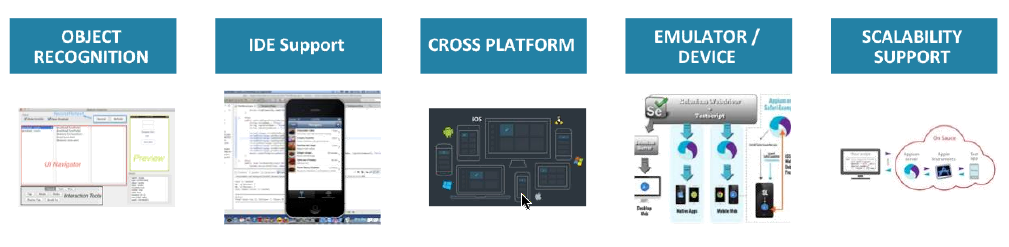
– How choose the automation tool ?

– Verify how you inspect the elements.

– Scalability, How many devices supports (IOS, windows phone, tablet, kindle, ipad, etc).

Integration with other tools like Jenkins, JIRA, etc.

Cloud, If this tool supports cloud tests (Amazon cloud, Sauce Labs, etc).

Automation Support, How long do you take to find the solution for some problem ? (Particularly, this is the most important for me )


Appium

Open source automation test automation framework for native, hybrid and mobile apps.


Supports:
Real devices, Simulators, Native Apps, Hybrid Apps, Mobile Web Apps (IOS and Android only).

Environment: Appium, Android Studio (Sdks) and Eclipse.

Screen Shot 2015-05-27 at 20.47.56

Setting parameters: App device, launch device, android setting (path of sdks).


Screen Shot 2015-05-27 at 20.49.03

Architecture, Blueprint: 

Screen Shot 2015-05-27 at 20.46.16

Screen Shot 2015-05-27 at 20.50.50

Make sure that you are doing right


Screen Shot 2015-05-27 at 21.14.19

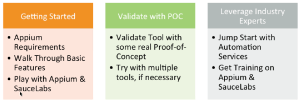
– Do some proof of concepts (The configuration it is the hard and most boring part for me).

– Share the right quantity of tests between emulators and devices.

– Distribute the right level of tests between unit (70%), integration (20%) and manual tests (10%).

– Remember that if you are using BDD, it is just 3 layers.

– Use CI since the beginning.

– Decide what must to have in the report.

– Considerate the language which the developers are using (You never know when you will need help).

Screen Shot 2015-05-27 at 21.18.30

Thank you guys ! See you next week 🙂

Source: link

When should I do End-to-End Tests ?

About End-to-End tests:

“Focus on the user and all else will follow”

  • Developers like it because it offloads most, if not all, of the testing to others.
  • Managers and decision-makers like it because tests that simulate real user scenarios can help them easily determine how a failing test would impact the user.
  • Testers like it because they often worry about missing a bug or writing a test that does not verify real-world behaviour; writing tests from the user’s perspective often avoids both problems and gives the tester a greater sense of accomplishment.


Building the Right Feedback Loop


  • It’s fast. No developer wants to wait hours or days to find out if their change works.
  • It’s reliable. No developer wants to spend hours debugging a test, only to find out it was a flaky test.
  • It isolates failures. To fix a bug, developers need to find the specific lines of code causing the bug.


Unit Tests


Unit tests take a small piece of the product and test that piece in isolation. They tend to create that ideal feedback loop:

  • Unit tests are fast. We only need to build a small unit to test it, and the tests also tend to be rather small.
  • Unit tests are reliable. Simple systems and small units in general tend to suffer much less from flakiness. Furthermore, best practices for unit testing – in particular practices related to hermetic tests – will remove flakiness entirely.
  • Unit tests isolate failures. Even if a product contains millions of lines of code, if a unit test fails, you only need to search that small unit under test to find the bug.


Unit Tests vs. End-to-End Tests


With end-to-end tests, you have to wait: first for the entire product to be built, then for it to be deployed, and finally for all end-to-end tests to run.
image


Although end-to-end tests do a better job of simulating real user scenarios, this advantage quickly becomes outweighed by all the disadvantages of the end-to-end feedback loop.


 Integration Tests


Unit tests do have one major disadvantage: even if the units work well in isolation, you do not know if they work well together. For that, you can use an integration test (more simple than end-to-end tests). An integration test takes a small group of units, often two units, and tests their behaviour as a whole, verifying that they coherently work together.


piramid

Even with both unit tests and integration tests, you still need do a small number of end-to-end tests to verify the system as a whole. End to end tests are very important even that you let this for the last phase.


What is the right balance ?


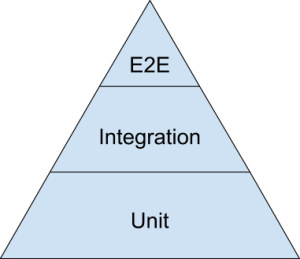
To find the right balance between all three test types, the best visual aid to use is the testing pyramid. Here is a simplified version of the testing pyramid from the opening keynote of the 2014 Google Test Automation Conference.


The bulk of your tests are unit tests at the bottom of the pyramid. As you move up the pyramid, your tests gets larger, but at the same time the number of tests (the width of your pyramid) gets smaller.

Google often suggests a 70/20/10 split: 70% unit tests, 20% integration tests, and 10% end-to-end tests. The exact mix will be different for each team, but in general, it should retain that pyramid shape.


How can I choose what will be the tests for each phase ?


  • End to end tests: Choose the flows/functions most used for the client.
  • Integration tests: Focus in the integration between the functions. E.g. If you register a new client, you should be able to see the new client in the search of the admin site, etc.
  • Unit tests: This part you will see if the function is working (single function).You should test the validations, negative scenarios, positive scenarios… E.g. If you register a new client, you should be able to check if the message in the end is ok, if the client will appear in the database, if you can register an invalid client…


Hope you like it guys, I read the original article and it seemed to me that the guy doesn’t think it is too important end-to-end tests. I don’t agree with it, maybe for this reason I changed the way he was speaking about (If you still want to do end-to-end tests). End-to-End tests is important as any other test phase, the difference is that you don’t need to do all the small tests in this phase. It is just my thought… And you can write your comment, suggestion too in this post.


Thank you ! See you next week 🙂

Sourcehttp://googletesting.blogspot.com.br/2015/04/just-say-no-to-more-end-to-end-tests.html?utm_source=feedburner&utm_medium=feed&utm_campaign=Feed:+blogspot/RLXA+(Google+Testing+Blog)&m=1

Webinar: Best Practices for Mobile CI – Sauce Labs

Hey guys, today I will post a webinar that I joined last week about Mobile CI.

It is very interesting, so you will see briefly when you need to use, why, how it works, etc. It lasts 43 minutes so, make sure that you have time to watch. Jump to 00:27:35 to watch the demo of Sauce Labs.

To download or watch you need follow the instructions in the link below:

https://saucelabsreview.webex.com/saucelabsreview/lsr.php?RCID=06e87f252b274b37b4500335b35ef868


What is CI for mobile ?

Screen Shot 2015-05-28 at 10.45.39

Automatically – every commit

How does it works?

Screen Shot 2015-05-28 at 10.46.57

Why ?

– Reduce the need for human-based testing (Save money and time)

– Faster Feedback

– Automate Everything (Very optimistic point of view)

– No touch configuration

– Automated OTA Distribution

– Code Validation: Automated Builds and Tests


How choose the right process ?

Screen Shot 2015-05-28 at 10.53.00


Depend the size of the

company.


Mobile is harder

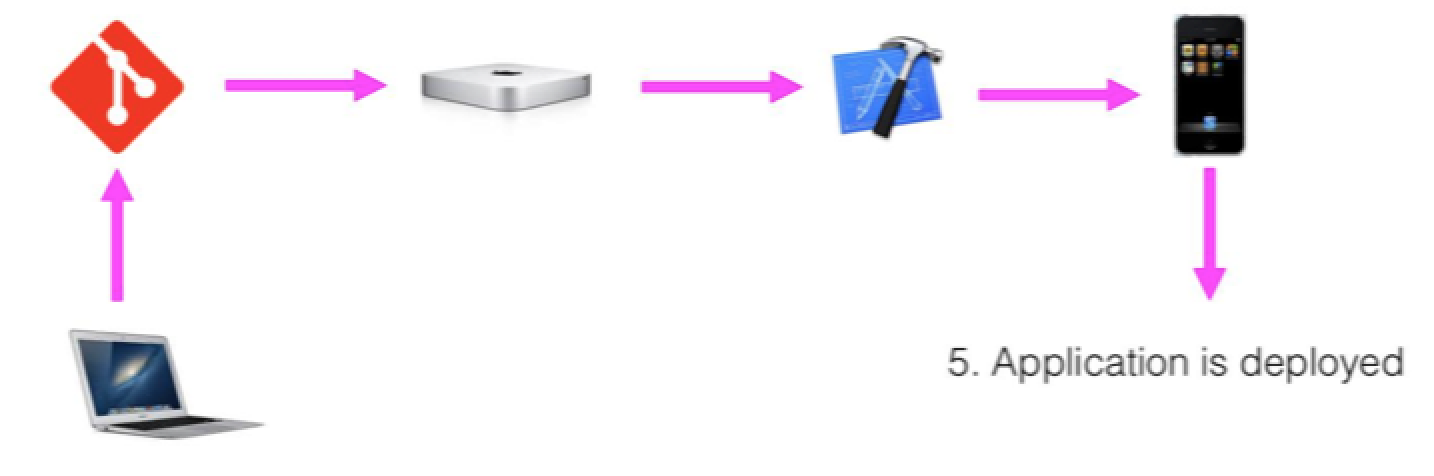
– Infrastructure (If you are building in iOS – You will need XCode, a MacMini, etc.)

– Compilation/Code Signing (You have to configure your build machine, so you will need your key store file, mobile provisioning…)

– Testing (What is the right time to use, challenge to choose what is the better for the project- real devices, simulators…)

– Deployment


Simulators x Emulators x Devices

Simulators

– Used by iOS, included w/ XCode

– Execute i386 instruction set, not ARM

Upside: Very fast compared to Emulators

Downside : You don’t have access hardware functions (GPS,Bluetooth Radio, Accelerometers,etc)

Emulators

– Used by Android, included with Android sdks

– Execute ARM (or native device instruction set)

Upside: You can find free tools

– Downside: Very slow compared to Simulators

– Do not have access to certain hardware functions (GPS, Bluetooth Radio, Accelerometers, etc)

Devices

Upside: Reproduces the actual performance experienced by your users

– Upside: The only way to catch manufacturer/OEM bugs

Downside: Very expensive to configure and maintain compared

– Upside: Full access to hardware functions (GPS, Bluetooth Radio, Accelerometers, etc)


When to use devices vs simulators/emulators ?

– Emulators and Simulators are an excellent solution for running automated tests during development. They are inexpensive and will reliably catch most problems.

– Physical Devices can be used on a lower frequency (i.e. pre-release, weekly, daily, etc.). They are the only way to catch performance problems, test certain hardware features and find OEM issues. In the least, devices should be used before every release.


Unit Testing

– 77% of developers said app quality is “very important or mission critical”

– 80% of mobile developers test their apps manually

– Only 13% of mobile developers use automated testing


Unit vs Functional

Unit: Testing small pieces of code

Functional: Testing button clicks and UI interaction

Benefits:

– Instant Gratification !

– Repeatable

– Can automatically test every commit

Challenges:

– Unit Tests are not users

– Lot of work to write and maintain them

Which framework to use ?

– You need to remember:

– What is the language/framework do your developers know

– Open Source/Community Support

– 3rd party framework requirements


CI Tools/Services for mobile

Jenkins:

Open Source, Lots of plugins, iOS and Android 

 Self-Hosted, DYI solution (Setup all the environment, it isn’t easy this part)

Travis CI:

Hosted Solution, OS X support, lots of plugins, iOS and Android 

Tedious setup process

Ship.io:

Hosted solution, Designed specifically for mobile, Easy setup, iOS and Android 

Less flexible than other solutions

Xcode CI:

Integrated w/ Xcode, Apple-Supported

Self-hosted, iOS Only

Thank you guys, thank you Sauce Labs ! Hope you like it !

Sublime and BDD

A simple guide about how to write formatted BDD features in Sublime. – Download what you want in Package Control. If you don’t have the package control in your sublime, follow these steps: – Open the console:

ctrl ` shortcut

– If your sublime is 2:

import urllib2,os,hashlib; h = 'eb2297e1a458f27d836c04bb0cbaf282' + 'd0e7a3098092775ccb37ca9d6b2e4b7d'; pf = 'Package Control.sublime-package'; ipp = sublime.installed_packages_path(); os.makedirs( ipp ) if not os.path.exists(ipp) else None; urllib2.install_opener( urllib2.build_opener( urllib2.ProxyHandler()) ); by = urllib2.urlopen( 'http://packagecontrol.io/' + pf.replace(' ', '%20')).read(); dh = hashlib.sha256(by).hexdigest(); open( os.path.join( ipp, pf), 'wb' ).write(by) if dh == h else None; print('Error validating download (got %s instead of %s), please try manual install' % (dh, h) if dh != h else 'Please restart Sublime Text to finish installation')

– If your sublime is 3:

import urllib.request,os,hashlib; h = 'eb2297e1a458f27d836c04bb0cbaf282' + 'd0e7a3098092775ccb37ca9d6b2e4b7d'; pf = 'Package Control.sublime-package'; ipp = sublime.installed_packages_path(); urllib.request.install_opener( urllib.request.build_opener( urllib.request.ProxyHandler()) ); by = urllib.request.urlopen( 'http://packagecontrol.io/' + pf.replace(' ', '%20')).read(); dh = hashlib.sha256(by).hexdigest(); print('Error validating download (got %s instead of %s), please try manual install' % (dh, h)) if dh != h else open(os.path.join( ipp, pf), 'wb' ).write(by)

– Hit Enter and restart the sublime after downloaded the package.

  How to install Packages from Package Control ?

– ‘Command+Shift+P’ – Type ‘Install Package’ and enter

– Choose the package as :

Cucumber

Gherkin[Cucumber] Formatter

Behat

Behat Snippets

How to use ?

You can try any of these commands to generate respective file.

– ‘Command+Shift+P’ – Type: ‘Gherkin’

– ‘Command+Shift+P’ – Type: ‘Feature’

– ‘Command+Shift+P’ – Type: ‘Scenario’ or ‘Scenario Outline’

– ‘Command+Shift+P’ – Type: ‘Example’

  If you want some snippet of Given/When/Then/etc, you can use the command  ‘Command+Shift+P’ – Type: ‘Given’

Screen Shot 2015-04-01 at 21.46.24

Easy and very useful, for this reason I like Sublime ! lol Thank you guys 🙂

Sourceshttp://shashikantjagtap.net/speed-up-your-bdd-with-sublime-text-2/ https://packagecontrol.io/installation