Test Reporting in Agile

When working in an Agile team, the feedback loop should be as quick as possible. If you don’t send the feedback at the right time, future bugs could be costly as the feature has already a big amount of code.

What is this feedback loop ?

If you have implemented Continuous integration and have automated tests running after a new commit on your dev environment, you need to report back as soon as possible the result of these tests. This is the feedback loop and you need to know the correct time to report the issue to the dev team.

If your automation is taking too long to run the tests after a new commit, this is a sign that you need to improve your smoke tests, maybe your scope is too long or maybe your automation is taking too long to run for other reason, sleeps, not scalable, etc.

The feedback loop influences how your agile process works and if you are saving or wasting time when developing. Tight feedback loops will improve performance of the team in general, give confidence, save time and avoid costly bug fixes.

Feedback loops are not only about the continuous integration, it is about pair programming and unit tests as well, but this time we will focus on Continuous integration tests.

When you are implementing a new scenario in your automated tests, you want to know ASAP if something you implemented is breaking some other scenario or the same scenario. Same situation when you are developing something related to that feature and you want to know if this new implementation is breaking the tests. It is easier to fix, it is fresh in your mind, you don’t need to wait 30 minutes to know there is a bug when you changed the name of a variable…

In my personal opinion, if you don’t have parallel tests to check in multiple browsers or mobiles at the same time if something is broken, it is better you focus on the most used browser/mobile, since this is first priority in all the cases.

Use case: 90% users are on Chrome on Desktop, other 5% users are on Firefox mobile, other 5% are on Safari mobile. What is the best strategy ?

After commit:

  1. Run Smoke tests and all the browsers, take 15 minutes to receive feedback ?
  2. Run Regression tests and all the browsers, take 40 minutes to receive feedback ?
  3. Run Smoke tests and only the most used browser, take 5 minutes to receive feedback, leave to run on all the browsers every hour ?
  4. Run Regression tests and only the most used browser, take 10 minutes to receive feedback, leave to run on all the browsers every hour ?

There is no rule to follow, since in this case you don’t have parallel tests, I would go for the third option. Then, you can focus on the most used browser and leave running the other browsers in a dedicated job each hour. Why not fourth option ? Because you need to keep in mind the business value.

Of course that we need to delivery the feature on all used browsers, but when the time is tight (very often) and you need to deliver as fast as you can, you go for the most business value option and implement the other browsers after. Don’t forget when you automate, you don’t think only about helping the development, but also you think about helping the end users.

If you are wondering how long each type of test should take to give feedback, you can build your own process basing on this graph:

Screen Shot 2017-04-06 at 19.18.44.png

For how long should the team keep the test reports ?

Depends of how many times you run the tests through the day. There is not a rule for that, so you need to find what is the best option for you and your team. In my team we keep the test reports until the 15th run on Jenkins and after this we discard the report and the logs. In most of the cases, I’ve found that if something goes back more than 3 major versions, look for more resolution is a waste of time.

If regressions are reported as soon as they’re observed, the reporting should include the first known failing build and the last known good build. Ideally these are sequential, but this isn’t necessarily the case. Some people like to archive the old reports outside Jenkins. I didn’t feel the need for this until now, but is up to you to keep these reports outside Jenkins.


Resources:

http://istqbexamcertification.com/why-is-early-and-frequent-feedback-in-agile-methodology-important/


https://www.infoq.com/news/2011/03/agile-feedback-loops

How to make automation tests more effective

As a QA Engineer you often need to do regression tests and you know this is a really waste of time since every time is the same test. Then, you keep in mind that you need to automate the regression tests in order to save time with the old things that could be broken with the introduction of the new features.

The development of the automation is usually done by the developers in test, people who has QA  and programming knowledge. One completes the other, so you know how to automate the right scenarios with the right prioritisation. Don’t spending time automating scenarios with no or small value or with wrong prioritisation for the regression pack.

You need to include the repetitive scenarios, the critical ones and the happy path but try to avoid the edge cases. Why ? Because edge cases are often scenarios with minimum or no value, where it is a specific flow that should be test once when developing the feature not every time when doing the regression. Regression pack ensures the happy path is working and the end user will be able to do what he needs to do. When you spend time implementing automated edge cases, you actually waste your valuable time implementing scenarios without real business value.

Although the product owners may be able to immediately suggest points to automate, it also depends on developers working on the detailed code. So, for this reason you need to have a good analyse before about the scenarios that should be implemented and if they will change very often.

Here some tips about how to create your automation tests more effectively:


Developing Automation

Automation code is quite similar to the development code, but it should be more simple and readable. Automation is not meant to be complex. The business rules should be implemented as part of the BDD scenarios, so the code is clean and doesn’t have anchors of complexity.

ROI (Return of Investment), you need to guarantee the value of the scenarios when automating them. For example, a scenario that tests the function of a feature is far more important and valuable than a scenario that tests if the buttons have the expected colour. Layouts are important, but you will spend more time implementing a scenario asserting the colour than opening the page and manually checking in milliseconds, also it is not a critical issue, the user will be able to finish the scenario despite the colour of the button. Measure the time before and after the automation is implemented, so you can have an idea of the time and effort saved.

Optimizing time

We have a common problem in the agile environment, when we rush to finish the sprint and forget quality. This is because we close the tickets, but we create a backlog of bugs every time and it keeps growing every sprint. These sprint backlogs make it difficult to devote time for the development, debugging and testing of each iteration.

For this reason it is really important to save a good amount of time for testing. To help saving time with the test, you can run the automation in parallel to the development, so any regression bug would be caught as soon as it is merged in a master branch. This gives more scope to the QA engineers to develop efficient tests through exploratory search.

Client Test Coverage

The ideas that come just after the brainstorming help testers to identify different scenarios and create a better test coverage for the feature. So you need to have this time to mature the idea of the feature and think about the flow and possibilities.

It is important to think more broadly when talking about test automation and not think only about the test cases. The planning and brainstorming can lead to breakthroughs that change the testing pattern altogether.

Regression Pack

When you implement the automated regression tests you need to keep well maintained with the development of the features. If not, your regression will be not up to date and you will not be able to trust on your automation anymore. Make sure your regression pack guarantee the functionality of the system and monitor the performance of the tests so as soon as you have some failure you can identify if it was a bug on the system or if is something you need to update with the current development code.

Regression tests should run smoothly and without human intervention. The only thing you need to worry is adding new features to the package.

Visibility

As I have described before, you need to keep it simple. This is the key to have a smooth automation. You need to be sure the stakeholders will understand what is being tested. Show the statistics of how long is taking to run the regression pack, how much time you are saving, the percentage of tests coverage vs time before and after automation, the overall quality improved.

Sharing this data will show a positive thinking about automation and how much you have improved automating the tests. This makes it simpler to frequently update test scripts, and guarantees collaborative effort through mutual cooperation.

Stay well aligned with Developers

It is essential to be aligned with the development work. Understand all the flow and how something they have changed could impact on another completely different, for example. This will help you to anticipate and be one step ahead when maintaining the scenarios. Also, it is good all the teams work with the same environment, using the most similar tools when it is possible.

Understand the functionality of the current environment, in order to successfully perform root-cause analysis that yields in constructive solutions. This will help you to find bugs more efficiently and build your automation focusing on your actual environment. Remember you need to align your needs with your project and the current development cycle. Companies/projects/teams are not equal and there is no formula, but some tips of how can you take the best for your situation.


Common questions about Performance Tests


When do I need to create a Performance Test ?

To validate the behavior of the system at various load conditions performance testing is done. So you can reproduce several user performs for desired operations Customer, Tester, Developer, DBA and N/W management team checking the behavior of the system. It requires close to production test environment and several H/W facilities to populate the load.

What all thing involves in Performance Testing Process?

    • Right testing environment: Figure out the physical test environment before carry performance testing, like hardware, software and network configuration
    • Identify the performance acceptance criteria: It contains constraints and goals for throughput, response times and resource allocation
    • Plan and design Performance tests: Define how usage is likely to vary among end users, and find key scenarios to test for all possible use cases
    • Test environment configuration: Before the execution, prepare the testing environment and arranges tools, other resources, etc.
    • Test design implementation: According to your test design, create a performance test
    • Run the tests: Execute and monitor the tests
    • Analyze, tune and retest: Analyze, consolidate and share test results. After that, fine tune and test again to see if there is any enhancement in performance. Stop the test, if CPU is causing bottlenecking.

What parameters should I consider for performance testing?

    • Memory usage
    • Processor usage
    • Bandwidth
    • Memory pages
    • Network output queue length
    • Response time
    • CPU interruption per second
    • Committed memory
    • Thread counts
    • Top waits, etc.

What are the different types of performance testing?

    • Load testing
    • Stress testing
    • Endurance testing
    • Spike testing
    • Volume testing
    • Scalability testing

Endurance vs Spike

    • Endurance Testing: It is one type of performance testing where the testing is conducted to evaluate the behavior of the system when a significant workload is given continuously
    • Spike Testing: It is also a type of performance testing that is performed to analyze the behavior of the system when the load is increased substantially.

How you can execute spike testing in JMeter?

In JMeter, spike testing can be done by using Synchronizing Timer.  The threads are jammed by synchronizing the timer until a specific number of threads have been blocked and then release at once, creating a large instantaneous load.

What is concurrent user hits in load testing?

In load testing, without any time difference when multiple users hit on the same event of an application under the load test is called a concurrent user hit.

What are the common mistakes done in Performance Testing?

    • Direct jump to multi-user tests
    • Test results not validated
    • Unknown workload details
    • Too small run durations
    • Lacking long duration sustainability test
    • Confusion on definition of concurrent users
    • Data not populated sufficiently
    • Significant difference between test and production environment
    • Network bandwidth not simulated
    • Underestimating performance testing schedules
    • Incorrect extrapolation of pilots
    • Inappropriate base-lining of configurations

What is the throughput in Performance Testing?

In performance testing, throughput is referred to the amount of data transported to the server in responds to the client request at a given period of time. It is calculated in terms of requests per second, calls per day, reports per year, hits per second, etc. Performance of application depends on throughput value, higher the value of throughput -higher the performance of the application.

What are the common performance bottlenecks?

    • CPU Utilization
    • Memory Utilization
    • Networking Utilization
    • S limitation
    • Disk Usage

What are the common performance problem does user face?

    • Longer loading time
    • Poor response time
    • Poor Scalability
    • Bottlenecking (coding errors or hardware issues)

Mobile Automation Strategy

Critical scenarios

First of all, you need to build a set of the most critical/important scenarios. So, create a smoke tests with the critical basic features and divide them into phases. Also, remember to add the most frequent scenarios, those that are used in a daily basis.


Continuous integration

Implement your continuous integration since the beginning so you can follow when a scenario has broken and if you have false positives. The reason why is you need to trust on your automation, for this reason in the beginning you will need to pair the manual tests with the automation until you have confidence on your tests.


Devices

It is impossible to make your tests run on all the existent devices in the world. So, what you need to do is getting the information about what are the most used devices for your app. Exactly, this needs to follow your app, your users. If you don’t have and there is no possibility to get this data, then you can follow the most used devices in general. Focus on your app and your client in the first place.

In this category we can include the different OS’s, screen resolutions, etc.


Network

Mobiles are trick because you need to test the network, so you will need to have specific scenarios to simulate the 3G, 4G, WiFi. Remember to have the expected behaviour with poor connection or if the connection drops down and back again.


Language (Localisation Testings)

If you have a multiple language app, you also need to worry with the translation.

  1. You can add the language after all the smoke tests are done, since this is easier and faster to test manually.
  2. You can add a specific scenario to go through all the pages and check the translation against the database.
  3. You can specify on your automation that you will run each time with a different language and add the checks along the scenarios.

My suggestion is go for a specific scenario going through all the main pages and checking the translations (2). If you go with option 3 remember, your automation will take longer since it is performing all the scenarios again but with different languages, when a simple assertion on the page without any functionality check would be enough.


Screen Orientation

As for mobile, you can have portrait or landscape, so you need to remember to add scenarios related to the orientation. You can start the tests including both of the orientations. You will need to set this in the beginning of the automation or you can have specific scenario to test the orientation for the main screens.


Emulators vs Real Devices

Another aspect for which “balance” is a good mantra is testing on real devices vs. emulators. Emulators can’t give you the pixel-perfect resolution you might need for some testing or allow you to see how your app functions in conjunction with the quirks of real-life phone hardware. But they do allow you to do cost-efficient testing at scale and are a powerful tool to have in your mobile testing arsenal. A healthy mix of real device and simulator/emulator testing can give you the test coverage you need at a reasonable price.


Be sure you are leaving room for growth, both of the marketplace and your own needs. You need to always choose the best tools and practices that fit your needs, but at the same time you need to think about what is coming in the future. So, expand your automation thinking about what could come next, and minimize the threat of having to spend more time and resources redoing or revising systems that are out of date. Choose always flexibility: Cross-platform testing tools and scalable third party infrastructure are a good example of how to keep it.

Evolution of Business and Engineering Productivity (GTALK 2016)

screen-shot-2016-12-18-at-22-07-44


screen-shot-2016-12-18-at-22-14-30

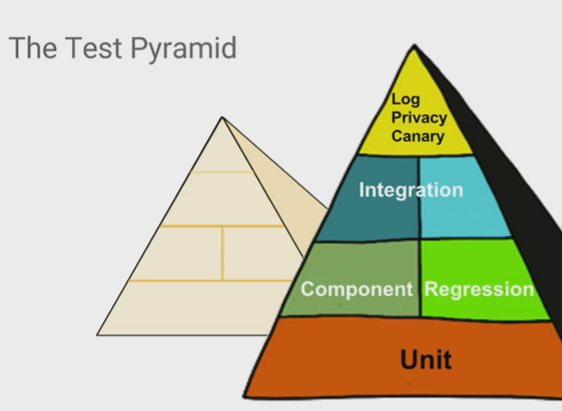
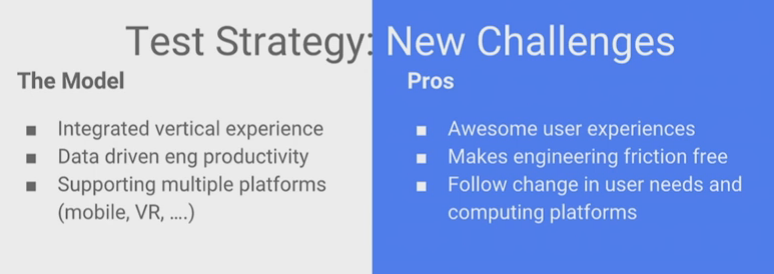
As any other model, this doesn’t say this should fit to every company, but this is the typical idea and what Google follows. You can follow this, but you need to be aware that maybe this is not the best model for your company.

This pyramid shows how much of each type of tests you should focus more. So, in numbers this should be:

  • Unit – 70%
  • Component Regression – 20%
  • Acceptance Criteria – 10%

The top of the pyramid is about test the logs, this is not really a common test, but it is about making sure the behaviour is correct, testing the logs according to the action, the base of your system. For example, Google saves all the data from the users in the logs and keep all these information making sure the data is protected. From bottom to top each stage of test requires high level of domain knowledge, high amount of setup costs, investment, time, machine resources.

The canary tests approach is about pushing the release to a first batch of end users, who are unaware that they are receiving this new code. Because the canary is only distributed to a small number of users, if your company is global remember to have this small group of end users divided per each location, its impact is relatively small and changes can be reversed quickly should the new code prove to be buggy.


screen-shot-2016-12-18-at-22-22-17

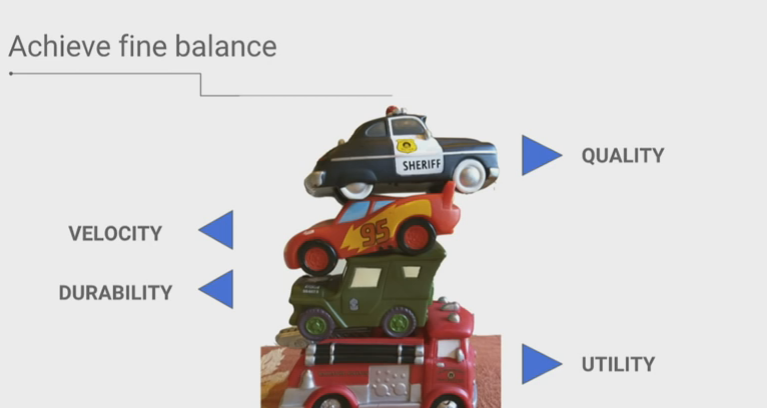
You need to consider all these aspects to build robust automation frameworks that have a utility and usability through the time. You need to consider the velocity of your tests and of course the quality that you can achieve with small and frequently releases, keep in mind they need to work together.


A bad model of test strategy

screen-shot-2016-12-18-at-23-02-34

  • Never test in production environment;
  • Release as much as you can, possibly every time a new feature is aproved;
  • Focus first on unit/smoke tests not the whole system;
  • Create good metrics to show the evolution of the product quality


screen-shot-2016-12-18-at-23-24-28

Google has grown on maturated taking into account different devices, platforms, features.


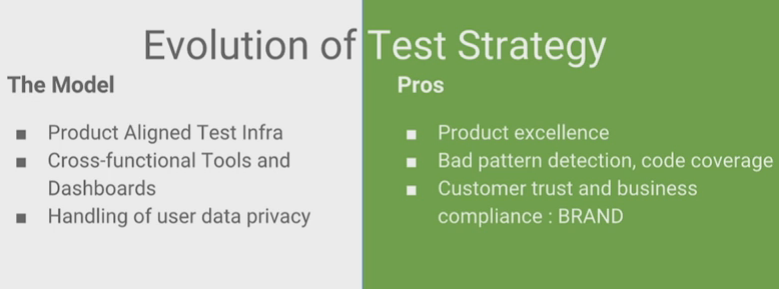
A good model of test strategy

screen-shot-2016-12-18-at-23-27-08

  • Focus on quality of your product and the infrastructure;
  • Stable automation frameworks/tools;
  • Cross functional tools, don’t rely on only one tool for tests.


screen-shot-2016-12-18-at-23-48-07

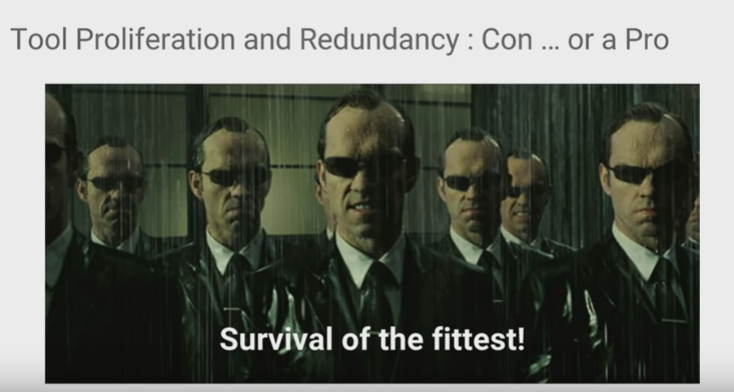
Take care of feature duplication. When a company grows, the number of tests with different goals grow together, but duplicating the same code. This leads to dead code and codes doing the same thing.

Metrics

screen-shot-2016-12-18-at-23-32-35

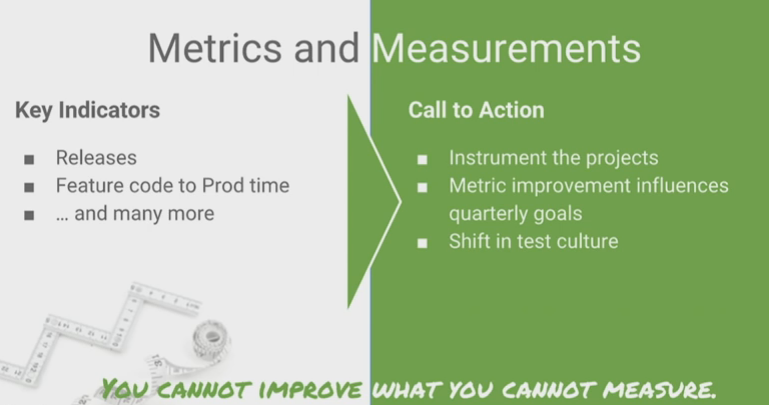
You can create metrics about defect leakage of your automation, how long is taking to run the tests, everything will help you to know where you can improve. So, try as much as possible to have clear objectives.

screen-shot-2016-12-18-at-23-35-26

This is the test and release model that Google has at the moment, with some canary testing, monitoring step, frequent releases and feedbacks.

screen-shot-2016-12-18-at-23-38-24

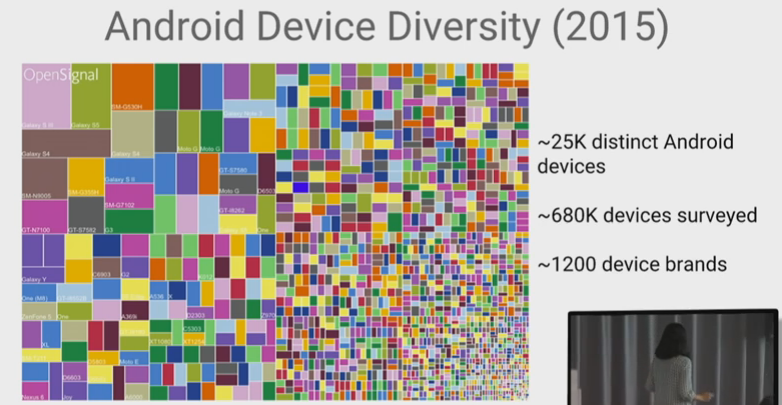
Most of the challenges that were said are the challenges of always, as a company you need to think constantly in growing and hire more people in different teams to work together, also every year we have hundreds of new devices to test and make sure your system is supported.

  • Integration tests between even more components;
  • Make multiple teams work together;
  • Support multiple platforms.

screen-shot-2016-12-18-at-23-41-20


The complete video is here: https://www.youtube.com/watch?v=2yN53k9jz3U

How can you relate software development phases to test life cycle ?

Hi guys, today I will expose the differences between Software Development Cycle and Software Test Life Cycle.


Phase SDLC – Software Development Life cycle STLC – Software Test Life Cycle
Requirements Gathering Gather as much information as possible about the details & specifications of the desired software from the client. This is nothing, but the Requirements gathering stage. QA team identify types of required testing and review the requirements for logical functional integration between features, so that any gaps can be caught at an early stage.
Design Plan the programming language. Which would be suited for the project, also some high-level functions & architecture. Test planning phase, high level of test points. Time to align the QA scenarios with requirements.
Coding Development It is built stage, that is nothing but actually code the software Create the QA scenarios here.
Testing Test phase, now you test the software to verify that it is built as per the specifications given by the client. Test Execution and bug reporting, manual testing, automation testing is done, defects found are reported.
Deployment Deploy the application in the respective environment Re-testing and regression testing is done in this phase. Here you can test the integration with different versions of different components and check the behaviour of the system.
Maintenance Basically, it includes, post production / deployment support & enhancements. Maintenance of the test plan and scenarios. Any other improvements should be done here.


Why QA should be involved since the beginning ?


screen-shot-2016-12-05-at-21-42-01


SDLC vs STLC


screen-shot-2016-12-05-at-21-40-47


Life Cycle Models


Resources:

http://www.softwaretestingstuff.com/2011/09/sdlc-vs-stlcdifferences-similarities.html

http://www.softwaretestingmentor.com/stlc-vs-sdlc/

http://www.guru99.com/software-testing-lifecycle.html

Audio Test Automation – Citrix (GTAC 2016)

Hey guys, today I will share the slides about the Audio Tests on Citrix – GTAC 2016:

screen-shot-2016-11-20-at-18-42-07

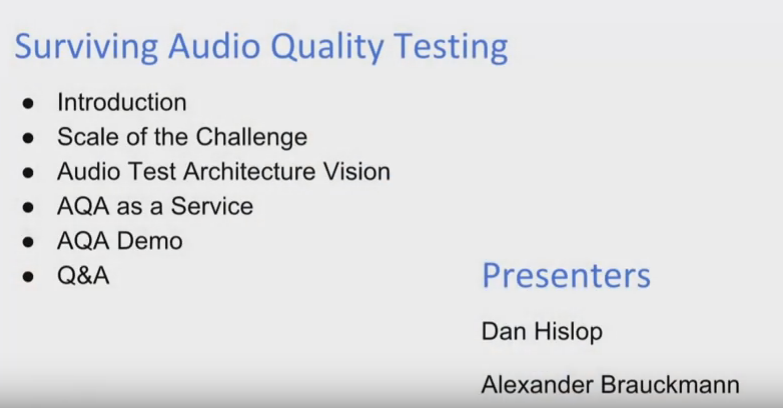
Audio Quality Tests and the current challenges, presenting Dan Hislop and Alexander Brauckmann from Citrix.

screen-shot-2016-11-20-at-18-44-10

Some products from Citrix.

screen-shot-2016-11-20-at-18-47-12

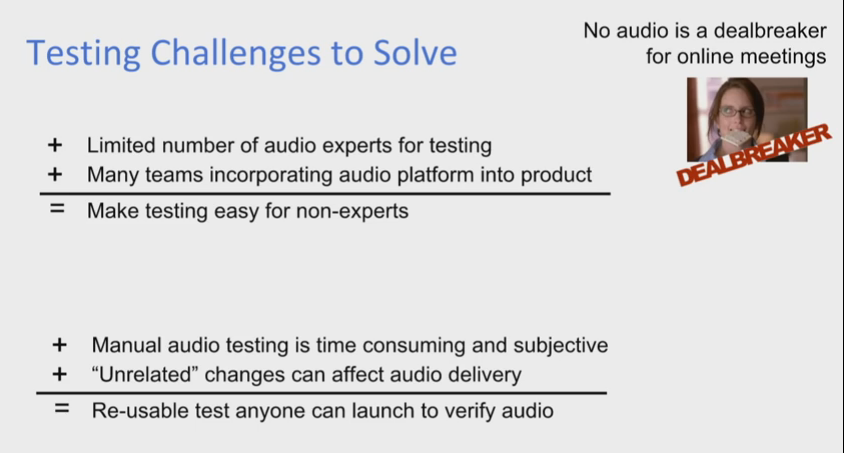
Many challenges we need to face with audio tests: We have limited number of audio test experts, manual audio tests are cost, some scenarios are hard to manual simulate.

screen-shot-2016-11-20-at-18-47-47

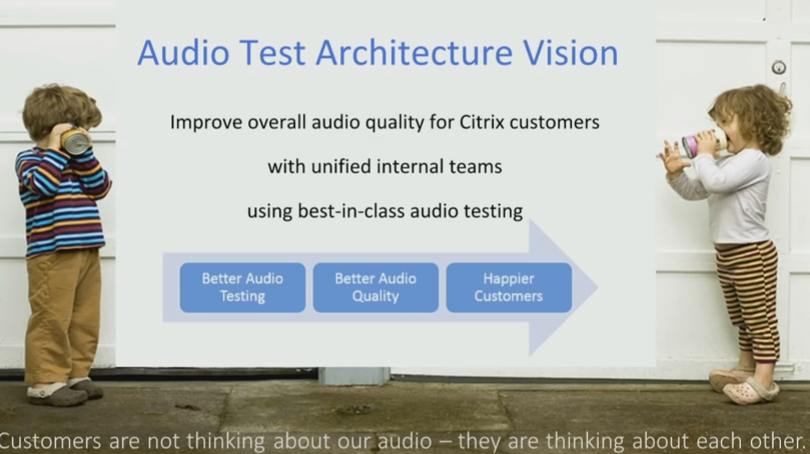
Always improve the quality of the sound that you are receiving and sending. You can live with poor video quality, but you can’t with a poor sound quality. If you miss a key word, you will not understand the context.

screen-shot-2016-11-20-at-18-48-05

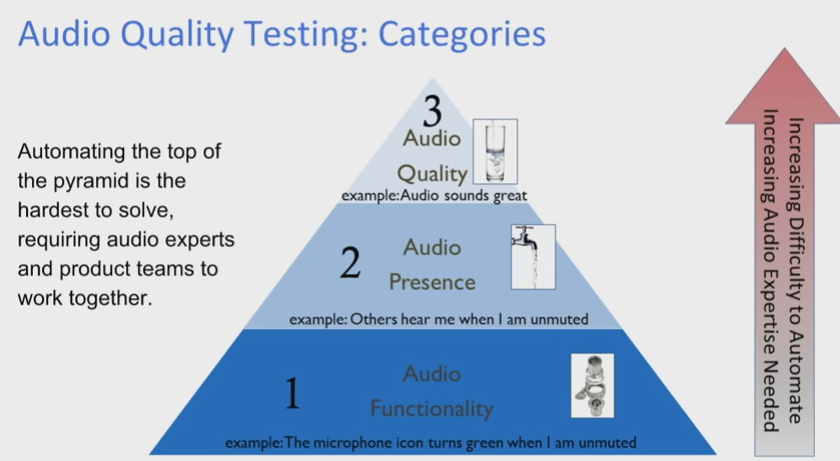
The Audio Test Pyramid shows what you need to start testing. Following this, first test if you are able to receive the audio (Pipes are connected), then check if you are receiving the audio (Water is flowing through the pipes) and the last step is test the quality of the sound (If you can drink this water).

screen-shot-2016-11-20-at-18-50-49

This is how to improve the quality of the audio automation, sharing the common libraries for the client teams, so they are able to test different scenarios.

screen-shot-2016-11-20-at-18-52-59

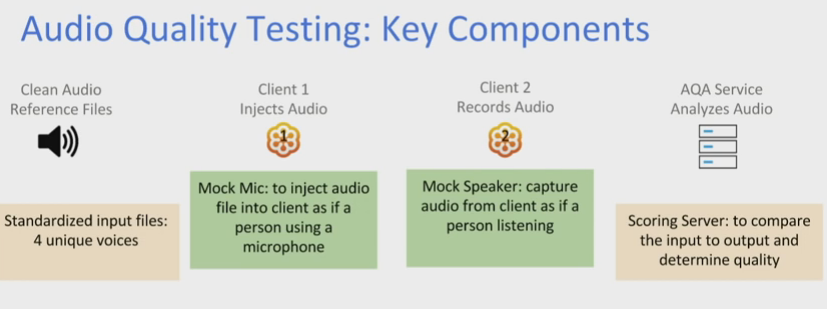
Here you have all the key components: You have the audio data, which will be injected into the first client. Then, you have the second client which will capture the audio from the first client and compare the sound quality between the input and the output.

screen-shot-2016-11-20-at-18-54-33

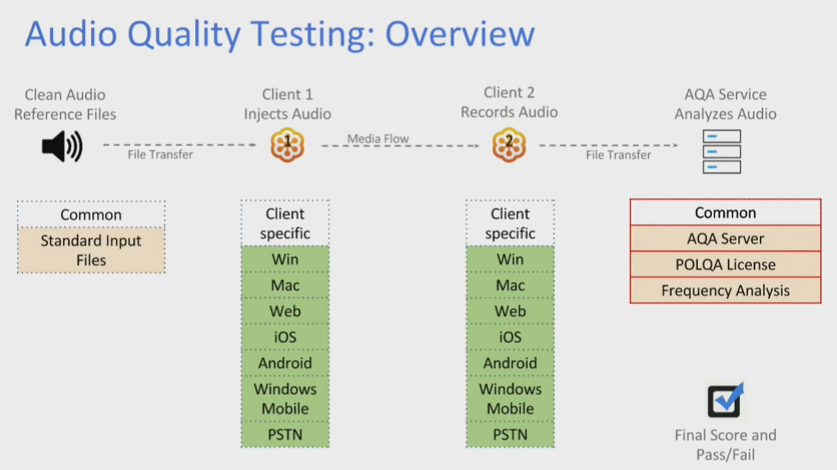
Here you can see all the various platforms you need to test the clients. The input and the output are commons, but the transition of one client to another will make sure the audio is stable on different environments.

screen-shot-2016-11-20-at-18-56-38

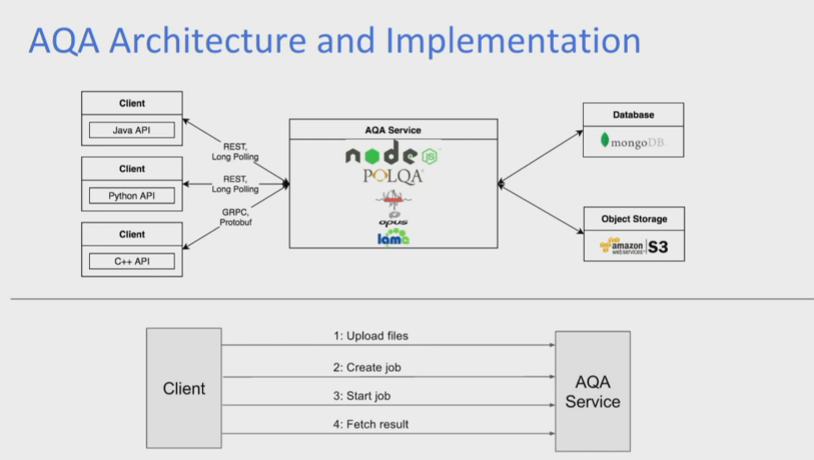
The client upload the audio files to the service and in the end fetch the quality results.

screen-shot-2016-11-20-at-18-59-15

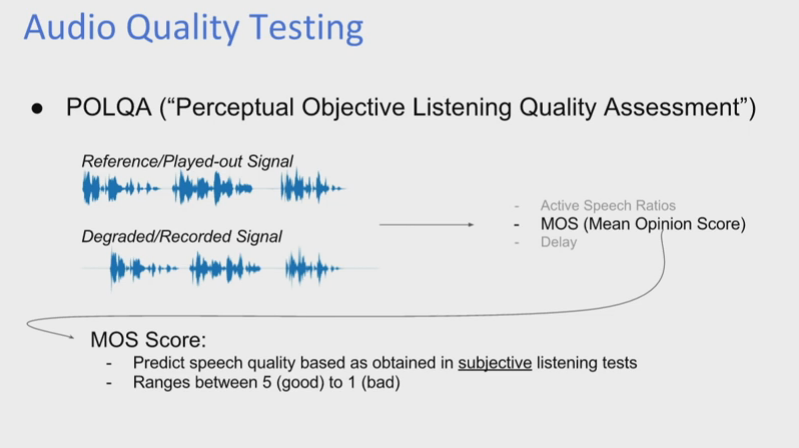
Depending of the MOS score, you are able to confirm the quality of the audio. This score compares the sent and the received audio.

screen-shot-2016-11-20-at-19-00-30

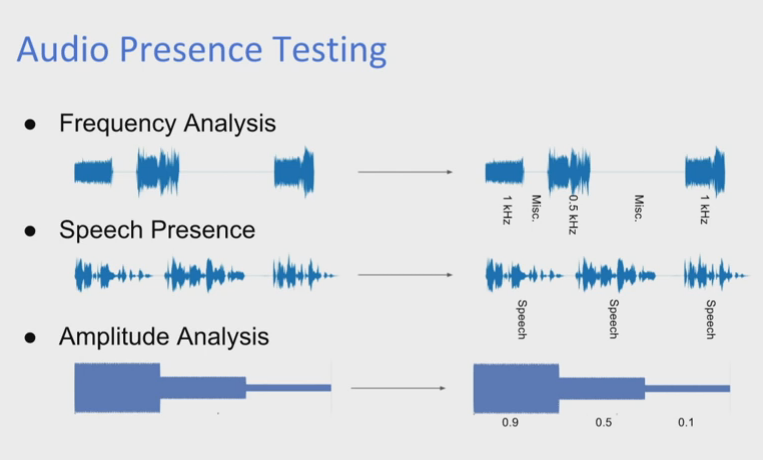
Type of the audio tests you can perform: Frequency Analysis, Speech Presence and Amplitude Analysis with different types of voices, will give you more confidence that the audio works with various voices (kid, adult, women, men, etc).


You can watch the demo here, it will start at 5h 13m 11s:

Thank you GTAC 2016 and Citrix professionals for sharing this !