BDD in resume

Behavior Driven Development is a term very used in actual days…

Developers, testers, managers talking about BDD. Frequently we heard complains about BDD like:


– The client don’t mind about the tests.

Make all sense that because the client wants that his software is finished and working. Unfortunately, the word test brings a negative image. But we talking about BDD, which is a development by behaviour and it isn’t anything with tests. Testing is something that you don’t can do while there isn’t software. Testing means to verify and BDD we are specifying before of anything.

BDD is an activity of design, where you build parts of a function according with the expected behaviour. In BDD we go out of the vision of tests and enter in the perspective oriented by specifications, what means that this complain born with a bad colocation.


– The client don’t want write the scenarios.

This is the second more used complain. The cliente should write the scenarios by himself. If the client write the scenarios, he won’t benefit himself of cognitive diversity. This diversity only appears in groups heterogeneous that work together.

The client needs the advices of engineers who knows the technical aspects of the problem that he is trying to resolve. He needs of paradigm of an QA Analyst, which will help with the create of scenarios that anyone though before. Otherwise, the solution that the client though can be more complex than the solution needs be.


– The client needs interact directly with the tool.

This isn’t the idea. What he really need to do is to provide informations to the team about the problem that he wants resolve.

– You can achieve the same result without a specific language of domain(DSL)

To finalize, the highlight idea behind the BDD is the focus in prevent fails of communication. This means have all in team  communicating in a frequently form, better and based in real examples – not only in abstraction and imperatives requirements.

Tools of BDD are only complements to this complete agile methodology.

You can read some books like:

– Specification by example – Gojko Adzic;

– TheRSpec Book – David Chelimsky;

– Gojko on BDD: Busting the Myths;


Bye , bye !

Steps to implement a Automation process

Hello guys, i saw a link in the internet with 7 steps about how implement automation tests and I will explain in other words what he told:

  1. Leadership support. Ask support of your boss to automatize the tests, show to him what you will win: time, money, effort. Search about cases in companies that was a success, show the positive points… You have to convince your boss that you will have a lot of gains.
  2. Choose the tool. Search about the tools on the market. You can make a POC with the tool and analyse if will supplement your needs. Make a prove of concept with a little part of your functionality. Costs/benefits ? You have to analyse according to the product will be tested. You can choose some free tools like WebDriver/Selenium or a shareware tool like QTP from HP. 
  3. Language. Talk with your team if they can learn another language and what are the languages that they know. Look in the development team what is the language that they use, take this into consideration too (if you need something about the language, they can help you). Choose a language that the team have more facility to use/learn, the language that the development team use, the effort of change the language.
  4. Time and Schedule. Now that you convinced your boss to automatize the tests and you know the tools that you will use, you have to plan the schedule. NEVER EVER AUTOMATE EVERYTHING !! This is a common error and impossible to do ! Remember the main objective of automated tests is REGRESSION. You have to put criteria what you will automate, like: What is the most used function/process ? …. What is the function/process most important ? … What is the function/process that have more bugs ? Measure the initial investment and don’t forget to show the objective, the results you will achieve. How much time/effort/money you will save ? How you can spend the time saved with another activities ?
  5. Workout. “A stupid with a tool still is a stupid person.” Form a team of automation and equality the level of knowledge. Make some meetings to prepare people in your team to use the tool with wisdom. It is better everyone know everything in your team, but we know that we can have some people who have facility to learn something in specific. 
  6. Include the Automation in your development. You have to know what to do and when do it. Involve SQA, or the team who have the responsibility of the process in the company. They have to learn this new process that will be deployed. 
  7. Structure of Scripts. Make Defaults. This will help you when one person of your team have to change something in the script of other person. Like Parameters, the structure of your automated tests, the name of variable, the comments, the name of classes… It is better that you separate the scripts according to the experience and facility of each person in your team. So, if someone likes and has facility to do the script with the structure, you have to let he/she do this. If you know that a specific person in your team has facility to write scripts about the business, you have to let he/she do this and become the main center of the scripts of business. Focus on reutilize. Yes, enjoy the scripts and have less work. Continuous Integration ! Without this your work will be lagged. You have to update the scripts and use they after each modification to know if they continue working. We have a tool called Jenkins that it help us with this part. The developers can change something and after the deploy, Jenkins will run the scripts of regression tests to know if something in application was broken.


Did you understand everything ? I wrote running today !

If someone has some question, go ahead and comment below 🙂


Fonts: http://www.infoq.com/br/presentations/automacao-testes-7-passos-sucesso?utm_source=infoq&utm_medium=related_content_link&utm_campaign=relatedContent_presentations_clk


Help to energy industry won’t be cheaper

In my last class of conversation of my course, there was a Japanese guy who told me that he would like to visit Brazil. I just told to him that he have another places better to visit. He didn’t understand and asked me the reason that I don’t like my country. So, I will tell about one reason and avail the news that I saw in a site.

Lately in Brazil, we are having a problem with dry weather. Everyday the temperature here is very high and it isn’t raining the sufficient to supports the number of air conditioners turned on and the other spends with energy.

Even more, we have elections this year and the Brazil Cup. Yeah, the politicians don’t want stay with a bad image…. Really… This year will occurs many things with interest politic.

OK, with theses informations I think we can continue.

Brazil decreased the value of the energy in 2012 and now it have to increase again to support this lack in industries or it can increase the value of petrol on Petrobras. BUT… if it do this, the people won’t like of ways that government is trying control the situation because will occur a inflation with the prices…  So, for this reason the politics won’t increase any prices and Who will pay the debts with the energy ?

The people’s money ! Yes, the public safes… We will pay the selfish particular interests of politicians… like always here in Brazil. But not everyone here in Brazil will be injured. The most people will be injured is the people who works and don’t need of “Bolsa Família”, a Brazilian program whose pays a salary to the poor people with a lot of kids…
After the elections, the politicians will have to inflate the prices or not… I really don’t know but anyway the people will pay in the end. Future of Brazil is this… will deteriorate more and more… because of ignorant people, a lot of corrupt politicians. In fact, I think the people will finish with everything in this world. Yes, a pessimist (or realist) thought.

But here in Brazil the people don’t know anything and they want keeps in their ignorance.. They like the ignorance.. it is a bless !

Or.. they think that they know something… I think this is the worst type of person !

Median Class supports Brazil in its shoulders (:

Haha, just my opinion… I am not cursing anyone xD

Fonts:

http://www.infomoney.com.br/mercados/acoes-e-indices/noticia/3239489/socorro-eletricas-nao-saira-barato-veja-quem-vai-pagar-conta

http://www2.planalto.gov.br/imprensa/noticias-de-governo/preco-da-energia-eletrica-cai-a-partir-de-5-de-fevereiro-do-ano-que-vem-garante-edison-lobao-no-bom-dia-ministro

http://g1.globo.com/economia/noticia/2013/01/reservatorios-de-usinas-do-sudeste-e-nordeste-continuam-em-queda-ons.html

Selenium First Steps

Hello guys !!

I have a friend that asked to me somethings to start in Selenium’s world. For this reason I will write today about first steps to automate in Selenium.

In this example, we will open in the Chrome browser. Install the Chrome in your Operational System and after that, you have to download the driver too.

The link to download the driver is: http://chromedriver.storage.googleapis.com/index.html

Now, you have to download the WebDriver’s lib. You can download in this link: http://docs.seleniumhq.org/download/

Import the lib in your Java project. This is how the structure will looks like. Pay attention on the folder of Libraries in this picture below.

structure

This is the package and the libs imported to use in our automation:

libs_import

This is the code to use the chrome’s driver. You have to put this, because the Chrome won’t open without the driver and this line. If you are using Windows, you have to download the .exe file. Each OS that you use, you have a specific file to download. After write this line, you will instantiate the ChromeDriver and write the command below, to open a site in Chrome.

comands-initial

You can find an element of different ways. You can use the id, the classname, tagname, etc… Xpath is the last option that you have to use, because there is a lot of problems when you have to use it in mutiple browsers. So, you can look all the possibilities in the picture below:

how-find-element-and-use


This is the correct way to wait some element to load on your page. You have to put this after load a new page, or click on a new function. It is better put this expected conditions to wait a element than put a time to wait, because unfortunately we depend a lot of environment and browser.

how-wait-until

You can use these commands to click and write something in specific field, respectively. You can instantiate the element and you will use only one time to search it. After that, you can use the instance to click, send words and others actions in the element without looking it again.

commands

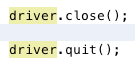
This is the command to close the browse, to close the driver, respectively, and finish your automation. After this, you can’t use the driver anymore, unless you instantiate again another WebDriver.

how-close-browser

This is the final code ! Maybe your code will looks like with mine. Afterward, just put to run and see the automation !

code-complete

Bye guys !!

What is TDD ?

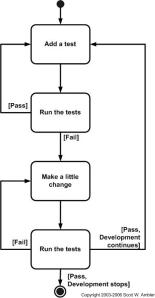
The first step is to quickly add a test, basically just enough code to fail.  Next you run your tests, often the complete test suite although for sake of speed you may decide to run only a subset, to ensure that the new test does in fact fail.  You then update your functional code to make it pass the new tests.  The fourth step is to run your tests again.  If they fail you need to update your functional code and retest.  Once the tests pass the next step is to start over (you may first need to refactor any duplication out of your design as needed, turning TFD into TDD).

tddSteps

I like to describe TDD with this simple formula:

   TDD = Refactoring + TFD.

TDD completely turns traditional development around. When you first go to implement a new feature, the first question that you ask is whether the existing design is the best design possible that enables you to implement that functionality.  If so, you proceed via a TFD approach.  If not, you refactor it locally to change the portion of the design affected by the new feature, enabling you to add that feature as easy as possible.  As a result you will always be improving the quality of your design, thereby making it easier to work with in the future.

Instead of writing functional code first and then your testing code as an afterthought, if you write it at all, you instead write your test code before your functional code.   Furthermore, you do so in very small steps – one test and a small bit of corresponding functional code at a time.   A programmer taking a TDD approach refuses to write a new function until there is first a test that fails because that function isn’t present.  In fact, they refuse to add even a single line of code until a test exists for it.  Once the test is in place they then do the work required to ensure that the test suite now passes (your new code may break several existing tests as well as the new one).   This sounds simple in principle, but when you are first learning to take a TDD approach it proves require great discipline because it is easy to “slip” and write functional code without first writing a new test.  One of the advantages of pair programming is that your pair helps you to stay on track.

There are two levels of TDD:

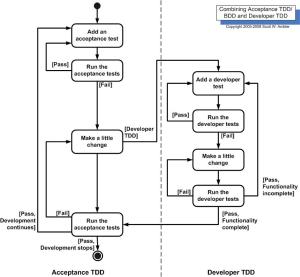
  1. Acceptance TDD (ATDD).  With ATDD you write a single acceptance test, or behavioral specification depending on your preferred terminology, and then just enough production functionality/code to fulfill that test.  The goal of ATDD is to specify detailed, executable requirements for your solution on a just in time (JIT) basis. ATDD is also called Behavior Driven Development (BDD).
  2. Developer TDD. With developer TDD you write a single developer test, sometimes inaccurately referred to as a unit test, and then just enough production code to fulfill that test.  The goal of developer TDD is to specify a detailed, executable design for your solution on a JIT basis.  Developer TDD is often simply called TDD.

atdd

Note that Figure 2 assumes that you’re doing both, although it is possible to do either one without the other.  In fact, some teams will do developer TDD without doing ATDD, see survey results below, although if you’re doing ATDD then it’s pretty much certain you’re also doing developer TDD.  The challenge is that both forms of TDD require practitioners to have technical testing skills, skills that many requirement professionals often don’t have (yet another reason why generalizing specialists are preferable to specialists).

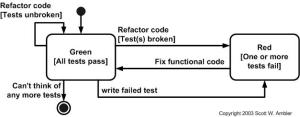
An underlying assumption of TDD is that you have a testing framework available to you.  For acceptance TDD people will use tools such as Fitnesse or RSpec and for developer TDD agile software developers often use the xUnit family of open source tools, such as JUnit or VBUnit, although commercial tools are also viable options.  Without such tools TDD is virtually impossible.  Figure 3 presents a UML state chart diagram for how people typically work with such tools.  This diagram was suggested to me by Keith Ray.

tddStates

Kent Beck, who popularized TDD in eXtreme Programming (XP) (Beck 2000), defines two simple rules for TDD (Beck 2003).  First, you should write new business code only when an automated test has failed.  Second, you should eliminate any duplication that you find.  Beck explains how these two simple rules generate complex individual and group behaviour:

You develop organically, with the running code providing feedback between decisions.

  • You write your own tests because you can’t wait 20 times per day for someone else to write them for you.
  • Your development environment must provide rapid response to small changes (e.g you need a fast compiler and regression test suite).
  • Your designs must consist of highly cohesive, loosely coupled components (e.g. your design is highly normalized) to make testing easier (this also makes evolution and maintenance of your system easier too).

For developers, the implication is that they need to learn how to write effective unit tests.  Beck’s experience is that good unit tests:

  • Run fast (they have short setups, run times, and break downs).
  • Run in isolation (you should be able to reorder them).
  • Use data that makes them easy to read and to understand.
  • Use real data (e.g. copies of production data) when they need to.
  • Represent one step towards your overall goal.


Font: http://www.agiledata.org/essays/tdd.html


2 Ways to make a Repository of WebElements WebDriver

Hello my friends 🙂

I hope that you are ok !! I will post today a technique to save the webelements in one file, or in various files but more organized and with this is easier to do maintenance when the website have some xpath, id, classname, tagname or link modified. I used this repository on xml in Bovespa. In this post I will show 2 ways to do this repository:


  • First – Create a class with the objects:

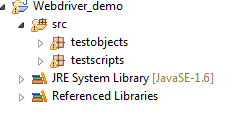
–  Create the project, you may follow the structure bellow:

OR-2-1

– Create a  class under testObjects Package (PageLogin.java)

– Create a  class under testScripts Package  (TestPageLogin.java)

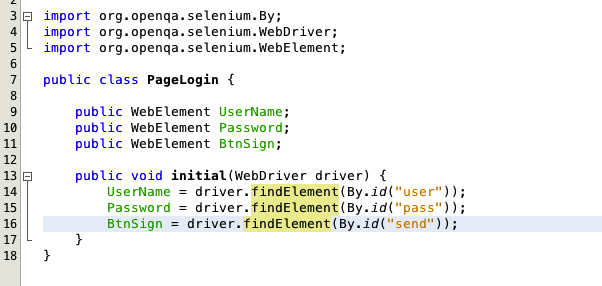
– Open your PageLogin.java and write the code :
1
Don’t forget the package of this class is testObjects, so put in the first line:
package testObjects;


– After this, open TestPageLogin.Java and write :
 

2

Don’t forget the package of this class is testScripts, so put in the first line:

package testScripts;


  • Second – Create a OR file (You can use XML too)

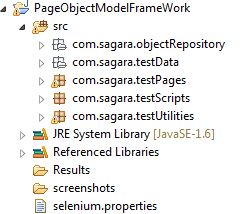
– Create the project, you may follow the structure bellow:

OR-1.1

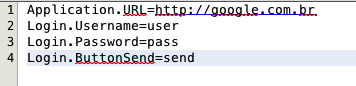
– Create a text file with the Extension as .OR  under the object Repository Package (in this case: com.sagara.objectrepository)


– Create a java class under test Pages package (in this case: com.sagara.testPages)


– Open your .OR file and write the objects informations with a structure like this:


1

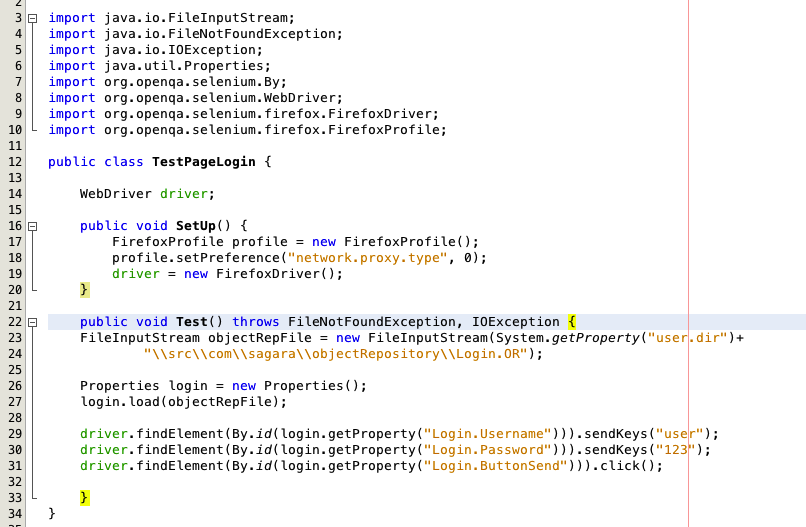
– Open your class Java and write the below code to get the objects information’s from the OR file and use it:

2

I hope that I has helped, if you have some doubts just let your comment 🙂

Bye guys !

Font: http://way2automationtesting.blogspot.in/2014/02/creating-object-repository-in-selenium.html

Using variables, data information, BD in Cucumber

Hello everyone again 🙂

I will describe to you how we can use some data and variables in ours features of cucumber. For this I will use the same last example of feature, the search. To use this data, we will have to change somethings. Look:

Feature: Search

Scenario Outline: Search                                   > Don’t forget to write Scenario Outline when you use Examples.

And look for: “<keyword>”

Examples:
|keyword |
|Nike |
|Paris |

The keyword is the variable, that I will use to substitute the data in the table of Examples. This table Examples should be this name “Examples:”. I already tried others name and the cucumber don’t recognise others names of BD. So this table with data should be this format too:

Examples:

|variable1|variable2|variable3|… >This is the title of each field, variables

|Data 1| Data 2| Data 3|… > This is the data of each column that will be used in the first interaction

|Data 4| Data 5| Data 6|… > This is the data of each column that will be used in the second interaction

|Data 7| Data 8| Data 9|… > This is the data of each column that will be used in the third interaction

… and this is the way ahead.

Don’t forget the |, these are the lines of each column, and they separate the datas. In my example, the cucumber will execute the first search with the keyword = Nike and the second search with keyword = Paris and after the execution will be stopped. Because I don’t have more data to use in the table.

You can just run the command: cucumberand the calabash will show you in yellow of your terminal, what is the step missed. So you need copy this step and put in the file of ruby.

Given(/^look for: “(.*?)”$/) do |arg1|

After this you can implement the code in ruby that this step will do. Look that this step that calabash showed to you has a regex in the local of your variable. This is normal, and you have to have a regex in the local of the variables.

After this, you can just change the name of this variable. In the final of sentence this variable is showed like: |arg1| and I changedfor the title of the field in the feature’s table . Look, everything that between | is a variable that you can use in the code. And my code was:

#encoding: utf-8
require ‘calabash-cucumber’
require ‘calabash-cucumber/keyboard_helpers’

Given(/^look for: “(.*?)”$/) do |keyword|
tap ‘icon openmenu’
sleep STEP_PAUSE
touch(“Label text:’buscar'”)
keyboard_enter_text keyword
end

Just this, now it is only run the command cucumber and wait for results !

I hope that I have helped you guys 🙂

I will post many examples, with more fields after. Just an observation: Cucumber have a limit of this fields and you can’t have many tables inside of Examples. If you have many scenarios inside this feature you can have another table of Examples, but each table should be after each scenario.

Bye !!

Cucumber and the steps

Hello everybody !

Now you can write your steps in cucumber and implement in ruby and calabash… I am using Sublime, but you can use whatever IDE that supports ruby to write the features and the rb.

Steps – Example:

Feature: Search – True And False Results      # This is the name of the feature

Scenario Outline: Search                                 # This is the name of scenario

And look for: something                              # This is one step

And save the file like Search.feature -> in the folder features (Remember the folders of calabash have to stay inside of project’s folder), in this case I wrote a case of search of an app.

If you run now, without write the ruby file, the console will show the step you have to use in the ruby file, the calabash changes somethings of your feature to run in ruby.

And the code in ruby is:

#encoding: utf-8
require ‘calabash-cucumber’
require ‘calabash-cucumber/keyboard_helpers’

Given look for: something do                     # This is the step of the feature
tapicon openmenu‘                                   # This is the command to tap in something in your app, you have to know first a id or label (I will explain how you can take this informations in a next post)
sleep 3                                                       # This command is to stop the execution for 3 seconds
touch(Label text:buscar‘”)                       # This command is to touch, like the tap, but you can use this command with querys too, different of tap that just use label or id
keyboard_enter_text something             # This command is to write something in the field wich you touched in the last command
end                                                            # This finalize this step, you have to write this every final of step

Save the file like Search.rb inside the folder step_definitions. Don’t forget the words in bold, every file of ruby and calabash have to have this words on head. This means that you have to import the lib of cucumber in this file and the file will accept the words of your feature file.

Run cucumber in the terminal, you have to inside of the project’s folder.

If the simulator don’t open, you have to write the local that your app is inside the param APP_BUNDLE_PATH. So will stay like this:

APP_BUNDLE_PATH=”Local of your app” cucumber 

If you wants open the console, the command is:

calabash-ios console

If the console don’t open for the same reason in the step here, you have to write the param of APP_BUNDLE_PATH again.

APP_BUNDLE_PATH=”Local of your app” calabash-ios console

If you wants install another lib in ruby you have to install in your terminal. I had to install a lib to generate a CPF. The command is:

gem install cpf_cnpj

After this, I just had import in the file of ruby like we did with cucumber, and stay like this:

require ‘cpf_cnpj

For now it is this 🙂  I will write many things about this in next time !

Bye Bye !!