Using openAI to create content for social media

Hello Hello 👋👋👋

Today my post is a bit different from the others as I was having some fun with AI last weekend. I realised I was spending too much time thinking about the content, adding some fun emojis and adding the hashtags for posts on social media.

Then I spent last Saturday evening creating this tool with OpenAI 🤖 quite basic now, but I am planning to have small increments as we go.

It's been a fun couple of hours doing research, coding, and testing, but it's here!  This AI tool can increase efficiency and optimize the content creation. 💪    

This paragraph was generated with the tool

If you are curious about the code and you want to run locally, this is the repo:

https://github.com/rafaelaazevedo/rediskets

You will need to create a .env file and add your OpenAI API Key, which is generated on their website after you create your account there (It is FREE).

If you just want to try it out, open the link and add the text explaining what your content should be about, maybe even add some personality like (friendly, assertive, etc) to help AI to find out what is more close to what you want. It will generate a post with emojis, hashtags and a picture related to what you wrote. The picture is definitely not the brightest feature as you saw above, but maybe you will have some fun like me and generate a picture of dogs without faces 😂

PS: you might get some 502 errors (they are random and unfortunately is because I am using a free trial and OpenAI api is returning the query with some timeouts) 😔

https://rediskets.netlify.app/

This really represents me after I deployed my code !

E2E Tests for Web3 Applications (TestJS Summit 2022)

It is out 🎉🎉

If you are curious to know about web3 and how can you test it, here are some ideas!

We will go through a brief explanation of what is Web3 and the architecture of a web3 application. Then we will talk about how to do end-to-end tests, its challenges, some test tools that are available, and 2 demos using Synpress and mocking the web3 layer.

The agenda is:

– What is Web3;

– The Architecture of a Web3 Application;

– Web3 E2E Tests Introduction;

– Web3 E2E Tests Challenges;

– E2E Test Tools;

Demo.

https://portal.gitnation.org/contents/e2e-tests-for-web3-applications

It took me ages to record this video, not going to deny, I am still improving my video editor/design skills… I even bought a new mic to help me and would love to have some feedback about the talk in general.

If you have literally 5 seconds, here is the link.

The big news is, we have created a Web3 Tests Community on Discord !

Yes, me and Jakub, one of the creators of Synpress, are on that and we are looking for contributors and members (of course) 🙂

  1. Yes, I know… We have too many places to create a community nowadays 😩, but this one is going to be one for all of our Web3 Testing people.
  2. Still in the beginning so bear with us while we build and share the content.
  3. Join and share 🤩

Monitoring and Alert Test Strategy Meetup

Hello all, in July I presented this meetup about Monitoring and Alerts Test Strategy for the Test Automation Talks Group.

Here are the slides:

The demos with different from the slides:

AWS Fault Injection Simulator

Chaos Engineering with Gremlin

ChaosMesh Doc

https://chaos-mesh.org/docs/basic-features/

KubeMonkey – Running Chaos Engineering

As always if you have any questions or feedback just ping me a message 😀

Dependency Injection with Selenium and Spring Boot

Hello guys,

Today I am going to share something that I learned recently. I am aware that so many people probably have been using this a long time ago, but I have moved away from java and Selenium quite some time ago and I recently got back into it.

So here is a boilerplate with an automated test project using Dependency Injection of Spring Boot with Selenium, Gradle, and Cucumber.

Feel free to contribute or give any feedback !!

Github project: https://github.com/rafaelaazevedo/Scrux

Benefits of AI in Test Automation

Photo by Kindel Media on Pexels.com

There are several interesting web app automation scenarios that we can improve using AI:

  • Reduce the execution time: Nowadays you have the feature target function already even without an AI test automation project, but with AI you can add this feature without having cucumber in place or even the need to tag the scenarios or features. The AI should be able to identify the features related to the change automatically.
  • Converted manual test cases to automation: you can use Natural Language Processing (NLP) to automatically translate manual test cases into automated test cases. I have seen this done with cucumber not AI yet, but totally possible as AI models work on datasets.
  • Creating different data combinations by training the AI to identify the possible combinations based on a dataset is possible. This would increase the data coverage and bring more confidence to the automation project.
  • Visual validations: Many tools perform this functionality already. I personally tried one tool ages ago called Percy, but you can also try some other popular tools like Applitools and Telerik
  • Test execution stability or self-healing automation: AI can automatically locate web elements when the primary locators fail. You can see this feature in some cutting-edge automation tools like Mabl and Xray and Functionize. Self-healing employs data analytics to identify objects in a script even after they have changed. When your script fails due to being unable to find the object it expected, the self-healing mechanism provides a fuller understanding and analysis of options. Rather than shutting down the process, it examines objects holistically, evaluates the attributes and properties of all available objects, and uses a weighted scoring system to select the one most similar to the one previously used.

Becoming a Domain Model Expert

Creating a model for your test automation requires a domain expert, therefore is critical to have a test automation specialist that also knows the business so the AI can bring the desired innovation. With such extensive use cases, AI systems will need different parameters from domain experts.

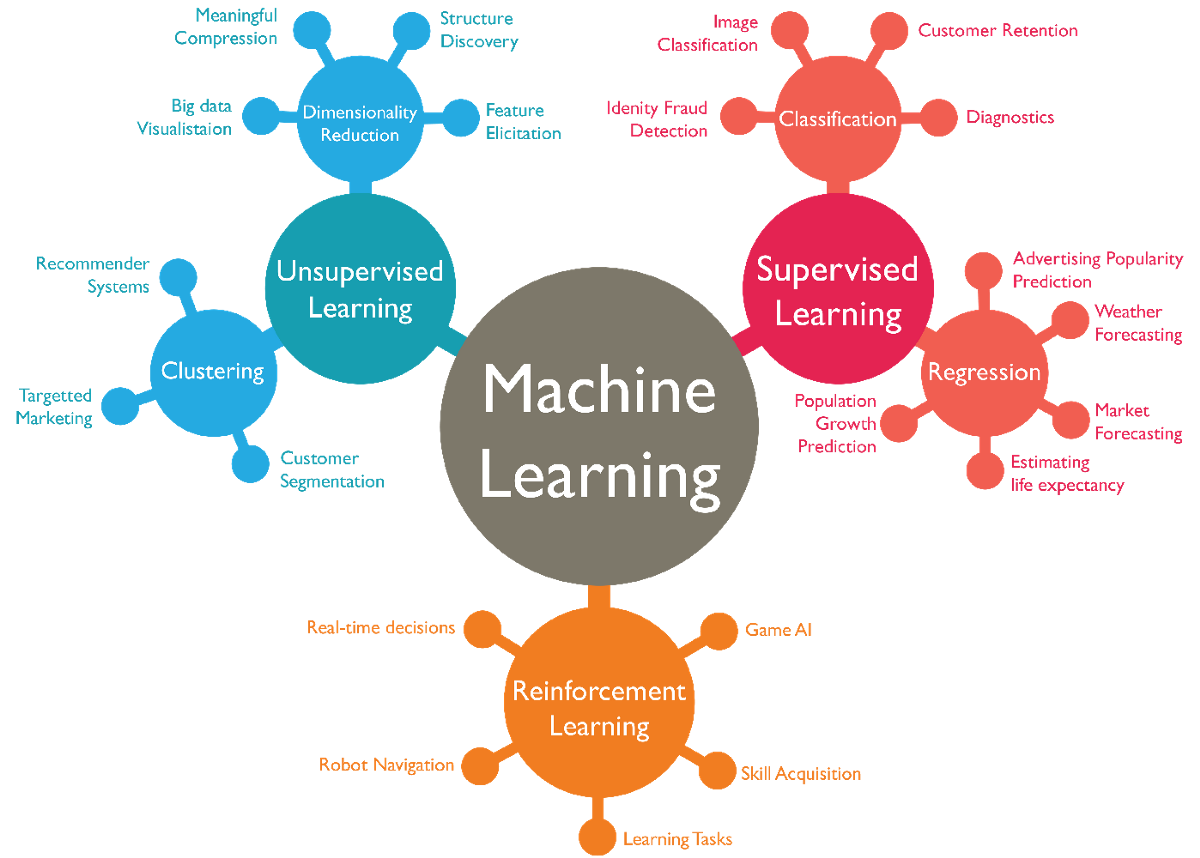
Machine Learning Algorithms In Layman's Terms, Part 1 | by Audrey  Lorberfeld | Towards Data Science
https://wordstream-files-prod.s3.amazonaws.com/s3fs-public/machine-learning.png

Be careful to not run more automated tests than you actually need it. A stage of supervision when the AI is learning the patterns is definitely needed it.

Resources:

Breaking The Bias – International Women’s Day

Hello guys,

As part of my STEM Ambassadors activity to bring more young women to the STEM area, I recorded a video telling my career history and how I ended up in tech.

As you know women are still a minority and one of the reasons why is that some people still believe there is a rule saying tech is a man’s job or a woman’s job. This is me when I hear these comments:

I wish the world was binary and simple like that.

Here is the presentation in case you are curious about how I ended up where I am now 😊

Javascript Executor with PageFactory Selenium

Photo by Antonio Batiniu0107 on Pexels.com

Hello guys,

Today I am going to post another problem that cost me a lot of research time and pulling out my own hair.

This was the initial code:

    public void javascriptExecutor(String script, WebElement element) {
       WebDriver driver = new ChromeDriver();  
       JavascriptExecutor jse = (JavascriptExecutor) driver;  
       jse.executeScript(script, element);  
    }

If you ever encounter the error complaining Selenium couldn’t find the Webdriver instance, then check the complete explanation of the problem here.

TL;DR; Webdriver when using PageFactory needs to extract the underlying WebElement with WrapsElement and then the WebDriver from it. Basically, you need to get the real element and then you will be able to use javascript executor:

    public void javascriptExecutor(String script, WebElement element) {  
       WebDriver driver = ((WrapsDriver)((WrapsElement)element).getWrappedElement()).getWrappedDriver();
       JavascriptExecutor jse = (JavascriptExecutor) driver;  
       jse.executeScript(script, element);  
    }

So, next time this problem comes up it will be smooth to fix and not days of trying to figure out what is happening 😂

Stale Element when using PageFactory – Selenium

Photo by luis gomes on Pexels.com

Hello guys,

The first post of the year will be a quick one. Took me a while to figure out since it has been ages I coded in Selenium/Java and used PageFactory (which I thought was deprecated, but it is just deprecated in C#)

If you ever come across an error like this when using PageFactory:

stale element reference: element is not attached to the page document

PageFactory initializes the elements the first time you run the automation and when the page changes (which happens on Angular and React pages) Selenium loses the reference to that element and needs to find it again with the new DOM.

You can do something like this:

protected void clickElement(WebElement element) {
   try {
      webDriverUtils.waitForElementToBePresent(element);
      element.click();
   } catch (StaleElementReferenceException e) {
       PageFactory.initElements(driver, this);
   }

Blockchain Tests Workshop at The National Software Testing Conference

Hello guys, here are the slides from the workshop on Blockchain Tests that I gave earlier this week, as well as some responses to the issues that were addressed during the session. I can say as my first presential workshop after pandemic, it was a great experience with a full room 😃


Unfortunately, there is no recording of it, but you may clone the repo and follow the coding instructions to build the test class and methods, then compare to version 2 of the project, which has the most recent version.

What is the Required() function in Solidity?

The require Solidity function guarantees validity of conditions that cannot be detected before execution. It checks inputs, contract state variables and return values from calls to external contracts.

Where the Address type comes from ?

The address type comes in two flavours, which are largely identical:

  • address: Holds a 20 byte value (size of an Ethereum address).
  • address payable: Same as address, but with the additional members transfer and send.

The idea behind this distinction is that address payable is an address you can send Ether to, while a plain address cannot be sent Ether.

Type conversions

Implicit conversions from address payable to address are allowed, whereas conversions from address to address payable must be explicit via payable(<address>).

Explicit conversions to and from address are allowed for uint160, integer literals, bytes20 and contract types.

Other tools that you can use to test Blockchain applications

  • Ethereum Tester,
  • Hyperledger Composer
  • Exonum test kit
  • Embark
  • Populus
  • BitcoinJ
  • Binance

Resources

Sending a JSON Parameter to Jmeter from pom-maven

Hello all,

Today I am going to post a quick snippet that I used recently and it quite made me spent a lot of time just because I didn’t read the Jmeter documentation in the first place 😅

In the pom.xml you will need to set some jmeter configurations:

 <?xml...    
 <project...
               <properties>                            
                  <jsonValue>[{"name": "Rafa", "age": 20},{"name": "Robin", "age": 5}]</jsonValue>                                     
               </properties>
...
<build>
   <plugins>
                 <plugin>
                   </configuration>
...
                        <propertiesUser>                            
                            <jsonValue>${jsonValue}</jsonValue>                                     
                        </propertiesUser>                                      
                   </configuration>
                </plugin>

How it should look like:

<?xml version="1.0" encoding="UTF-8"?>
<project xmlns="http://maven.apache.org/POM/4.0.0"
         xmlns:xsi="http://www.w3.org/2001/XMLSchema-instance"
         xsi:schemaLocation="http://maven.apache.org/POM/4.0.0 http://maven.apache.org/xsd/maven-4.0.0.xsd">

    <modelVersion>1.0.0</modelVersion>

    <artifactId>jmeter-json-param-example</artifactId>
    <groupId>com.azevedorafaela.jmeter</groupId>
    <version>1.0</version>
    <packaging>pom</packaging>

    <properties>
        <host>www.google.co.uk</host>
        <jsonValue>[{"name": "Rafa", "age": 20},{"name": "Robin", "age": 5}]</jsonValue>
        <duration>30</duration>
        <threads>10</threads>
        <targetThroughput>1500</targetThroughput>
    </properties>

    <profiles>
        <profile>
            <id>performance</id>
            <build>
                <plugins>
                    <!-- execute JMeter test -->
                    <plugin>
                        <groupId>com.lazerycode.jmeter</groupId>
                        <artifactId>jmeter-maven-plugin</artifactId>
                        <version>2.9.0</version>
                        <executions>
                            <execution>
                                <id>test</id>
                                <goals>
                                    <goal>jmeter</goal>
                                </goals>
                            </execution>
                        </executions>
                        <configuration>
                           <generateReports>true</generateReports>
<ignoreResultsFailures>false</ignoreResultsFailures>
<testResultsTimestamp>false</testResultsTimestamp>
                            <propertiesUser>
                              <threads>${threads}</threads>
                              <targetThroughput>${targetThroughput}</targetThroughput>
                             <duration>${duration}</duration>
<!-- json parameter, host and port -->
                             <jsonValue>${jsonValue}</jsonValue>                                 
                             <server>${host}</server>
                            </propertiesUser>
                        </configuration>
                    </plugin>

                    <plugin>
                        <groupId>com.lazerycode.jmeter</groupId>
                        <artifactId>jmeter-analysis-maven-plugin</artifactId>
                        <version>1.0.6</version>
                        <executions>
                            <execution>
                                <goals>
                                    <goal>analyze</goal>
                                </goals>
                                <phase>post-integration-test</phase>
                            </execution>
                        </executions>
                        <configuration>
                            <!--
                            source file that contains jmeter result data. Needs to be XML format or a GZIPed XML format
                            -->
<source>${project.build.directory}/results/*</source>
                        </configuration>
                    </plugin>

                </plugins>
            </build>
        </profile>
    </profiles>
</project>

On the Test Plan configuration you will need to set the parameters getting it from the pom.xml:

  • The default value for this parameter is: [{"name": "Rafa", "age": 20},{"name": "Robin", "age": 5}]
  • It is optional to set a default value in case it is not sent.
  • Note that we will need to escape the commas when adding the value to the jmeter script:
${__P(jsonValue,[{"name": "Rafa"\, "age": 20}\,{"name": "Robin"\, "age": 5}])}

Now you can run your jmeter tests passing a json code to the maven command line and if you don’t pass this parameter, then Jmeter is going to use the default one.

Resources: