
I have adventured myself to test the new TestProject Python SDK this week and I can say it has been quite straight forward. Also, the documentation is extensive and cover a lot of different scenarios and setups.
For those who don’t know, TestProject is a Free Automation Platform that wrappers open source test frameworks (Selenium and Appium) integrating your automation scripts. It consolidates all the needed drivers to run your test automation without additional setup.
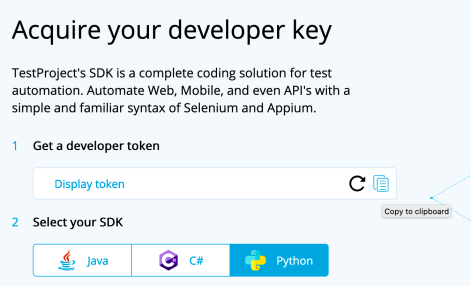
1- To start you need to get SDK token from the TestProject Portal (you can register for free here)
2- Download and install TestProject Agent
3- Run the agent locally and verify the status
4- Install the latest version of python (the min. supported Python version is 3.4)
pip install testproject-python-sdk
5- Generate and copy your developer token
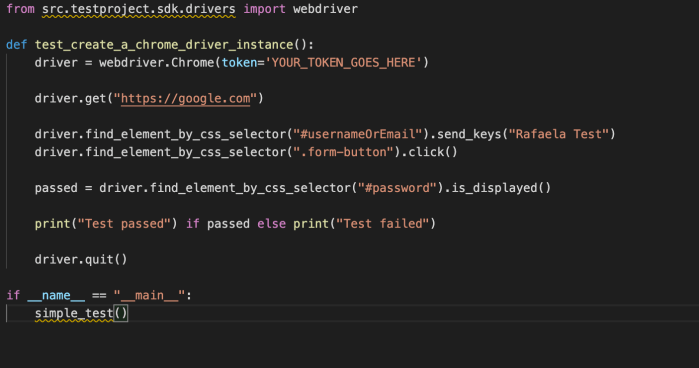
6- Create your first test, for example
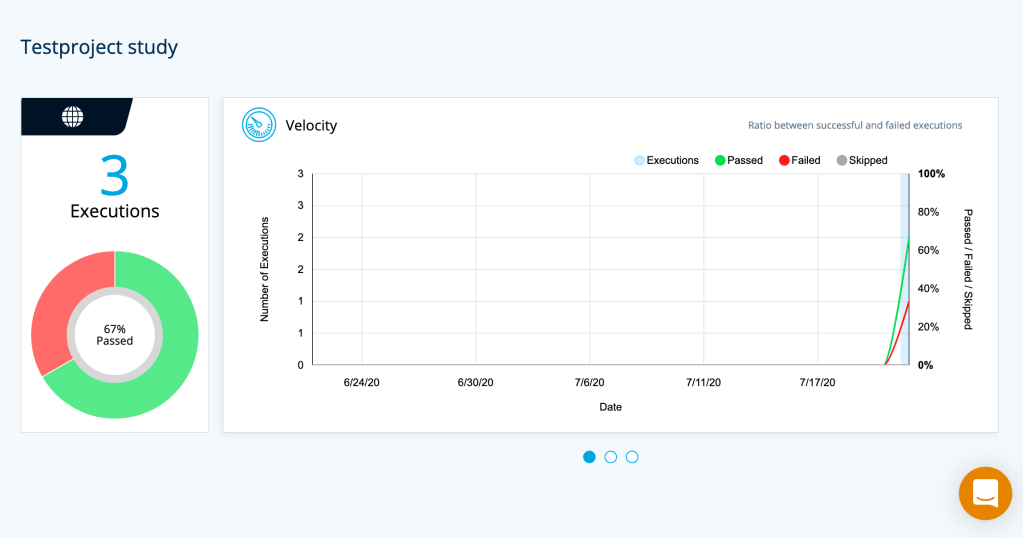
7- Then you can see the reports published on your TestProject account, for example
You can find a lot more examples on their README file.
Resources:
 Rafaela Azevedo
hi
This post on TestProject’s new Python SDK is incredibly informative and well-written! The detailed breakdown of the SDK’s features and its integration with Python is really useful for developers looking to streamline their testing processes. For those interested in sharing their own insights or contributing articles on related topics, the Software Testing Board is currently looking for guest writers. It’s a great opportunity to get your expertise published and reach a broader audience. Check out the details here: Write for Us