Summary of Calabash iOS Ruby API – Assertions

Hi guys ! I hope you are well ! Here there are many commands of calabash-ios that are very useful 🙂

Assertions


fail(msg="Error. Check log for details.")

check_element_exists(query)
check_element_does_not_exist(query)
check_view_with_mark_exists(expected_mark)

check_element_exists("view marked:'#{expected_mark}'")


Touch


touch(uiquery, options={})


irb(main):037:0> touch("view marked:'switch'")
irb(main):038:0> tap 'switch'
irb(main):040:0> touch("view marked:'First'", :offset => {:x => 50, :y => 0})
irb(main):041:0> touch(nil, :offset => {:x => 50, :y => 0})


Keyboard


keyboard_enter_char(chr)

irb(main):043:0> keyboard_enter_char "a"
irb(main):076:0> keyboard_enter_char "More"

keyboard_enter_text(text)

irb(main):044:0> keyboard_enter_text "The Quick Brown Fox"

done

Scroll

scroll(uiquery, direction)

irb(main):082:0> scroll "scrollView", :down


Tables


scroll_to_row(uiquery, number)

irb(main):081:0> scroll_to_row "tableView", 2

scroll_to_cell(options)

{:query => "tableView",
 :row => 0,
 :section => 0,
 :scroll_position => :top,
 :animate => true}
irb(main):003:0> scroll_to_cell(:row => 13, :section => 0)
=> ["; contentOffset: {0, 0}>. Delegate: LPThirdViewController, DataSource: LPThirdViewController"]

:row the row to scroll to
:section the section to scroll to
:scroll_position the position to scroll to :top, :bottom, :middle
:animate animate the scrolling or not

each_cell(options, &block)

{:query => "tableView", #the table view to act on
 :post_scroll => 0.3,  #a pause after each action taken
 :skip_if => nil, #an optional proc to skip some cells
 :animate => true #animate the scrolling?
}
irb(main):008:0> each_cell(:post_scroll=>0) do |row, sec|
irb(main):009:1* puts "Row #{row} in Section #{sec}"
irb(main):010:1> end
Row 0 in Section 0
Row 1 in Section 0
Row 2 in Section 0
Row 3 in Section 0
...
irb(main):001:0> table_labels = []
=> []

irb(main):002:0> each_cell(:animate => false, :post_scroll => 0.1) do |row, sec|
irb(main):003:1*  txt = query("tableViewCell indexPath:#{row},#{sec} label", :text).first
irb(main):004:1>  table_labels << txt irb(main):005:1> end
=> 1

irb(main):006:0> table_labels
=> ["Cell 0", "Cell 1", "Cell 2", "Cell 3", "Cell 4", "Cell 5", "Cell 6", "Cell 7", "Cell 8", "Cell 9", "Cell 10", "Cell 11", "Cell 12", "Cell 13", "Cell 14", "Cell 15", "Cell 16", "Cell 17", "Cell 18", "Cell 19", "Cell 20", "Cell 21", "Cell 22", "Cell 23", "Cell 24", "Cell 25", "Cell 26", "Cell 27", "Cell 28", "Cell 29"]


Rotation

rotate(dir)

irb(main):083:0> rotate :left


(Event) Playback

playback(recording, options={})

irb(main):103:0> playback "drag_switch_around", :query => "view marked:'switch'", :offset => {:x=>2, :y=>0}

record_begin and record_end

irb(main):104:0> record_begin
=> ""
irb(main):105:0> record_end "move_down"
=> "move_down_ios5_iphone.base64"


Location

set_location(options)

:place => "Tower of London"
:latitude => ..., :longitude => ...


Backdoor

backdoor(sel, arg)

- (NSString *) calabashBackdoor:(NSString *)aIgnorable;
irb(main):002:0> backdoor("calabashBackdoor:", "")
=> "YES"


Screenshot

screenshot(options={:prefix=>nil, :name=>nil})

screenshot({:prefix => "/Users/krukow/tmp", :name=>"my.png"})

screenshot_embed(options={:prefix=>nil, :name=>nil, :label => nil})

screenshot_embed({:prefix => "/Users/krukow/tmp", :name=>"my.png", :label => "Mine"})


Misc


server_version

irb(main):026:0> server_version
=> {"outcome"=>"SUCCESS", "app_name"=>"LPSimpleExample-cal", "simulator_device"=>"iPhone", "iOS_version"=>"5.1", "app_version"=>"1.0", "system"=>"x86_64", "app_id"=>"com.lesspainful.example.LPSimpleExample-cal", "version"=>"0.9.126", "simulator"=>"iPhone Simulator 358.4, iPhone OS 5.1 (iPhone/9B176)"}


client_version

irb(main):027:0> client_version
=> "0.9.127.pre1"


calabash_exit

irb(main):028:0> calabash_exit
=> []
irb(main):029:0> server_version
Errno::ECONNREFUSED: Connection refused - connect(2) (http://localhost:37265)


escape_quotes(str)

irb(main):007:0> quoted = escape_quotes("Karl's child")
=> "Karl\\'s child"
irb(main):008:0> query("view marked:'#{quoted}'")


macro(txt)

macro 'I touch "Second"'

lbl = ".......a long text......"
macro %Q[I use a step with "double" quotes and 'single' and #{lbl}]


flash(uiquery)

flash("TableView index:2")


Font: https://github.com/calabash/calabash-ios/wiki/03.5-Calabash-iOS-Ruby-API

Summary of Calabash iOS Ruby API – QUERY

Just a summary of useful commands !

Query

query(uiquery, *args)
irb(main):003:0> query("button index:0")
=> [{"class"=>"UIRoundedRectButton", "frame"=>{"y"=>287, "width"=>72, "x"=>100, "height"=>37}, "UIType"=>"UIControl", "description"=>">"}] 
irb(main):005:0> query("button index:0").first.keys
=> ["class", "frame", "UIType", "description"]

irb(main):006:0> query("button index:0").first["frame"]["width"]
=> 72

irb(main):031:0> query("tableView","numberOfSections")
=> [1]
irb(main):033:0> query("tableView","delegate","description")
=> [""]
irb(main):034:0> query("tableView",numberOfRowsInSection:0)
=> [30]
irb(main):035:0> query("tableView","numberOfRowsInSection"=>0)
=> [30]
irb(main):036:0> query("pickerView",:delegate, [{pickerView:nil},{titleForRow:1},{forComponent:0}])
=> ["1,0"]
[pickerView.delegate pickerView:nil titleForRow:1 forComponent:0]

classes(uiquery)

def classes(uiquery,*args)
  query_map(uiquery,:class,*args)
end
irb(main):001:0> classes("view")
=> ["UILayoutContainerView", "UITransitionView", "UIViewControllerWrapperView", "UIView", "UITextField", "UITextFieldRoundedRectBackgroundView", "UIImageView", "UIImageView", "UIImageView", "UITextFieldLabel", "UILabel", "UIRoundedRectButton", "UIButtonLabel", "UISwitch", "_UISwitchInternalView", "UIImageView", "UIView", "UIImageView", "UIImageView", "UIImageView", "UIRoundedRectButton", "UIButtonLabel", "UITabBar", "UITabBarButton", "UITabBarSelectionIndicatorView", "UITabBarSwappableImageView", "UITabBarButtonLabel", "UITabBarButton", "UITabBarSwappableImageView", "UITabBarButtonLabel", "UITabBarButton", "UITabBarSwappableImageView", "UITabBarButtonLabel", "UITabBarButton", "UITabBarSwappableImageView", "UITabBarButtonLabel"]

label(uiquery)

 def label(uiquery)
  query(uiquery, :accessibilityLabel)
end
irb(main):001:0> label("view")
[nil, nil, nil, nil, nil, nil, nil, nil, nil, nil, "Empty list", nil, nil, nil, "Mon", "Dec 17", nil, nil, nil, "Tue", "Dec 18", nil, nil, nil, nil, "Today", nil, nil, nil, "Thu", "Dec 20", nil, nil, nil, nil, nil, "Empty list", nil, nil, "12", "12", nil, nil, "1", "1", nil, nil, "2", "2", nil, nil, "3", "3", nil, nil, nil, nil, nil, "Empty list", nil, nil, "56", "56", nil, nil, "57", "57", nil, nil, "58", "58", nil, nil, nil, nil, nil, "Empty list", nil, nil, "AM", "AM", nil, nil, "PM", "PM", nil, nil, nil, nil, nil, nil, nil, nil, nil, nil, "Name", "First View", "First", "First", nil, "Second", "Second", nil, "other", "switch", nil, nil, nil, nil, nil, nil, "login", "Login", nil, "First", nil, nil, "First", "Second", nil, "Second", "Third", nil, "Third", "Fourth", nil, "Fourth"]

element_does_not_exist(uiquery)

element_exists(uiquery)

view_with_mark_exists(expected_mark)

element_exists("view marked:'#{expected_mark}'")

Waiting

wait_for(options, &block)
{:timeout => 10, #maximum number of seconds to wait
 :retry_frequency => 0.2, #wait this long before retrying the block
 :post_timeout => 0.1, #wait this long after the block returns true
 :timeout_message => "Timed out waiting...", #error message in case options[:timeout] is exceeded
 :screenshot_on_error => true # take a screenshot in case of error
}
irb(main):030:0> wait_for(:timeout => 5) { not query("label text:'Cell 11'").empty? }
irb(main):031:0> wait_for(:timeout => 5) { element_exists("label text:'Cell 20'") }
wait_for(:timeout => 30) do
    res = query("button marked:'Player play icon'", :isSelected)
    res.first == "1"        
end

wait_for_elements_exist(elements_arr, options={})

irb(main):008:0> wait_for_elements_exist( ["label text:'Cell 11'", "tabBarButton marked:'Third'"], :timeout => 2)
wait_for_elements_do_not_exist(elements_arr, options={})
wait_for_none_animating(options={})
wait_poll(opts, &block)
{:until => nil #a predicate which should return true when the condition is satisfied
 :until_exists => nil #a uiquery to function as predicate (i.e. element_exists(opts[:until_exists]))
 :timeout => 10, #maximum number of seconds to wait
 :retry_frequency => 0.2, #wait this long before retrying the block
 :post_timeout => 0.1, #wait this long after the block returns true
 :timeout_message => "Timed out waiting...", #error message in case options[:timeout] is exceeded
 :screenshot_on_error => true # take a screenshot in case of error
}
irb(main):023:0> wait_poll(:until_exists => "label text:'Cell 22'", :timeout => 20) do
irb(main):024:1* scroll("tableView", :down)
irb(main):025:1> end


Bye Guys 😀

Font: https://github.com/calabash/calabash-ios/wiki/03.5-Calabash-iOS-Ruby-API

Query Calabash Android

Hey guys, I will post today some queries to find elements in different ways with calabash-android in console !


Basic usage

Using the class of the elements (Button, Label, View, Webview, Tableview, etc…). If you don’t know what is the class, you can use only * to find all the elements on the screen.


Results:


You can use size, to know the qty of the elements with this class:


Filtering by class


Simple class name

Filtering by class means that we only want to look at certain types of views. This is what we’ve done before when we were searching for Button or TextView:

This is called filtering by simple name. The result shows you that the full class name is android.widget.Button: this is what we call fully qualified class name and the andorid.widgetpart is called package name.

When you query with simple name Calabash only looks at the last bit of the name. This is also case insensitive, so Button, button or bUtTOn is the same in this context.


Fully qualified class name

You can also use the fully qualified class name in the query:

Interestingly this gives us two results: the login button and a checkbox. Why is the CheckBox included? In order to understand this you have to understand subclasses.

Let’s look at an example:

There are a lot different buttons in Android like ToggleButton and the Switch. A ToogleButton is just a specific type of Button with some extra functionality and look. A Button is just a simple button with a text in it where the ToggleButton has two states (on and off). So every ToggleButton is a Button but not every Button is a ToggleButton.

The CheckBox is also a subclass of Button – which explains why we get two results. If you use the fully qualified name in the query it will give you the class and all of it’s subclasses. So if there were ToggleButtons and Switches it would also return those.

The main distinction is this:

  • using simple name only looks at the last part of the class and does a simple comparison
  • using the qualified name looks at the class hierarchy and gives back all the class and all of it’s subclasses


Filtering by property

Usually there are several buttons, textviews and edit texts on the screen so filtering by class is not enough to identify a single element.

In the query results you get back a set of properties for each view like id, text, class.

Calabash allows you to filter on these properties.

The most used property is the id. On Android every view can have an id, which is an invisible string identifier. The id is not necessarily unique and also not every view has one. Even with these restriction using id is the most reliable way to find views.


id property

Let’s try to find the login button by id:

The first part of the query is the class filtering: * means give me all the views. The second part is the property filtering: id:'login_button' means find the view that has the id login_button.

The filtering happens on the result of the first part of the query string. Previously we used "*" so the filtering was applied to all the views. But we could have used different class.


text property

Of course id is not the only property that you can filter on. Another commonly used one is the text. This is the label of the view which is visible on the screen:

This will find the view on the screen which has a text Login. Once I found them though I use id instead of text. This results in more stable tests. Labels tend to change more frequently than ids. It also eliminates all the translation and localisation problems.

What if a view doesn’t have an id? Ask the developers to add one. It’s a 5 second task and it will make your life a lot easier.


Other properties

Let’s try to find all the disabled buttons:

Notice that while we used single quotes for string parameters we’re not using anything here for false.

The third type of parameter is the integer parameter (numbers). One example is the width parameter:

This gives you all the views that are exactly 200 pixel wide. Notice that we are not using the single quotes to define the value.

You can also combine the filters using multiple criteria. Let’s get all the views which are enabled and the are 50 pixel heigh:


How it works

The general syntax for property filtering is the following:

The prop is the name of the property and the value is either a string, a boolean or an integer value.

We’ve already used a couple of properties like id, text, enabled and width. There are a lot more. For starters you can use all the attributes that you see in the query results. But that’s not everything.

Every view object supports a set of methods – you can find all the supported methods on the view’s documentation. For example the View class has an isEnabled() method. When Calabash tries to resolve the property it find the following methods on the view: prop(), getProp() and isProp() in this order.

So for the enabled property it tries to find the enabled(), getEnabled() or isEnabled() methods.

If Calabash does find a method it calls it and compares the return value with the value you specified. If it doesn’t match it gets rid of that view. It also discards the view if it can’t find the appropriate methods.


Useful things

In addition to the basic query syntax there are a couple of useful things you can use.


marked

The marked keyword is a shorthand for identifying an element by it’s name. It’s a convenience method to filter by id, text or contentDescription properties.


index

The result of each query is a standard Ruby array. Because of this you can access the elements directly in it. If you want to get the first view on screen you can do it like this:

The query language also supports the index keyword. The index is very similar than using the array indexing – it gives you the element at a given index:

This is usually used with lists and other collection views. Often you just want to click on the first element on a list.

Be warned though: you should only use index if you really need it. Using index to identify elements in the layout is usually not a good idea – it leads to brittle tests and hard to diagnose problems.

Use ids, text and other identifiers and don’t rely on the ordering of the items!


Returning certain properties

Sometimes you’re only interested in certain properties not the full result. Let’s say you want to get all the id’s on the screen:

As you can see a result is an array of strings where only the ids are shown. Isn’t this much nicer?

You can put any property as the second argument of query to get the data you’re interested in. Another example to get all the labels for the enabled views:

query("* enabled:true", :text)


Predicate

Calabash supports some filters that are not present in UIScript. Particularly we support filtering by simple NSPredicates. For example searching for a string prefix:

"label {text BEGINSWITH 'Cell 1'}"

which would return the labels with text Cell 1 and Cell 10.

In general you use a NSPredicate by writing a filter: {selector OP val}, where selector is the name of an Objective-C selector to perform on the object, OP is operation, and val is a string or integer value.

Common operations

  • BEGINSWITH, prefix, e.g., "label {text BEGINSWITH 'Cell 1'}"
  • ENDSWITH, suffix, e.g., "label {text ENDSWITH '10'}"
  • LIKE, wildcard searches, e.g., "label {text LIKE 'C*ll'}"
  • CONTAINS, substring, e.g., "label {text CONTAINS 'ell'}"
  • Comparison, <, >, …
  • Case or diacritic insensitive lookups, e.g., "label {text CONTAINS[cd] 'cell'}"

To understand what additional options are available, consult the full syntax for NSPredicate documented by Apple: NSPredicate Syntax


Direction

There are four directions descendant, child, parent and sibling. These determines the direction in which search proceeds.

Often, query expressions are a sequence of ClassName expressions. For example:

 "tableViewCell label"

this means “first find all UITableViewCell views, then inside of those, find all the UILabel views”. The key here is the word inside. This is determined by the query direction.

By default the direction is descendant, which intuitively means “search amongst all subviews (or sub-views of sub-views, etc).” But you can change the traversal direction. Here is an advanced example:

label marked:'Tears in Heaven' parent tableViewCell descendant 
tableViewCellReorderControl

This query finds a label ‘Tears in Heaven’, and then proceeds to find the tableViewCell that contains this label (i.e., moving in the parent instead of descendant direction). From the tableViewCell we move down and find the tableViewCellReorderControl.

Valid directions are descendant, parent, child and sibling. Both descendant and childlooks for subviews inside a view. The difference is that descendant keep searching down in the sub-view’s subviews, whereas child only looks down one level. The direction sibling searches for views that are “at the same level” as the present view (this is the same as: first find the immediate parent, then find all subviews except for the view itself).


Thank you again !

Bye 🙂

Fonts:

https://github.com/calabash/calabash-ios/wiki/05-Query-syntax

http://krazyrobot.com/2014/04/calabash-using-query/

Error with signature on the app Android

If you got some of these errors when try create the signature of your app (or try run calabash-android run) on Android:


> fingerprint_from_apk': No RSA file found in META-INF. Cannot proceed. 
(RuntimeError)


Or


> jarsigner: unable to open jar file (When try re-signed)


Try these steps:


– Verify if the file zipalign is inside of the folder sdk/tools.


– If the zipalign don’t exist inside the tools folder, download on this link :


– Give the execute permissions:

chmod 777 zipalign


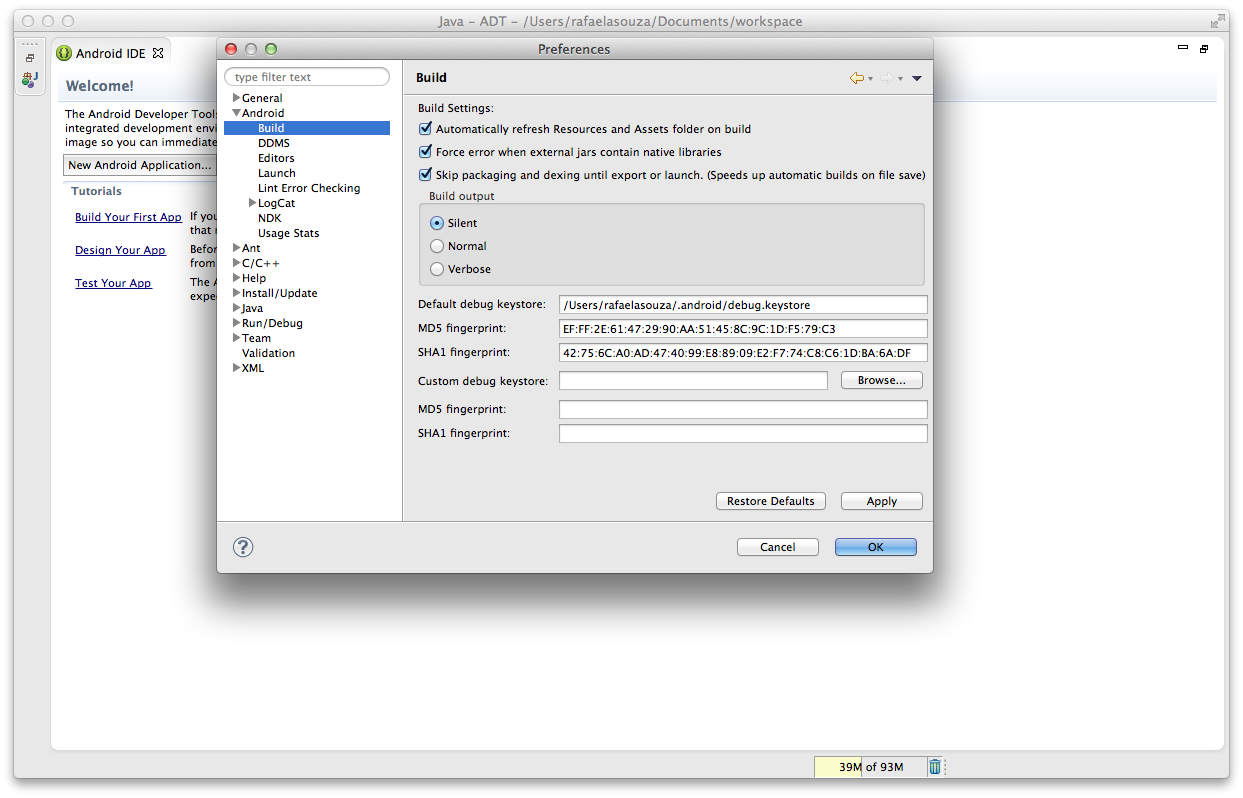
– Open the Eclipse, Click in Preferences:

Screen Shot 2014-07-16 at 0.06.31


– Open the Android Tab, Click on Build, Click on Apply and OK:


Screen Shot 2014-07-16 at 0.07.03
– Try runs the command again:
calabash-android resign NAMEAPP.apk
– After try run the cucumber again 🙂
calabash-android run NAMEAPP.apk


Worked for me !


Bye guys 🙂

Calabash-Android Install Example Project

Hello guys,

Today I will post about install calabash-android in your machine. And for this I will use the project sample of this git repository: https://github.com/calabash/x-platform-example.git

You can do the download too if you don’t have a project neither an apk file.

Download and install ruby and RVM:

\curl -sSL https://get.rvm.io | bash -s stable --ruby
rvm install ruby 1.9.3
Install calabash-android:
sudo gem install calabash-android


Install bundler unless you already have it installed:

gem install bundler

(or sudo gem install bundler)

Install gems in the Gemfile:

bundle install

iOS

To run the iOS tests, make sure Xcode 5.1 is installed with command line tools.

Run

bundle exec cucumber -p ios

Android

To run the Android tests, ensure a recent Android SDK is installed, and that

  • environment variable ANDROID_HOME is set to point to the sdk folder, for example/Users/krukow/android/adt/sdk

PS: This an example of a project with generated key and certificates, so you don’t need assign the app.

Run

bundle exec calabash-android run prebuilt/Android-debug.apk -p android

This example you must to install bundle too. If you have any question or comment, just write below. Thank you again 🙂


Fonts: https://github.com/calabash/x-platform-example

Abstract Methods and Classes

Hello guys,

I will continue with more technical posts today… 🙂

What is ? 

An abstract class is a class that is declared abstract—it may or may not include abstract methods. Abstract classes cannot be instantiated, but they can be subclassed.

An abstract method is a method that is declared without an implementation (without braces, and followed by a semicolon), like this:

abstract void moveTo(double deltaX, double deltaY);

If a class includes abstract methods, then the class itself must be declared abstract, as in:

public abstract class GraphicObject {
   // declare fields
   // declare nonabstract methods
   abstract void draw();
}

When an abstract class is subclassed, the subclass usually provides implementations for all of the abstract methods in its parent class. However, if it does not, then the subclass must also be declared abstract.

An Abstract Class Example

In an object-oriented drawing application, you can draw circles, rectangles, lines, Bezier curves, and many other graphic objects. These objects all have certain states (for example: position, orientation, line color, fill color) and behaviors (for example: moveTo, rotate, resize, draw) in common. Some of these states and behaviors are the same for all graphic objects (for example: position, fill color, and moveTo). Others require different implementations (for example, resize or draw). All GraphicObjects must be able to draw or resize themselves; they just differ in how they do it. This is a perfect situation for an abstract superclass. You can take advantage of the similarities and declare all the graphic objects to inherit from the same abstract parent object (for example, GraphicObject) as shown in the following figure.

Classes Rectangle, Line, Bezier, and Circle Inherit from GraphicObject  

Classes Rectangle, Line, Bezier, and Circle Inherit from GraphicObject

First, you declare an abstract class, GraphicObject, to provide member variables and methods that are wholly shared by all subclasses, such as the current position and the moveTo method. GraphicObject also declares abstract methods for methods, such as draw or resize, that need to be implemented by all subclasses but must be implemented in different ways. The GraphicObject class can look something like this:

abstract class GraphicObject {
    int x, y;
    ...
    void moveTo(int newX, int newY) {
        ...
    }
    abstract void draw();
    abstract void resize();
}

Each nonabstract subclass of GraphicObject, such as Circle and Rectangle, must provide implementations for the draw and resize methods:

class Circle extends GraphicObject {
    void draw() {
        ...
    }
    void resize() {
        ...
    }
}
class Rectangle extends GraphicObject {
    void draw() {
        ...
    }
    void resize() {
        ...
    }
}

Class Members

An abstract class may have static fields and static methods. You can use these static members with a class reference (for example,AbstractClass.staticMethod()) as you would with any other class.

When ?

Abstract Classes is to create templates for future classes and offer the added benefit of letting you define functionality that your child classes can utilize later. You can’t provide an implementation for an Interface.

Why ?

Abstract Classes are a good fit if you want to provide implementation details to your children but don’t want to allow an instance of your class to be directly instantiated (which allows you to partially define a class). If you want to simply define a contract for Objects to follow, then use an Interface.

 
Abstract methods are useful ?

Abstract methods are useful in the same way that defining methods in an Interface is useful. It’s a way for the designer of the Abstract class to say “any child of mine MUST implement this method”.


Any question or comment, just write below ! Thank you again ! 

Bye 🙂


Font: http://docs.oracle.com/javase/tutorial/java/IandI/abstract.html

http://stackoverflow.com/questions/3344816/when-and-why-to-use-abstract-classes-methods

What is a Module on Ruby ?

Hello guys, I will summarise this post because there are many examples and methods that you can learn. So, today I will talk about more technical questions. What is and when you can use module on Ruby.

WHAT IS ?

Module is a collection of methods and constants. The methods in a module may be instance methods or module methods. Instance methods appear as methods in a class when the module is included, module methods do not. Conversely, module methods may be called without creating an encapsulating object, while instance methods may not. (See below, module_function)

USING PARAMETERS

Once a module is written, its global entities (i.e., global PARAMETERs, global variables and internal functions) can be made available to other modules and programs. The program or module that wants to use a particular module must have a USE statement at its very beginning. The USE statement has one of the following forms:

SYNTAX

The following form is the syntax of a module:

USE  module-name

USE  module-name, ONLY: name-1, name-2, ..., name-n

Here is the meaning of these USEs:

  • The first indicates that the current program or module wants to use the module whose name is module-name. For example, the following main program indicates that it wants to use the content of module SomeConstants:
    PROGRAM  MainProgram
       USE   SomeConstants
       IMPLICIT  NONE
       ..........
    END PROGRAM  MainProgram
    

    Once a USE is specified in a program or in a module, every global entities of that used module (i.e.PARAMETERs, variables, and internal functions) becomes available to this program or this module. For example, if module SomeConstants is:

    MODULE  SomeConstants
       IMPLICIT  NONE
       REAL, PARAMETER :: PI = 3.1415926
       REAL, PARAMETER :: g = 980
       INTEGER         :: Counter
    END MODULE  SomeConstants
    

    Then, program MainProgram can access to PARAMETERPI and g and variable Counter.

  • However, under many circumstances, a program or a module does not want to use everything of the used module. For example, if program MainProgram only wants to use PARAMETER PIand variable Counter and does not want to use g, then the second form becomes very useful. In this case, one should add the keyword ONLY followed by a colon :, followed by a list of names that the current program or module wants to use.
    PROGRAM  MainProgram
       USE   SomeConstants, ONLY: PI, Counter
       IMPLICIT  NONE
       ..........
    END PROGRAM  MainProgram
    

    Thus, MainProgram can use PI and Counter of module SomeConstants; but, MainProgram cannot use g!USE with ONLY: is very handy, because it could only “import” those important and vital information and “ignore” those un-wanted ones.

  • There is a third, not recommended form, that can help to rename the names of a module locally. If a module has a name abc, in a program with a USE, one can use a new name for abc. The way of writing this renaming is the following:
    new-name => name-in-module
    

    For example, if one wants to give a new name to Counter of module SomeConstants, one should write:

    NewCounter => Counter
    

    Thus, in a program, whenever it uses MyCounter, this program is actually using Counter of module SomeConstants.This kind of renaming can be used with ONLY: or without ONLY:.

    PROGRAM  MainProgram
       USE   SomeConstants, ONLY: PI, MyCounter => Counter
       IMPLICIT  NONE
       ..........
    END PROGRAM  MainProgram
    

    The above example wants to use PI of module SomeConstants. In this case, when program MainProgram uses PI, it actually uses the PI of module SomeConstants. Program MainProgramalso uses Counter of module SomeConstants; but, in this case, since there is a renaming, when MainProgram uses MyCounter it actually uses Counter of module SomeConstants.Renaming does not require ONLY:. In the following, MainProgram can use all contents of module SomeConstants. When MainProgram uses PI and g, it uses the PI and g of module SomeConstants; however, when MainProgram uses MyCounter, it actually uses Counter of module SomeConstants.

    PROGRAM  MainProgram
       USE   SomeConstants, MyCounter => Counter
       IMPLICIT  NONE
       ..........
    END PROGRAM  MainProgram
    

    Why do we need renaming? It is simple. In your program, you may have a variable whose name is identical to an entity of a module that is being USEed. In this case, renaming the variable name would clear the ambiguity.

    PROGRAM  MainProgram
       USE   SomeConstants, GravityConstant => g
       IMPLICIT  NONE
       INTEGER :: e, f, g
       ..........
    END PROGRAM  MainProgram
    

    In the above example, since MainProgram has a variable called g, which is the same as PARAMETER g in module SomeConstants. By renaming g of SomeConstantsMainProgram can use variable g for the variable and GravityConstant for the PARAMETER g in module SomeConstants.

However, renaming is not a recommended feature. You should avoid using it whenever possible.

EXAMPLES

module Mod

  include Math
  CONST = 1
  def meth
    #  ...
  end
end
Mod.class              #=> Module
Mod.constants          #=> [:CONST, :PI, :E]
Mod.instance_methods   #=> [:meth]


Public Class Methods

I will write two examples, but if you click in the link below (Fonts), you can see a lot of other examples of modules used on Ruby.

new → mod
new {|mod| block } → mod

Creates a new anonymous module. If a block is given, it is passed the module object, and the block is evaluated in the context of this module using module_eval.

fred = Module.new do
  def meth1
    "hello"
  end
  def meth2
    "bye"
  end
end
a = "my string"
a.extend(fred)   #=> "my string"
a.meth1          #=> "hello"
a.meth2          #=> "bye"


Assign the module to a constant (name starting uppercase) if you want to treat it like a regular module.

static VALUE
rb_mod_initialize(VALUE module)
{
    if (rb_block_given_p()) {
        rb_mod_module_exec(1, &module, module);
    }
    return Qnil;
}
module_function(string, …) → self

Creates module functions for the named methods. These functions may be called with the module as a receiver, and also become available as instance methods to classes that mix in the module. Module functions are copies of the original, and so may be changed independently. The instance-method versions are made private. If used with no arguments, subsequently defined methods become module functions. String arguments are converted to symbols.

module Mod
  def one
    "This is one"
  end
  module_function :one
end
class Cls
  include Mod
  def call_one
    one
  end
end
Mod.one     #=> "This is one"
c = Cls.new
c.call_one  #=> "This is one"
module Mod
  def one
    "This is the new one"
  end
end
Mod.one     #=> "This is one"
c.call_one  #=> "This is the new one"

               static VALUE
rb_mod_modfunc(int argc, VALUE *argv, VALUE module)
{
    int i;
    ID id;
    const rb_method_entry_t *me;

    if (!RB_TYPE_P(module, T_MODULE)) {
        rb_raise(rb_eTypeError, "module_function must be called for modules");
    }

    if (argc == 0) {
        SCOPE_SET(NOEX_MODFUNC);
        return module;
    }

    set_method_visibility(module, argc, argv, NOEX_PRIVATE);

    for (i = 0; i < argc; i++) {
        VALUE m = module;

        id = rb_to_id(argv[i]);
        for (;;) {
            me = search_method(m, id, 0);
            if (me == 0) {
                me = search_method(rb_cObject, id, 0);
            }
            if (UNDEFINED_METHOD_ENTRY_P(me)) {
                rb_print_undef(module, id, 0);
            }
            if (me->def->type != VM_METHOD_TYPE_ZSUPER) {
                break; /* normal case: need not to follow 'super' link */
            }
            m = RCLASS_SUPER(m);
            if (!m)
                break;
        }
        rb_method_entry_set(rb_singleton_class(module), id, me, NOEX_PUBLIC);
    }
    return module;
}


Guys, if you have any question, suggestion or complaint (I hope this last you don’t have) just write in the comments. Bye 🙂


Fonts: http://www.ruby-doc.org/core-2.1.2/Module.html

http://www.cs.mtu.edu/~shene/COURSES/cs201/NOTES/chap06/mod-use.html

How To Optimize Regression Test Suite Effectively

Hi guys, I read a article about Optimize Regression Tests and for this reason I will summarize with my words what you can do more effectively with Regression Tests. According to different surveys, more than 70% of software work relates to application maintenance and improvement. This means that you will have a lot of work updating your regression test code and also keeping focus on the newer application functionality on the same time.

regression testing, optimize regression test suitesThere are a few factors that affect the effectiveness of the regression test suites. So, how to maintain the effectiveness of the regression test suite, or optimize regression test suite effectively?

  • RTS – Regression Test Selection is one of the most popular methods for test case suite optimization. Divide the test suite into reusable test cases, retestable test cases and obsolete test cases. Apart from all these, it also creates new test cases that test the program for areas not covered in current test cases.
  • TRACK MECHANISM – The effectiveness of the regression test suite can be easily maintained by monitoring the changes to the test suite. A clearly outlined process will ensure that only tests that are useful to the entire testing strategy get added to the test suite, which ensures the efficiency and usability of the test harness at a high level.
  • PERIODIC CLEANUP – Considering periodic cleanup of old tests, all the existing tests in the test suite need to be analyzed for their effectiveness in a specific scenario. In such cases, the relevant regression test suites should also be eased out. It will ensure robustness of the regression test suite for a long period of time. You can also measure the effectiveness of regression test suites on a release-to-release basis. It will allow you to know the root cause for reduction in the effectiveness of the test harness if any, and enable you to take appropriate action on the same.
  • METRICS ANALYSIS – Collection of some metrics and their analysis could also be useful when it comes to the effectiveness of the regression test suite. You can consider different metrics such as percentage of defects found by the regression tests suite, their importance, etc.

You can consider optimization of tests when the tests get lengthy or huge, evaluate different regression test selection strategies and plan and explore changes in the regression test suite framework in order to maintain the effectiveness of the regression test suite.

If you have another method, tell to us commenting below.

Thank you again 🙂

Referenceshttp://intersog.com/blog/How-To-Optimize-Regression-Test-Suite-Effectively

How to run Selenium Headless Browser in Ubuntu ?

Hello again !!!

Today I will post a tutorial about how configure and run selenium headless in Ubuntu using Mozilla Firefox as your primary browser.

Install Firefox headless in Ubuntu

Download the latest version of Firefox on your PC. In case you don’t have firefox or using older version of firefox, follow the steps to upgrade firefox.

  • In /etc/apt/sources.list add the following line.
	ppa:mozillateam/firefox-stable
  • Run the following commands to upgrade or install latest version of Firefox to work with Selenium.
	sudo apt-get update
	sudo apt-get install firefox

Install Xvfb – the X Virtual FrameBuffer

This piece of software emulates the framebuffer using virtual memory which lets you run X-Server in machines with no display devices. This service is required to make browsers run normally by making them believe there is a display available. To install xvfb in ubuntu or Debian, run the following command:

sudo apt-get install xvfb

Now run the xvfb service in a display number which is less likely to clash even if you add a display at later stage. For this example, you can assume a display, 10.

sudo Xvfb :10 -ac

The parameter -ac makes xvfb run with access control off. The server should be running now.

Start browser headlessly in Ubuntu

Before you can run a browser, you need to set the environment variable DISPLAY with the display number at which xvfb is running. Before we add the environmental variable as a persistent one, let us check whether everything works as expected.

export DISPLAY=:10
firefox

If there was no error on the terminal, then you have successfully running firefox headlessly in Ubuntu. The command should keep running until you kill the process by pressing ctrl+ C or similar. There wont be any output.

Now that you have a browser running headless in Ubuntu server, you can run selenium server as you will run in your local machine.

Easy, don’t you think ? If you have any questions, just write below !

Thank you ! Have a good weekend !


Fonts: http://www.installationpage.com/selenium/how-to-run-selenium-headless-firefox-in-ubuntu/

Using DOM on Selenium

Hello guys, today I will post about DOM, what is and where you will use on Automation.

What is the Document Object Model?

The Document Object Model is a platform- and language-neutral interface that will allow programs and scripts to dynamically access and update the content, structure and style of documents. The document can be further processed and the results of that processing can be incorporated back into the presented page. 

Why the Document Object Model?

“Dynamic HTML” is a term used by some vendors to describe the combination of HTML, style sheets and scripts that allows documents to be animated.
DOM lookups in a view
Let’s look at some example code. The first thing you can do is to create a container class called LoginContainer. This class is used to find the DOM elements of the Login View. For the DOM lookup, you can use the @FindBy annotation, which takes parameters specifying what to find. In Listing 10, we use the How parameter for the lookup and using as the lookup variable. How options include CSS, ID, and XPATH.

Listing 10. LoginContainer with DOM lookups on Ruby, Cucumber and Selenium

	@FindBy(how = How.ID, using = "LoginPage")
	public WebElement loginPageDiv;
	
	@FindBy(how = How.CSS, using = "#LoginPage input[name=username]")
	public WebElement usernameInput;
	
	@FindBy(how = How.CSS, using = "#LoginPage input[name=password]")
	public WebElement passwordInput;
	
	@FindBy(how = How.CSS, using = "#LoginPage span[role='button']")
	public WebElement submitButton;

A more generically class on Java and Selenium to Find a Element

public void FindElement(Parameters_Config configParam, String idName, 
String findBy) throws IOException, Exception {
        switch (findBy) {

            case "linkText":
                try {
                    configParam.driver.findElement(By.linkText(idName));
                } catch (Exception e) {
                    System.out.println(e.getMessage());
                }
                break;

            case "className":
                try {
                    configParam.driver.findElement(By.className(idName));
                } catch (Exception e) {
                    System.out.println(e.getMessage());
                }
                break;

            case "id":
                try {
                    configParam.driver.findElement(By.id(idName));
                } catch (Exception e) {
                    System.out.println(e.getMessage());
                }
                break;

            case "cssSelector":
                try {
                    configParam.driver.findElement(By.cssSelector(idName));
                } catch (Exception e) {
                    System.out.println(e.getMessage());
                }
                break;

            case "tagName":
                try {
                    configParam.driver.findElement(By.tagName(idName));
                } catch (Exception e) {
                    System.out.println(e.getMessage());
                }
                break;

            case "xpath":
                try {
                    configParam.driver.findElement(By.xpath(idName));
                } catch (Exception e) {
                    System.out.println(e.getMessage());
                }
                break;

            default:
                Exception e = new Exception();
                System.out.println(e.getMessage());
                break;
        }
    } 

Thank you 🙂

Font: http://www.w3.org/DOM/