Spoon and Cucumber take screenshot

Hi guys,

Today I will post the code that I’ve improved to make the Cucumber take the screenshots and spoon use them:

Your helper class:

public void takeScreenshot() {
    String[] formattedInfo = treatFeatureScenarioStrings();
    mFeature = formattedInfo[0];
    mScenario = formattedInfo[1];

    if (mScenario == null) {
        throw new ScreenshotException("Error taking screenshot: I'm missing a 
valid test mScenario to attach the screenshot to");
    }
    mSolo.waitForActivity(mSolo.getCurrentActivity().getLocalClassName());
    String tag = Thread.currentThread().getStackTrace()[3].getMethodName();
    ScreenshotTaker.screenshot(mSolo.getCurrentActivity(), 
mSolo.getCurrentViews(), 
tag, mFeature, mScenario);
}


/*
This method is formatting the mScenario info to get the mFeature and 
mScenario namesand format them for the same format which Spoon is 
using. The name mFeature needs to follow this
pattern: Feature Test something and mScenario: Scenario Test something
- First letter of the first word of mScenario in uppercase, the same 
for mFeature
- All the others letters need to be in lowercase
- Before mFeature's name put the word Feature and before mScenario's 
name put the word Scenario
- When Scenario Outline the prefix of the scenario needs to be diferent
*/

private String[] treatFeatureScenarioStrings() {
    String mFeatureCap = mScenarioInfo[0].substring(0, 1).toUpperCase() 
+ mScenarioInfo[0].substring(1);
    String mScenarioCap = mScenarioInfo[1].substring(0, 1).toUpperCase() 
+ mScenarioInfo[1].substring(1);
    mFeature = "Feature " + mFeatureCap.replace("-", " ");
    mScenario = "Scenario " + mScenarioCap.replace("-", " ");

    if (mScenarioInfo.length > 2) {
        mScenario = "Scenario Outline " + mScenarioCap.replace("-", " ");
    }

    return new String[]{mFeature, mScenario};
}

private static class ScreenshotException extends RuntimeException {
    ScreenshotException(final String message) {
        super(message);
    }
}


ScreenshotTaker class:

import android.app.Activity;
import android.content.Context;
import android.graphics.Bitmap;
import android.os.Build;
import android.os.Environment;
import android.util.Log;
import android.view.View;
import java.io.File;
import java.io.FileOutputStream;
import java.io.IOException;
import java.util.ArrayList;
import java.util.HashSet;
import java.util.Set;
import timber.log.Timber;
import static org.assertj.core.api.Assertions.assertThat;
public abstract class ScreenshotTaker {
private static Set<String> mClearedOutputDirectories = new HashSet();
 static final String NAME_SEPARATOR = "_";
 static final String SPOON_SCREENSHOTS = "spoon-screenshots";
 public static File screenshot(Activity activity, ArrayList<View> views
, String tag, String testClassName, String testMethodName) {
 return screenshot(activity, getRecentDecorView(views), tag, 
testClassName, testMethodName);
 }
public static File screenshot(Activity activity, View view, String tag, 
String testClassName, String testMethodName) {
 try {
 if (view == null) {
 File viewFile = null;
 Log.e("Spoon", "Unable to take screenshot of this view, because it is 
null.");
 return viewFile;
 }
File parentFolder = obtainScreenshotDirectory
(activity.getApplicationContext(), testClassName, testMethodName);
 assertThat(parentFolder).isNotNull();
 final String screenshotName = System.currentTimeMillis() + 
NAME_SEPARATOR + tag + ".png";
 File screenshotFile = new File(parentFolder, screenshotName);
getBitmapOfView(view, activity, screenshotFile);
 Log.d("Spoon", "Captured screenshot \'" + tag + "\'.");
 return screenshotFile;
 } catch (Exception var7) {
 return null;
 }
}
 private static void getBitmapOfView(final View view, Activity activity
, final File screenShotFile) {
 activity.runOnUiThread(new Runnable() {
 @Override
 public void run() {
 view.destroyDrawingCache();
 view.buildDrawingCache(false);
 Bitmap orig = view.getDrawingCache();
 android.graphics.Bitmap.Config config = null;
 if (orig == null) {
 Timber.e("Bitmap is null");
 } else {
 config = orig.getConfig();
 if (config == null) {
 config = android.graphics.Bitmap.Config.ARGB_8888;
 }
 Bitmap mBitmap = orig.copy(config, false);
FileOutputStream mFileOutput = null;
 try {
 mFileOutput = new FileOutputStream(screenShotFile);
 if (mFileOutput != null) {
 mBitmap.compress(Bitmap.CompressFormat.PNG, 100, mFileOutput);
 screenShotFile.setReadable(true, false);
 }
 mFileOutput.flush();
 mFileOutput.close();
 } catch (IOException e) {
 e.printStackTrace();
 }
 orig.recycle();
 view.destroyDrawingCache();
 }
 }
 });
 }
private static File obtainScreenshotDirectory(Context context, 
String testClassName, String testMethodName) {
 return filesDirectory(context, SPOON_SCREENSHOTS, testClassName, 
testMethodName);
 }
private static File filesDirectory(Context context, String directoryType,
 String testClassName, String testMethodName) {
 File directory = null;
 if (Build.VERSION.SDK_INT >= 21) {
 directory = new File(Environment.getExternalStorageDirectory(), "app_" + 
directoryType);
 } else {
 directory = context.getDir(directoryType, 1);
 }
if (!mClearedOutputDirectories.contains(directoryType)) {
 deletePath(directory, false);
 mClearedOutputDirectories.add(directoryType);
 }
File dirClass1 = new File(directory, testClassName);
 File dirMethod = new File(dirClass1, testMethodName);
if (!dirMethod.exists()) {
 createDir(dirMethod);
 }
return dirMethod;
 }
private static void createDir(File dir) {
 File parent = dir.getParentFile();
 if (!parent.exists()) {
 createDir(parent);
 }
if (!dir.exists() && !dir.mkdirs()) {
 Timber.e("Unable to create output dir: " + dir.getAbsolutePath());
 } else {
 Chmod.chmodPlusRWX(dir);
 }
 }
 private static void deletePath(File path, boolean inclusive) {
 if (path.isDirectory()) {
 File[] children = path.listFiles();
 if (children != null) {
 File[] arr$ = children;
 int len$ = children.length;
for (int i$ = 0; i$ < len$; ++i$) {
 File child = arr$[i$];
 deletePath(child, true);
 }
 }
 }
if (inclusive) {
 path.delete();
 }
}
/**
 * Returns the most recent DecorView
 *
 * @param views the views to check
 * @return the most recent DecorView
 */
public static final View getRecentDecorView(ArrayList<View> views) {
 if (views == null) {
 Timber.e("Error in getRecentDecorView: 0 views passed in.");
 return null;
 }
final View[] decorViews = new View[views.size()];
 int i = 0;
 View view;
for (int j = 0; j < views.size(); j++) {
 view = views.get(j);
 if (view != null && view.getClass().getName()
 .equals("com.android.internal.policy.impl.PhoneWindow$DecorView")) {
 decorViews[i] = view;
 i++;
 }
 }
 return getRecentContainer(decorViews);
 }
/**
 * Returns the most recent view container
 *
 * @param views the views to check
 * @return the most recent view container
 */
private static final View getRecentContainer(View[] views) {
 View container = null;
 long drawingTime = 0;
 View view;
for (int i = 0; i < views.length; i++) {
 view = views[i];
 if (view != null && view.isShown() && view.hasWindowFocus() && 
view.getDrawingTime() > drawingTime) {
 container = view;
 drawingTime = view.getDrawingTime();
 }
 }
 return container;
 }
}

Please fell free to improve if you have any comment and suggestion it would be great !
Thank you guys, see you next week !
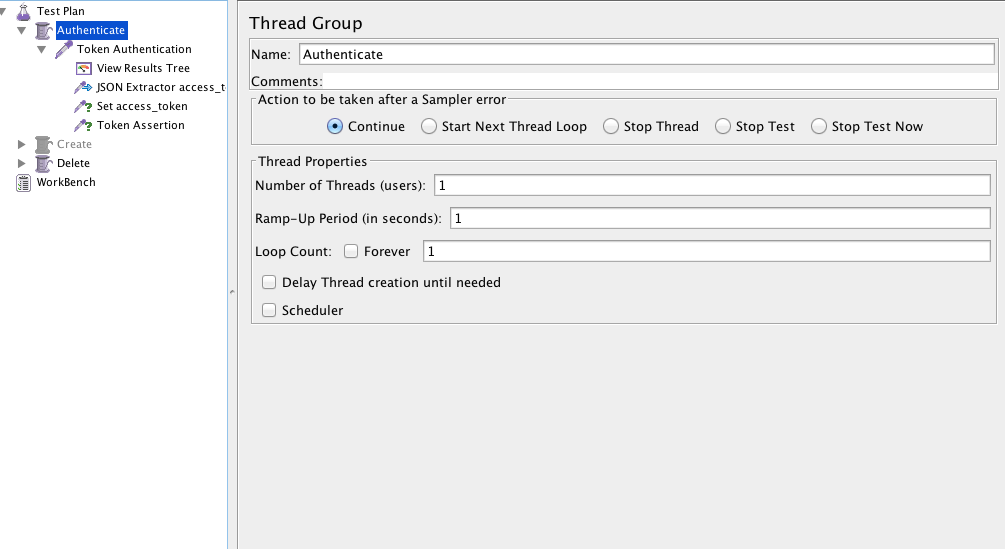
Get json path from an authentication request


This example I am getting json path from an authentication request and use it in another group thread.
Remember install the json plugin for jmeter (If you don’t have), you can do that with homebrew command :

brew install jmeter --with-plugins


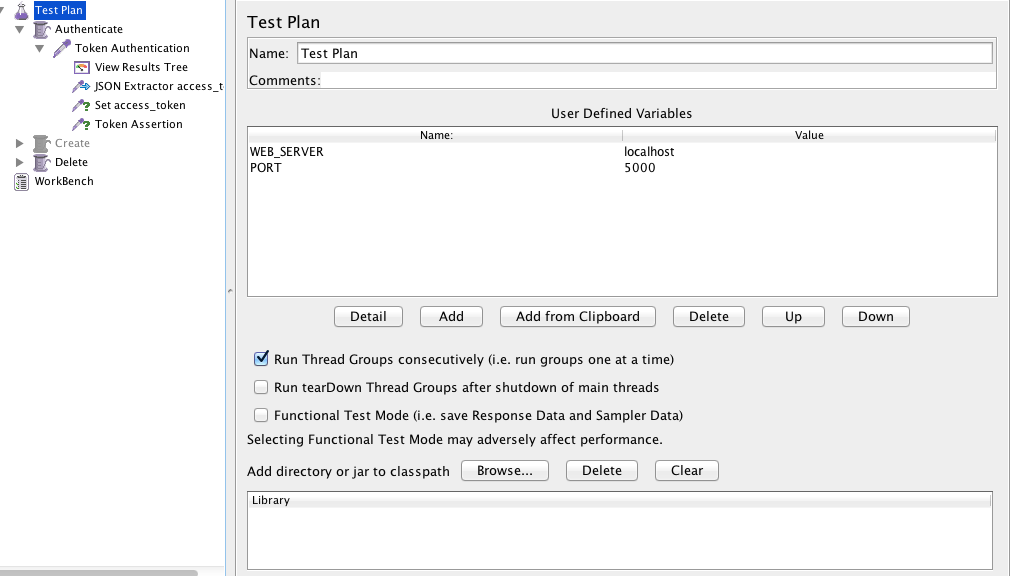
  • Create a test plan and set the web server and the port:


Screen Shot 2015-11-11 at 20.08.27


  • Create a Thread Group:


Screen Shot 2015-11-11 at 20.08.44

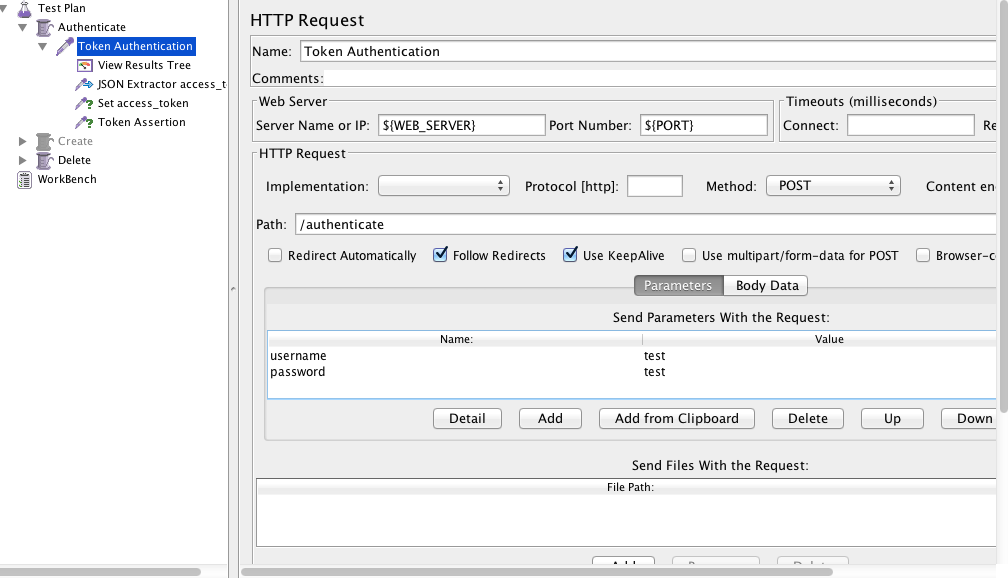
  • Create HTTP Request, use the variables for the server and the password. Put the path of the authentication page, username and the password.


Screen Shot 2015-11-11 at 20.09.09

  • Create Json Path Extractor and put the path Expression and the variable that you will use. You can test if your path is correctΒ here.


Screen Shot 2015-11-11 at 20.10.14


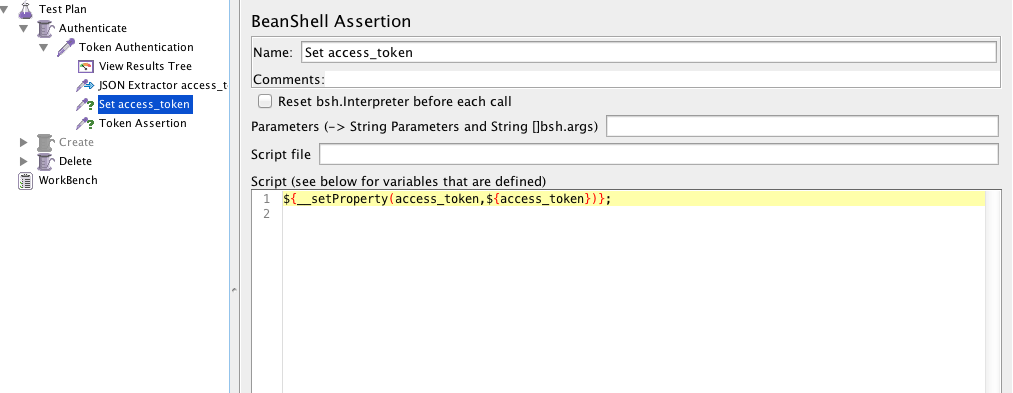
  • Create a beanshell Assertion or Post processor and set the property:


${__setProperty(access_token,${access_token})};

Screen Shot 2015-11-11 at 20.10.27


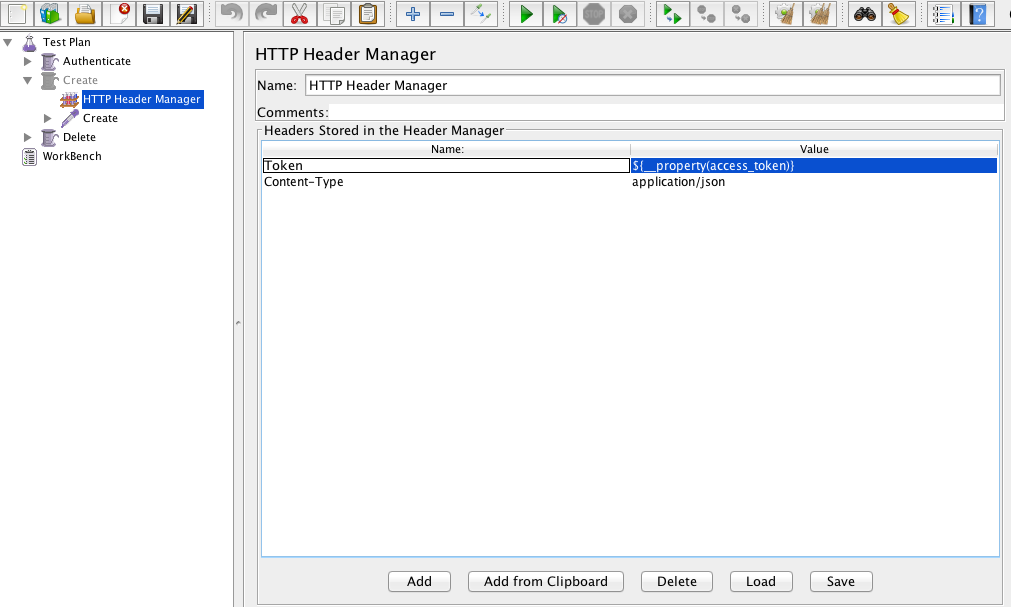
  • Create a new Thread Group and a HTTP Header Manager and use the same variable you used before:


${__property(access_token)}

Screen Shot 2015-11-11 at 20.42.41


  • Create the Listener > View Result Tree and it’s done, you can run the jmeter and see if it’s getting the token and using in the next thread group


See you guys πŸ™‚

Tests Coverage

As a tester you have a different way to think about the scenarios. You know that you need to think beyond the scenarios. So, how do you know when it will be enough ? When will you have 100% of tests coverage ?

You probably already found a bug out of the requirements, and in a specific sequence of steps. I normally find these kind of bugs with exploratory tests, when I have time to free my creative side and start to do different ways to test the same thing. Developers follow the requirements, they don’t do exploratory tests, usuallyΒ they think even the user has the possibility to do the same step in a different way, they shouldn’t (Because it’s not the right way).

In my humble opinion, if your software allow to do the same function in 1000 different ways, you should be prepare to test every single “invalid” way, because this will increase the trust in your software. If I find a single stupid bug in an application, like an error when I send invalid characters, I start to think what type of software was delivered, like neither the basic simple stupid scenario of invalid characters was tested, imagine the more complex ones… This could be low priority, but if you ignore this, you need to face there are many people like me (critical detail vision), that see these kind of things and lose the confidence on the software and to be honest, the respect too.

Developer-Calls-It-Done-Meme

Imagine you have all the requirements:

requirements

And you have the system software in this another circle:

system

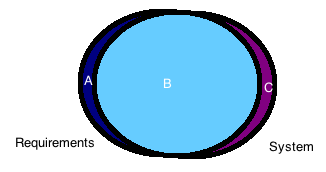
But in the real world, we don’t have every requirement covered by the system, we have something like this:

merge

Which means you will have someΒ parts in your system not covered by your requirements and you have some parts in your requirements not covered by your system. It is exactly in this part that we, testers should start to think about. We need knowledge of both of the parts, and this takes time.

So, you don’t need to worry cover 100% of your tests in the beginning, you need to worry if you know everything about what you are testing, some scenarios you just figure out when you are testing, because you are pretending you are an user. You need a good background, someone to sit next to you, or some good documentation about what you will test, spend some time exploring the app before you start the scenarios. This will create yourΒ first impression of the software and you will be more intoΒ itΒ and the user experience.

Finally, my advice to know if you have a good test coverage is:

  • Exploratory tests, this will help you to find unknown scenarios between system and requirements. This is a type of test you can’t automate, it involves more about your creativity than objective steps. Sometimes is just a different sequence that you do and you can find a critical bug.
  • Kick-off requirements, this is another thing that helps to reduce the unknown scenarios, like if you have an explanation about what a new function will do, you can raise and think in points which you already know and maybe nobody thought yet. As I said before, it’s better if you have a good background about what is coming.
  • System flow, the last key is try to understand the gaps and the flow of the software, like what is the flow to a function update something in database. It seems very technical, but this will help you to think about scenarios that might crash when you do in a different sequence or if you do many times, or if you don’t wait a specific time, this is quality assurance πŸ™‚

See you next week !

Choose the right test framework for mobile


Today I will post more about my experiences inΒ developing the automation project fromΒ scratch. I developed 2 test mobile automation from scratch until now: one was with Calabash and Cucumber and the otherΒ one was with Robotium and Cucumber.

  • Support –Β Be sure that you will have a lot of support from the framework team. If it’s an open source you could have fast support or not, depends of how the developers are busy. So, make sure that you will have a good support when you start to use the framework, go to the github of the project and look for the open issues and what is the frequency they reply and when it was the last bug fixed. Pay attention the frequency of the answers in forums on google groups/linkedin groups/stackoverflow, etc.


  • StabilityΒ – Is stable enough ? How long this framework is in the market ? Really, you don’t want to start your automation with a lot of problems because the framework that you are using is still in beta phase or is still improving a lot of things. You need to be sure that your choice will depend more inΒ you and your code than the framework you’ve chosen.


  • Your app – Yes, you need to know first if your app is stable, with good performance and what are the objectives of your automation. Some frameworks work very well with stable apps, but when you need to test an app with memory leaksΒ orΒ performance problems you won’t be able to even start a scenario. I worked with Calabash most of my mobile automation experience and to be honest I didn’t have any problems to test some unstable apps, but when I did a POC with Espresso, the first simple scenario couldn’t even go further the first step, just because the app wasΒ not stable enough (and this it wasn’t the first priority of the automation – of course if you know that you have performance issues and they are not relevant enough you should be able to carry on the automation).


  • DevelopersΒ – Again, I will use the experience that I had with Espresso. The developers are from Google, which is a famous company. You could think, of course I will choose this one, because google is taking care of it. No, to be honest, I don’t really care about the company, I mayΒ consider the fact of the framework being developed from a good company, but in first place I see all the priorities above. In this example: Espresso is relative new if you compare with robotium or calabash, it takes serious about the performance of the app, so it won’t go further the automation if you have performance problems, the support is really fast and you can find a lot of people who already started use it.


  • Pressure – You need to consider this, probably you will have a developer who will need to push you to use the framework he thinks it is really good (OMG Espresso is being developed by Google, we need to use it, because reasons and stuffs). I think all of us already worked with people like this, I am not saying that you need to ignore them, but just pay attention about what is more important and WHAT IT WILL WORK FOR YOUR COMPANY/APP. Please, not all the appsΒ orΒ companies work in the same way, you don’t need to follow the crowd, just follow a single tip to figure out whichΒ framework is better: POC.


  • POC (Proof of concept) – The last tip and probably the most important one. If you want to know whichΒ framework will work better with your app it’s easy, take one scenario, a basic one, and automate it for the frameworks that you are in doubt πŸ™‚


I hope this helps someone as well. If you have any suggestions/questions, please fell free to comment below. See you next week πŸ™‚

How to install Espresso and Cucumber in Android Studio

You can download a sampleΒ project that is already configured and try first:Β https://github.com/cucumber/cucumber-jvm/tree/master/examples/android/android-studio/Cukeulator

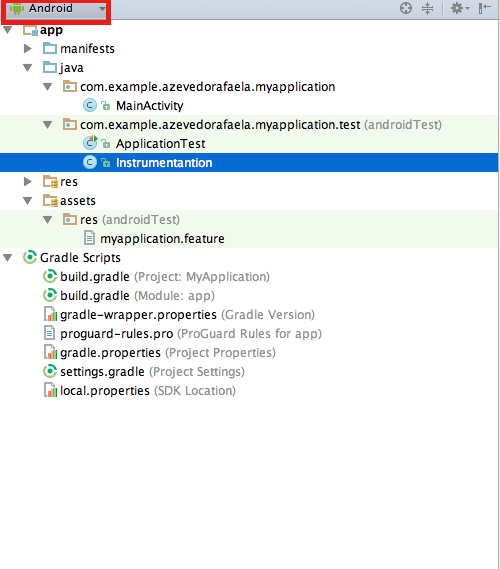
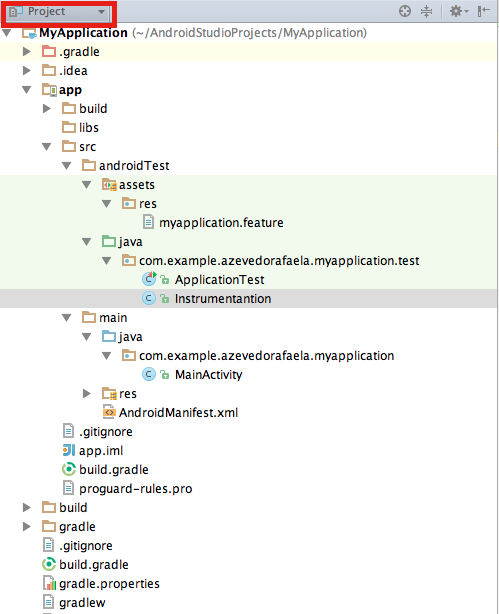
  • The structure of your project should be like this:

On Android View:

Screen Shot 2015-09-12 at 15.14.59

On Project View:

Screen Shot 2015-09-12 at 15.14.46


  • Now, open the build.gradle of your app and write these dependencies:
dependencies {
 androidTestCompile 'com.android.support.test.espresso:espresso-core:2.2'
 androidTestCompile 'com.android.support.test:testing-support-lib:0.1'
 androidTestCompile 'info.cukes:cucumber-android:1.2.4'
 androidTestCompile 'info.cukes:cucumber-picocontainer:1.2.4'
}
  • I had some problems with the version ofΒ java, if you have the same problem just update your java or downgrade/upgrade the version of the pluginΒ which is incompatible.
  • In your build.gradle you will need to write more these configs. Change the name of your application and the package of the runner, following the structure of your project and sync your build.gradle file.
android {
 defaultConfig {
 testApplicationId "com.example.azevedorafaela.myapplication"
 testInstrumentationRunner "com.example.azevedorafaela.myapplication.test.
Instrumentation"
 }
   sourceSets {
     androidTest {
        assets.srcDirs = ['src/androidTest/assets']
     }
   }
} 
  • In your FeatureΒ file you an write your scenario like this:
Feature: Test

Scenario: Espresso with cucumber test
Given I have my app configured
When something happens
Then I should see xx on the display
  • In your Instrumentation class:
package com.example.azevedorafaela.myapplication.test;
import android.os.Bundle;
import android.support.test.runner.MonitoringInstrumentation;
import cucumber.api.android.CucumberInstrumentationCore;
public class Instrumentation extends MonitoringInstrumentation {
private final CucumberInstrumentationCore instrumentationCore = new 
CucumberInstrumentationCore(this);
@Override
 public void onCreate(final Bundle bundle) {
 super.onCreate(bundle);
 instrumentationCore.create(bundle);
 start();
 }
@Override
 public void onStart() {
 waitForIdleSync();
 instrumentationCore.start();
 }
}
  • In your StepsΒ file:
package com.example.azevedorafaela.myapplication.test;

import android.test.ActivityInstrumentationTestCase2;

import com.example.azevedorafaela.myapplication.MainActivity;

import cucumber.api.CucumberOptions;
import cucumber.api.java.en.Given;
import cucumber.api.java.en.Then;
import cucumber.api.java.en.When;
import com.example.azevedorafaela.myapplication.R;
import static android.support.test.espresso.Espresso.onView;
import static android.support.test.espresso.action.ViewActions.click;
import static android.support.test.espresso.assertion.ViewAssertions.
matches;
import static android.support.test.espresso.matcher.ViewMatchers.withId;
import static android.support.test.espresso.matcher.ViewMatchers.withText;

@CucumberOptions(features = "features")
public class MainActivitySteps extends ActivityInstrumentationTestCase2
<MainActivity> {

    public MainActivitySteps(){
        super(MainActivity.class);
        assertNotNull(getActivity());
    }

    @Given("^I have my app configured$")
    public void I_have_my_app_configured() {
    }

    @When("^something happens$")
    public void something_happens(final char op) {

    }

    @Then("^I should see xx on the display$")
    public void I_should_see_xx_on_the_display(final String s) {
    }
}


Now you can start write your espresso code inside of each step. To run your test you need to:

  • In your terminal, open your project folder and run:
gradle --parallel :app:assembleDebugTest
  • Β Now you need istall the apk in your device/simulator:
adb install -r app/build/outputs/apk/app-debug.apk
  • Check if your app is installed. Should display the instrumentation of your app
adb shell pm list instrumentation
  • To run the tests with gradle:
gradle connectedCheck
  • To run the tests with adb:
adb shell am instrument -w com.example.azevedorafaela.myapp
lication/com.example.azevedorafaela.myapplication.test.Instrum
entation
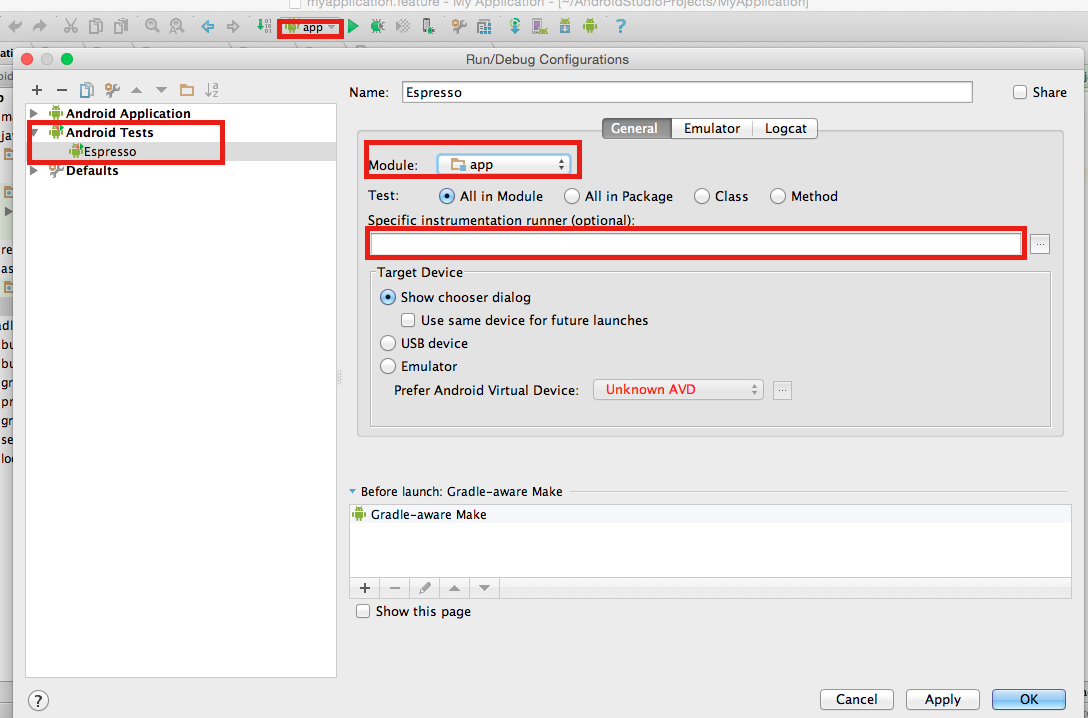
  • To run your tests via android configurations:
    1. Open your run configurations
    2. Create an androidTests
    3. Give a name to this config
    4. Select your module
    5. Don’t write anything on the instrumentation field. (We already configured this in our build.gradle)
    6. Ok.

Screen Shot 2015-09-12 at 15.39.22


Now you can run your cucumber with espresso tests. I hope this “tutorial” helps youΒ as helped me to install everything onΒ my project.

Thank you guys ! See you next week πŸ™‚

10 Steps to setting up the QA Area

Hello guys, today I will post about some steps that you can follow to create the QAΒ area from the scratch.

1 – Make questions like:

  • Do you have any written scenarios ?
  • Who is writing the scenarios and in what phase ?
  • QA team will need create its own scenarios, what phase mayΒ the team do that ?
  • Who will need to lookΒ the scenarios, just QA and dev area ?
  • Who will run the tests DEVΒ and QAΒ only ?
  • How the application is working ?
  • What are the critical scenarios ? Like, what are the scenarios which will crash the functions/app/process ?
  • What are the most used scenarios (Like create an account…) ?
  • What are the scenarios which areΒ more unstable, like if you change a simple thing you will need to test this scenario every time ?
    • What are the most repetitive tests ?
  • Do you need run the regression everyday ? before every release ? (regression tests, exploratory tests, monkey tests, stress tests, performance tests) every time after a push ? (smoke tests)
  • Do youΒ have a QA environment ?
  • If you are in a mobile/web project, remember to make these questions:
    • What are the most used devices/browsers/OS ?
    • What are the most unstable devices/browsers/OS ?
    • What are the most used versions onΒ theseΒ browsers/OS ?
    • What are the most unstable versions onΒ theseΒ browsers/OS ?
  • If you are in a mobile project:
    • The app is hybrid, native or web app ?
  • If you are in a web project:
    • Is this site responsive ?
  • Do you have a process of QA, like SCRUM, Kanban ?
  • If you find a bug in a task, do you return the task or create the bug to be fix separately ?

2 – Understand what will be first priority and until where you will reach (Like performance tests, integration ui tests, etc…), so you can have a big picture of the project

3 – Remember that if you are using BDD, it is just 3 layers (Don’t expose your code)

4 – Decide what are the scenarios that must be in the regression (Priority). Β What are the most repetitive tests ?

5 – Use tags for all the type of scenarios, like smoke, regression, iOS, android, manual. Even manual tests should be in the features inside the automation project

6 – Don’t use too many complex steps in your scenarios

7 – Try to re-use steps so you don’t need waste time

8 – Use examples

9 – Regression tests – Automated tests

  • Choose the tool, do a POC with different frameworks
    • OnΒ this POC, choose the most simple and important scenario (E.g. Create an account)
  • Considerate the language which theΒ developers are using (You never know when you will need help)
  • Distribute the right level of tests between unit (70%), integration (20%) and manual tests (10%) – new functions
  • Include the Automation in your development
  • Decide if you need to create the automation project inΒ the sameΒ or separated project
  • Use CI since the beginning
  • Decide what must to have in the report
  • Choose a good report fromΒ the beginning
  • Structure of Scripts.Β CreateΒ or follow a Code Style Guideline

10 – Form a team of automation and equality the level of knowledge. Make some meetings to prepare people in your team to use the tool with wisdom.

I think it’s pretty much this. Sorry guys if I forgot something… If I remember anything else I will update here. Thank you ! Feel free for comments and your opinion always ! See you next weekΒ !

Open your application with CodedUI and C#

Hello guys, I will post a snippet code which you can use toΒ open your DesktopΒ Windows Application and start your automated test. You can see the code onΒ myΒ githubΒ account too. Do not forget to change the path of your application and maybe the timeout to load the application.


using System;
using System.Diagnostics;
using Microsoft.VisualStudio.TestTools.UITesting.WinControls;
using Microsoft.VisualStudio.TestTools.UITesting.Playback;
using System.Windows.Forms;

namespace ProjectName
{
	public class Application{

	        public static void Open()
	        {
	            System.Diagnostics.Process proc = new System.Diagnostics.
Process();
	            proc.EnableRaisingEvents = false;
	            proc.StartInfo.FileName = "C:\\Users\\yourUser\\AppData
\\Roaming\\Microsoft\\Windows\\Start Menu\\Programs\\UI.appref-ms";
	            try
	            	{ 				
	             	   proc.Start();
			   WaitApplicationLoad();
			}
 		    catch (Exception e)
	             	{
	                   MessageBox.Show(e.Message);
	               	}
	        }

	        public static bool WaitApplicationLoad(){
	        	WinButton button = new WinButton();
			while(!button.WaitForControlExist())
			{
				PlayBack.Wait(5000);
			}
	        }	
	}
}


Why are you usingΒ Playback instead of the Thread.Sleep ?

  1. There is PlaybackSettings.ThinkTimeMultiplier which you can modify your sleep.Β  By default this variable is 1 but you can increase\decrease it to change the wait time all over the code.Β  For example, if you are specifically testing over slow network (some other slow performance case), you can change this variable at one place (or even in the configuration file) to 1.5 to add 50% extra wait at all places.
  2. Playback.Wait() internally calls Thread.Sleep() (after above computation) in smaller chunks in a for-loop while checking for user cancel\break operation.Β  In other words, Wait() lets you cancel playback before the end of the wait whereas sleep might not or throw exception.

I’ve found this code to open the application, but to be honest it’s a recorded code, which means that it’s generated automatically when you are recording the manual clicksΒ on your application. I don’t recommendΒ because with the recording comes a lot of trash code. But you can change the names and remove the trash of the code anyway.


   public class UISwitcherProDesktopTPWindow : WinWindow
    {

        public UISwitcherProDesktopTPWindow()
        {
            #region Search Criteria
            this.SearchProperties[WinWindow.PropertyNames.Name] = 
"Application Name";
            this.SearchProperties.Add(new PropertyExpression(WinWindow.
PropertyNames.ClassName, "WindowsForms10.Window", 
PropertyExpressionOperator.Contains));
            this.WindowTitles.Add("Application Desktop");
            #endregion
        }
    }


Thank you guys, it’s just this for today. See you next week πŸ™‚


References:

https://github.com/rafaelaazevedo/CodedUI/blob/master/OpenApplication.cs

https://social.msdn.microsoft.com/Forums/en-US/a42cf655-e202-4bd4-82e2-036d7015cab5/how-do-i-make-codedui-wait-for-application-to-fully-load?forum=vsautotest

https://social.msdn.microsoft.com/Forums/en-US/a2a0d838-c55e-4304-a508-b66f79f9da69/waitforcontrolexist-returns-false-event-if-control-available-on-screen?forum=vsautotest

http://blogs.msdn.com/b/gautamg/archive/2010/02/12/how-to-make-playback-wait-for-certain-event.aspx

Orthogonal Array Test

What is ?
It’s used forΒ small number of inputs, but with exhaustive number of possibilities. It’s a black box testing with systematic andΒ statistics techniques so, you don’t need to have the knowledge of the implementation of the system. The main aim is maximize the coverage by comparatively lesser number of test cases

Orthogonal arrays can be applied in user interface testing, system testing, regression testing, configuration testing and performance testing.


What are the benefits ?

Remember Pairwise? So, the benefits are the same, you will have a precisely test. 100% of Orthogonal Tests implies 100% of Pairwise.

  • Precise tests
  • Generate TestCases moreΒ quickly and cheaply
  • Increase coordination among the team
  • Easy for managers measure the team’s performance
  • Make the analysis simple
  • Isolate defects


Why don’t use it ?

Well, as any other technique we can find some negative points:

  • Testing will fail if youΒ fail to identify the good pairs
  • Probability of not identifying the most important combination which can result in losing a defect
  • This technique will fail if youΒ do not know the interactions between the pairs
  • Applying only this technique will not ensure the complete coverage
  • It can find only those defects which arise due to pairs, as input parameters

So, you need to choose wisely because not all the applications will suit in this technique, this depends of the behaviour of your application. You need to measure the priority points of the project as well, like if you want to cover 100% of the tests of cover a good part of the tests and save a lot of time…


How to use it ?

  1. Identify the independent variables. These will be referred to as β€œParameter x”
  2. Identify the values which each variable will take. These will be referred as β€œTest Case x”
  3. Search for an orthogonal array that has all the factors from step 1 and all the levels from step 2
  4. Map the factors and levels with your requirement
  5. Translate them into the suitable test cases
  6. Look out for the left over or special test cases (if any)


Examples:

If we have 3 parameters, each can have 3 values then the possible Number 
of tests using conventional method is 3^3 = 27
While the same using OAT, it boils down to 9 test cases.

Screen Shot 2015-08-19 at 18.14.37

The array is orthogonal, because all possible pair-wise combinations 
between parameters occurs only once.
The given L9 Orthogonal Array assess result of test cases as follows:

Single Mode Faults - Single mode faults occur only due to one parameter. 
For example, in above Orthogonal array if test cases 7, 8 and 9 show error
, we can expect that value 3 of parameter 1 is causing the error. 
Likewise we can detect as well as isolate the error.

Double Mode Fault - Double mode fault is caused by the two specific 
parameters values interacting together. Such an interaction is a 
harmful interaction between interacting parameters.

Multimode Faults - If more than two interacting components produce the 
consistent erroneous output, then it is a multimode fault. 
Orthogonal array detects the multimode faults.


As always, if you have any suggestion or question please feel free to comment below.

Thank you ! See you next week πŸ™‚


References:

http://www.tutorialspoint.com/software_testing_dictionary/orthogonal_array_testing.htm

http://www.softwaretestinghelp.com/combinational-test-technique/

https://en.wikipedia.org/wiki/Orthogonal_array_testing

Parallel tests with Maven – Junit

Hello guys,

Today I will post about multithreading with Maven.Β We have some plugins which are able to do the thread safe in your tests:

  • Surefire offers a variety of options to execute tests in parallel, allowing you to make best use of the hardware at your disposal.
  •  

  • Forking in particular can also help keeping the memory requirements low.


How can you configure the test executionΒ ?

 
One can impose thread-count limitations on suites, classes or methods using one or more of the parameters threadCountSuites, threadCountClasses and threadCountMethods. If only threadCount is specified, Surefire attempts to estimate the thread counts for suites, classes and methods and reuses the threads in favor of a leaf, e.g. parallel methods (possibly increasing concurrent methods).
 
In the next post I will do some tests with junit and testng, so I can talk more about this plugin with each framework, but for now you can see the example pages:Β JUnit and TestNG.

 
As an example with an unlimited number of threads, there is maximum of three concurrent threads to execute suites: parallel = all, useUnlimitedThreads = true, threadCountSuites = 3.Β In the secondΒ example the thread-counts represent a ratio, e.g. for parallel = all, threadCount = 16, threadCountSuites = 2, threadCountClasses = 3, threadCountMethods = 5. Thus the concurrent suites will be 20%, concurrent classes 30%, and concurrent methods 50%.
 
Finally, the threadCount and useUnlimitedThreads may not be necessarily configured if the equivalent thread-counts are specified for the value in parallel.
 
The parameters parallelTestsTimeoutInSeconds and parallelTestsTimeoutForcedInSeconds are used to specify an optional timeout in parallel execution. If the timeout is elapsed, the plugin prints the summary log with ERROR lines: “These tests were executed in prior to the shutdown operation”, and “These tests are incomplete” if the running Threads were interrupted.
 
The important thing to remember with the parallel option is: the concurrency happens within the same JVM process. That is efficient in terms of memory and execution time, but you may be more vulnerable towards race conditions or other unexpected and hard to reproduce behavior.


Parallel Test Execution and Single Thread Execution

 
As mentioned above the parallel test execution is used with specific thread count. Since of Surefire 2.18, you can apply the JCIP annotation @net.jcip.annotations.NotThreadSafe on the Java class of JUnit test (test class, Suite, Parameterized, etc.) in order to execute it in single Thread instance. The Thread has name “maven-surefire-plugin@NotThreadSafe“.
 
This way the parallel execution of tests classes annotated with @NotThreadSafe are forked in single thread instance (don’t mean forked JVM process).
 
If the Suite or Parameterized is annotated with @NotThreadSafe, the suite classes are executed in single thread. You can also annotate individual test class referenced by Suite, and the other unannotated test classes in the Suite can be subject to run in parallel.

 
Note: As designed by JUnit runners, the static methods annotated with @BeforeClass and @AfterClass are called in parent thread. Assign classes to the @NotThreadSafe Suite to prevent from this trouble.


Forked Test Execution


The parameter forkCount defines the maximum number of JVM processes that Surefire will spawn concurrently to execute the tests. It supports the same syntax as -T in maven-core: if you terminate the value with a ‘C’, that value will be multiplied with the number of available CPU cores in your system. For example forkCount=2.5C on a Quad-Core system will result in forking up to ten concurrent JVM processes that execute tests.

 
The parameter reuseForks:Β to reuse the processes to execute the next tests (reuseForks=true/false).Β The default setting is forkCount=1/reuseForks=true, which means that Surefire creates one new JVM process to execute all tests in one maven module.Β forkCount=1/reuseForks=false executes each test class in its own JVM process, one after another.Β You can use the place holder ${surefire.forkNumber} within argLine, or within the system properties (both those specified via mvn test -D... and via systemPropertyVariables).

 
The following is an example configuration that makes use of up to three forked processes that execute the tests and then terminate. A system property databaseSchema is passed to the processes, that shall specify the database schema to use during the tests. The values for that will be MY_TEST_SCHEMA_1, MY_TEST_SCHEMA_2, and MY_TEST_SCHEMA_3 for the three processes.
 
<plugins>
[...]
  <plugin>
    <groupId>org.apache.maven.plugins</groupId>
    <artifactId>maven-surefire-plugin</artifactId>
    <version>2.18.1</version>
    <configuration>
        <forkCount>3</forkCount>
        <reuseForks>true</reuseForks>
        <argLine>-Xmx1024m -XX:MaxPermSize=256m</argLine>
        <systemPropertyVariables>
            <databaseSchema>MY_TEST_SCHEMA_${surefire.forkNumber}</databaseSchema>
        </systemPropertyVariables>
    </configuration>
  </plugin>
[...]
</plugins>


In case of a multi module project with tests in different modules, you could also use, say, mvn -T 2 ... to start the build, yielding values for ${surefire.forkNumber} ranging from 1 to 6.
 
By setting reuseForks=true, you can reuse the same context for consecutive tests. And as many tests tend to use and access the same test data, you can avoid database locks during the concurrent execution by using distinct but uniform database schemas.
 
As reuseForks=false creates a new JVM process for each test class, using parallel=classes would have no effect. You can still useparallel=methods, though.
 
When using reuseForks=true and a forkCount value larger than one, test classes are handed over to the forked process one-by-one. Thus, parallel=classes would not change anything. However, you can use parallel=methods: classes are executed in forkCountconcurrent processes, each of the processes can then use threadCount threads to execute the methods of one class in parallel.


Examples:

 
In your pom.xml file:

Add ths surefire plugin.

<plugins>
[...]
  <plugin>
    <groupId>org.apache.maven.plugins</groupId>
    <artifactId>maven-surefire-plugin</artifactId>
    <version>2.18.1</version>
    <dependencies>
      <dependency>
        <groupId>org.apache.maven.surefire</groupId>
        <artifactId>surefire-junit47</artifactId>
        <version>2.18.1</version>
      </dependency>
    </dependencies>
  </plugin>
[...]
</plugins>


After, you must set the parallel parameter, and may change thethreadCount or useUnlimitedThreads attribute.
 

<plugins>
    [...]
      <plugin>
        <groupId>org.apache.maven.plugins</groupId>
        <artifactId>maven-surefire-plugin</artifactId>
        <version>2.18.1</version>
        <configuration>
          <parallel>methods</parallel>
          <threadCount>10</threadCount>
        </configuration>
      </plugin>
    [...]
</plugins>


As of Surefire 2.7, no additional dependencies are needed to use the full set of options with parallel. As of Surefire 2.16, new thread-count attributes are introduced, namely threadCountSuites, threadCountClasses and threadCountMethods. Additionally, the new attributesΒ parallelTestsTimeoutInSeconds and parallelTestsTimeoutForcedInSeconds are used to shut down the parallel execution after an elapsed timeout, and the attribute parallel specifies new values.

Thank you guys ! Hope you can enjoy and search even more about this. I’ve just summarised what I think it’s more important to know about junit, maven and parallel tests πŸ™‚

As always if you have some question, suggestion feel free to comment below. I will reply as soon as possible and if I don’t know I will find someone to help me reply to you. Have an excellent weekend everyone ! See you next week !
 
 
Resources:

https://maven.apache.org/surefire/maven-surefire-plugin/examples/fork-options-and-parallel-execution.html

http://maven.apache.org/surefire/maven-surefire-plugin/examples/junit.html