Cucumber – First Steps

Hello Guys !

I hope that you didn’t had any problem with installation, BUT how I had, I will put some solutions and some things that I discovered using everyday.

1 – The calabash don’t support IOS 7, you have to start with instruments (But I still didn’t get) and nevertheless you can’t use the tool record and play for the drag gesture.

2 – If your app isn’t generated in the root folder, you have to write in the launch.app inside the Support’s folder where is your app builded with framework. Like, I generated with my user, rafaela, so the initial folder is: Users/rafaela/Library… and for calabash find the app alone, you have to builded the app in /var/root/Library….

3 – When I have to start the app with console, I have to write the folder where it is, for the same reasons in the step before, like: APP_BUNDLE_PATH=”XXX/XxxxxX/DerivedData/” calabash-ios console

Cucumber and Calabash – IOS Automation

Hello guys !

I will teach how configure the cucumber and calabash in your mac and some others issues that I had when I set up cucumber. Write this commands in the terminal and inside of the project’s folder.

– First you have to install and update the rvm and ruby stable in your mac:

\curl -sSL https://get.rvm.io | bash -s stable –ruby

– Uninstall others ruby and Clean the rvm if needed

sudo rvm uninstall 2.0.0

sudo rvm cleanup all

– Use the last stable version of the ruby

sudo rvm get stable

– Search in the list the latest version of ruby

sudo rvm list known

– Install the ruby

sudo rvm install 2.1.2

– Let the last version Default

rvm –default use 2.1.2

– And install cucumber

sudo gem install cucumber

– and calabash-cucumber

sudo gem install calabash-cucumber

– Create the folders of the cucumber

sudo calabash-ios gen

– In the folder of the X-code project

sudo calabash-ios setup

Just remember to install the calabash on Workspace, not on the Project.

Maybe you will have to install pods and other things of your project, like here I had. After that you can generate the build of the calabash of your project, but remember you have to change the target the project to YourProject-cal.

I had some problems, like to calabash to find the folder of the app’s build. And I just edited the line of APP_BUNDLE_PATH inside the 01_launch.rb in the folder features/support and put the full path where the app is.

– To test if the configuration is ok, just write in the terminal > inside project’s folder

cucumber

If you have any problem, just comment below. In next steps I will show how you can run the tests and functions in general.

Bye 🙂

CTAL-TM ! Free practice !

Hello guys,

Sorry for my absence, but it is really necessary. I started study for my Exam CTAL-TM and the exam will be on December, 6.

For now, I will put a site that I am doing the simulate of the exam. It is very hard to find some simulated or files to study for this exam, and I didn’t know that until now.

http://www.free-online-exams.com/Pages/Exams/DumpsQA.aspx?d=ISTQB-iSQI&c=CTAL-TM-UK&q=1

Wish me Good studies !

Thank you 🙂

What Automatize, what don’t Automatize, Objectives and Benefits of Automation

Hello guys, I feeling need of explain about what is the objectives in automation.

So let’s go !

Objectives of Automation

  • Testing and automation have different objectives
  • Run regression tests overnight and weekends
  • Reduce testing staff
  • Find more bugs
  • Reduce elapsed time for testing
  • Automate x% of the testing (Yes, DON’T automates 100% every time, because neither ever it is possible automate everything)
  • If useful tests, then making use of under-used resource is a good idea
  • Run most important tests using spare resource (top 10% of usefulness rating, run out of hours)
  • Find more regression bugs (measured by increase in DDP of regression tests by 10% over 6 months)
  • Reduce elapsed time of tool-supported activities (measured for maintenance & failure analysis time)
  • Improve automation support for testers (testers rate usefulness of automation support, how often utilities/automation features are used)
  • Remember: Good objectives for automation are: measurable, realistic and achievable
  • Improve the completeness and consistency

What automatize ?

  • Regression Test
  • Smoke Tests
  • Repeated Tasks
  • Mathematical Calculations
  • Critical Functionalities

What don’t automatize ?

  • Prototypes
  • Functionality that are little used
  • Functionality that needs visual inspection
  • New Functionalities

Benefits of Automation

Automation offers system-wide and network-wide benefits by simplifying your operating environment. You can reduce the amount of manual intervention required to manage operating systems, subsystems, application programs, network devices, and many other products.

The need to simplify operations increases as you add hardware and software products to your data center, data centers to your network, and personnel to your data-processing staff. By simplifying your operations, NetView automation can help you meet required service levels, contain costs, and make efficient use of your operation staff.

NetView automation helps you:

Improve system and network availability
Remove constraints to growth
Increase operator productivity
Ensure more consistent operating procedures

Fonts:

http://pic.dhe.ibm.com/infocenter/tivihelp/v3r1/index.jsp?topic=%2Fcom.ibm.itnetviewforzos.doc_5.2%2Fdqal2mst31.htm

http://www.bcs.org/upload/pdf/aug09-automationobjectives.pdf

http://www.slideshare.net/intellecta/introducao-a-automao-de-testes-de-softwares

Configuration to tests with device (netbeans) – Calabash Android (Cucumber)

Acess the folder plataform-tools of Android Sdk and execute:
./adb start-server

Verify if the device was connected on pc, list of device and emulator:
./adb devices

Ps. 1 : Case give some error telling that the device wasn’t connected, verify if the USB Debugging Mode are enable on device (Settings> Developer Options > USB Debugging)

Fonts: http://stackoverflow.com/questions/7394868/netbeans-android-compile-test-on-real-device-unix-osx

Ps. 2 :If the your environment be configurate to run with emulator on Eclipse is necessary adjust the configurations of execution, it is written on the link: http://www.donnfelker.com/running-your-android-app-on-a-device/

*Execute the Apk on Device:
– If you have an emulator and a device connected in the same time, execute:
calabash-android to run apkfile.apk ADB_DEVICE_ARG=SERIAL (Serial captured of the device’s list, previously)

– Execute the console irb of apk
Same way on emulator, execute:
calabash-android console apkfile.apk

* Don’t forget of do the start of server on shell:
start_test_server_in_background

Contributed by Lieuthier, Eduardo

Send Message Skype in the middle of automation

Hello guys, sorry for my lateness to write for you, but I’m trying to gain the certificate of CTAL, and I have studied a lot. So, I will show one function to send a skype message in the middle of automation. This is very usefull when occurs some error and you have to send on the exactly moment to some developer or responsible.

First you have to download the lib of skype: skype-java-api-1.4.jar , after creates a class, and after the function.

This is my example of function, you have to installed the skype in the machine that will execute the automation.

Add the people will receive this message. In the skype config permits others application use, maybe you have to execute the first time and after, go to skype and enable the advertisement that will be showed, asking for permission of use skype.

Function:

package Test;

import com.skype.ContactList;            // Import the classes of lib.
import com.skype.Friend;
import com.skype.Skype;
import com.skype.SkypeException;

public class MessageSkype_Send {

public static void Errors_Send() throws SkypeException {
try {

ContactList list = Skype.getContactList();

Friend resp = list.getFriend(userIdSkype);        // Change the skype name
resp.send(“(*) Error Automation \n“);            // This is the message that will be send

} catch (Exception e) {

System.println(e.getMessage());
}
}
}

Understanding BDD – Behavior Driven Development

Hello guys,

I will explain what is BDD in a simple way. It’s a development technique, who extends quality assurance, design, requirements and validations. The BDD is divided by cycles, the cycle outside-in.

1. Scenario: It’s is a specific functionality, very clear and exact.

2. Specification for the scenario: Write a specification that explains for steps how the scenario will work (for users).

3. Specification of unity: Write a specification that explains how the scenario will works, but this time the specification will be for development, in some class or function.

4. Make the specification of unity works: This artefact of software should be done of a minimum and simple way. The most simple way for the specification work.

5. Refactor:  The specification that was made simple, will be re-structured for the new design.

6. Refactor: This re-structure will work in a different way , of the implementation (artifacts of software) to the requirements (user), in this level, new functions and design can be introduced.

Structure:

– (Given) that specify the pre-conditions for the occurrence of the action of the interest scene;
– (When), whose function is to specify the events that must occur to the scenario to run;
– (Then) that specify the expectations regarding the results of the execution of events in the scenario.

References:

ASTELS, D. Test-Driven Development: A Practical Guide. Upper Saddle River, NJ: Pearson Education, 2003.
BAIN, S. Emergent Design: The Evolutionary Nature of Professional Software Development. New York: Addison-Wesley, 2008.
BECK, K. Test-Driven Development By Example. New York: Addison-Wesley, 2002.
BECK, K. Implementation Patterns. New York: Addison-Wesley, 2007.
BECK, K.; ANDRES, C. Extreme Programming Explained: Embrace Change. 2. ed. New York: Addision-Wesley, 2004.
BOEHM, B. Software Engineering Economics. New York: Prentice-Hall, 1981.
CHELIMSKY, D. et al. The RSpec Book: Behaviour Driven Development with RSpec, Cucumber, and Friends. Dallas: The Pragmatic Bookshelf, 2010.
COHN, M. User Stories Applied: For Agile Software Development. New York: Addison-Wesley, 2004.
CRISPIN, L. Driving Software Quality: How Test-Driven Development Impacts Software Quality. IEEE Software, IEEE, v. 23, n. 6, p. 70, 2006.
ERDOGMUS, H.; MORISIO, M.; TORCHIANO, M. On the Effectiveness of Test-First Approach to Programming. IEEE Transactions on Software Engineering, IEEE, v. 31, n. 3, p. 226, 2005.
EVANS, E. Domain-Driven Design: Tackling Complexity in the Heart of Software. New York: Addison-Wesley, 2004.
FOWLER, M. et al. Refactoring: Improving the Design of Existing Code. New York: Addison-Wesley, 1999.
FREEMAN, S.; PRYCE, N. Growing Object-Oriented Software, Guided By Tests. New York: Addison-Wesley, 2009.
JANZEN, D. Software Architecture Improvement Through Test-Driven Development. In: Proceedings of the 20th Annual ACM SIGPLAN Conference on Object-Oriented Programming, Systems, Languages and Applications. [S.l.: s.n.], 2005.
JANZEN, D.; SAIEDIAN, H. On the Influence of Test-Driven Development on Software Design. In: Proceedings of the 19th Conference on Software Engineering Education & Training. North Shore Oahu, HI: [s.n.], 2006. p. 141–148.
JEFFRIES, R.; MELNIK, G. TDD: The Art of Fearless Programming. IEEE Software, IEEE, v. 24, n. 3, p. 24, 2007.
KOSKELA, L. Test Driven: TDD and Acceptance TDD for Java Developers. New York: Manning, 2007.
MARTIN, R. Clean Code: A Handbook of Agile Software Craftsmanship. New York: Prentice-Hall, 2008.
MESZAROS, G. xUnit Patterns: Refactoring Test Code. New York: Addison-Wesley, 2007.
NORTH, D. Introducing Behaviour-Driven Development. 2006. Disponível em http://dannorth.net/introducing-bdd, acesso em 26/02/2010.
NORTH, D. What’s In a Story? 2007. Disponível em http://dannorth.net/whats-in-a-story, acesso em 01/03/2010.
PRESSMAN, R. Engenharia de Software. 6. ed. São Paulo: McGraw-Hill, 2006.
SOMMERVILLE, I. Engenharia de Software. 8. ed. São Paulo: Pearson Addison-Wesley,
2007.
WILLIAMS, L.; MAXIMILIEN, M.; VOUK, M. Test-Driven Development as a Defect Reduction Practice. In: Proceedings of the 14th International Symposium on Software
Reliability Engineering
. [S.l.: s.n.], 2003.

Understanding encapsulation

This technique is used to hide an idea, when you don’t want expose the inter details to the users.

As a more technical example we can describe what happens in a sales system, where we have records of employees, users, managers, clients, and other products. If happens a problem in the user, only this sector will be fixed and does not affect the others.

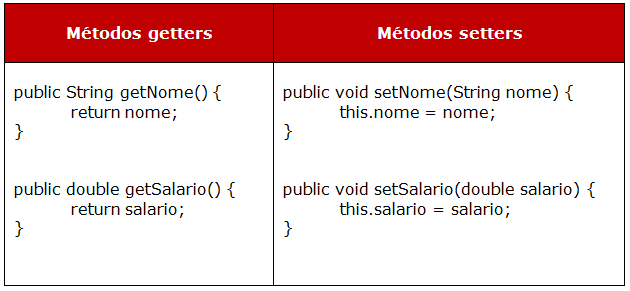
In a process of encapsulating the attributes of the classes are kind of private. To access these types of modifiers, you must create getters and setters methods.

The methods setters are used to change the information of a property of an object, and getters to return the value of this property.

See an example of encapsulation, in Listing 2 creates the attributes private (private) and is carried out the process of generating getters and setters methods.

Image

Code:

public class Funcionario {
    private double salario;
    private String nome;
    public String getNome() {
        return nome;
    }
    public void setNome(String nome) {
        this.nome = nome;
    }
    
    public void setSalario(double salario) {
        this.salario = salario;
    }
    
    public double getSalario() {
        return salario;
    }
}

So, is instantiated class “Employee”, where the variable reference is used to invoke methods setters, reporting any data. In the end, the getters is used within the “System.out.println” to output the results that were passed in the methods setters.

Code:

public class TestaFuncionario {
    public static void main(String[] args) {
        Funcionario funcionario = new Funcionario();
        funcionario.setNome("Thiago");
        funcionario.setSalario(2500);
        
        System.out.println(funcionario.getNome());
        System.out.println(funcionario.getSalario());
    }
}

This is easy and helps you avoid pass a lot of parameters in methods, classes and functions.

Introducing a BDD

Hello, my friends ! Look what I’ve found. A simple text about tests in BDD (Behavior Driven Development). It is very interesting and usefully.


“[…]

Test method names should be sentences

My first “Aha!” moment occurred as I was being shown a deceptively simple utility called agiledox, written by my colleague, Chris Stevenson. It takes a JUnit test class and prints out the method names as plain sentences, so a test case that looks like this:

public class CustomerLookupTest extends TestCase {
    testFindsCustomerById() {
        ...
    }
    testFailsForDuplicateCustomers() {
        ...
    }
    ...
}

renders something like this:

CustomerLookup
- finds customer by id
- fails for duplicate customers
- ...

The word “test” is stripped from both the class name and the method names, and the camel-case method name is converted into regular text. That’s all it does, but its effect is amazing.

Developers discovered it could do at least some of their documentation for them, so they started to write test methods that were real sentences. What’s more, they found that when they wrote the method name in the language of the business domain,the generated documents made sense to business users, analysts, and testers.”


Font: http://dannorth.net/introducing-bdd/

Adding and deleting a cookie with Selenium

It’s simple 🙂

// Now set the cookie. This one’s valid for the entire domain
Cookie cookie = new Cookie(“key”, “value”);
driver.manage().addCookie(cookie);

// And now output all the available cookies for the current URL
Set<Cookie> allCookies = driver.manage().getCookies();
for (Cookie loadedCookie : allCookies) {
System.out.println(String.format(“%s -> %s”, loadedCookie.getName(), loadedCookie.getValue()));
}

// You can delete cookies in 3 ways
// By name
driver.manage().deleteCookieNamed(“CookieName”);
// By Cookie
driver.manage().deleteCookie(loadedCookie);
// Or all of them
driver.manage().deleteAllCookies();

I’ve found this in the selenium site

Font: http://docs.seleniumhq.org/docs/03_webdriver.jsp