7 Possible issues and fixes – Calabash android

  • 1. To get rid of warning about ansicolor (windows):

  • open cmd and navigate to the unzipped folder
  • Navigate to x64 (if you have a 64 bit machine) otherwise navigate to x86
  • Execute ‘ansicon.exe -i’ to install and add ansicon to your Windows
  • Run your cucumber test and you should
  • get the colored output result on Windows


  • 2. Warning about gem json ~>1.7.7 (Windows):

  • If the above, doesn’t fix it,
    • uninstall Ruby.
    • Install Ruby 1.9.x again
    • Make sure you also install the corresponding Devkit
    • gem install json -v 1.7.7
    • bundle update json


  • 3. Jarsigner: unable to sign jar

  • Rename the .apk file to .zip
  • Unpack the .zip file and remove the META-INF folder
  • Zip the folder again and rename it to .apk (zip -r <xxx.apk> *)
  • Sign the apk:
  • Copy your “Calabash” folder having “feature” file.


  • 4. No MD5 fingerprint found: (RuntimeError)

  • Paste it into your android workspace having gen, res, src folder. eg., ~/.android
  • Now, Test server will create inside your calabash folder.
  • Navigate to new path and again run apk file.


  • 5. If the AndroidManifest.xml is missing:

  • To create AndroidManifest.xml file:  where should this be?
  • calabash-android extract-manifest Downloads\mytest.apk


  • 6. If adb device not showing up in “adb devices”:

  • adb kill-server adb start-server adb devices


  • 7.Cannot load such file rspec/expectations:

  • Make sure you add the foll. line in your Gemfile
  • gem ‘rspec’

Using Excel Sheet as BD – Selenium – (Read)

Hello guys !

Today I will post about how to use Excel Sheet as a database with Selenium.

– First create your BD as this example:

Sheet 1 – Consumers

Untitled


Sheet 2 – Products: Now, you can create other sheets with information about the products or something that you want.

– Always save as .xls

– Create a class for open the Data base (Sheet) – remember download the lib jxl > Link with download of all versions

import java.io.File;
import java.io.IOException;
import jxl.Sheet;
import jxl.Workbook;
import jxl.WorkbookSettings;
import jxl.read.biff.BiffException;


public class OpenDataBase {


Sheet sheet;
Workbook bddatabase;

    public Sheet Open() throws BiffException, IOException, Exception {

WorkbookSettings ws = new WorkbookSettings();
ws.setEncoding("Cp1252");

//Change for the folder of the .xls
bddatabase = Workbook.getWorkbook(new File("BD//BDFile.xls"), ws);  

//Change the name of your sheet
sheet = bddatabase.getSheet("tbclient");
return sheet;
}

public void Close(Workbook bddatabase) throws BiffException, IOException, Exception {

    bddatabase.close();

    }
}


– Create a class to list all the informations inside of the sheet (table):

import org.openqa.selenium.WebDriver;
import java.io.IOException;
import jxl.Cell;
import jxl.read.biff.BiffException;
import org.openqa.selenium.By;


public void TestCase() throws BiffException, IOException, Exception {

// open Data base
opendatabase.Open();

// bring the cells from BD
for (int i = 1; i < opendatabase.sheet.getRows(); i++) {
Cell id_client = opendatabase.sheet.getCell(0, i);
Cell casenameBD = opendatabase.sheet.getCell(1, i);
Cell email = opendatabase.sheet.getCell(2, i);
Cell name = opendatabase.sheet.getCell(3, i);
Cell surname = opendatabase.sheet.getCell(4, i);
Cell date_born = opendatabase.sheet.getCell(5, i);
Cell gender = opendatabase.sheet.getCell(6, i);
Cell discount = opendatabase.sheet.getCell(7, i);
Cell pass = opendatabase.sheet.getCell(8, i);


driver.findElement(By.id("field")).sendKeys(id_client.getContents());
driver.findElement(By.id("field")).sendKeys(casenameBD.getContents());
driver.findElement(By.id("field")).sendKeys(email.getContents());
driver.findElement(By.id("field")).sendKeys(name.getContents());
driver.findElement(By.id("field")).sendKeys(surname.getContents());
driver.findElement(By.id("field")).sendKeys(date_born.getContents());
driver.findElement(By.id("field")).sendKeys(gender.getContents());
driver.findElement(By.id("field")).sendKeys(discount.getContents());
driver.findElement(By.id("field")).sendKeys(pass.getContents());

}

}


If you have any questions, just write below !

Thank you 🙂

Refactoring by the Book

Refactoring is one of the techniques that allows us to be agile and apply an evolutionary approach to our design.  A core XP practice and one of TDD’s pillars, constant refactoring keeps the evil design upfront at bay and maintain our codebases in a healthy state. One of the few things I think most developers agree on is that refactorings are helpful and should be done at some point in any project, preferably in a continuous manner. The problem is that, like every other developer term, the definition of refactoring has become muddled over time. Refactoring is now commonly conflated with it’s more dangerous cousin, the Rewriting. The term is used whenever we want to improve the design of some part of a codebase, either a single class or entire subsystems.

The original refactorings

Although they existed a long time before that, Refactorings were introduced to the large world by Martin Fowler’s book Refactoring: Improving the Design of Existing Code where he writes about coding practices from legendary SmallTalkers like Kent Beck and Ward Cunningham. A definition from the same book: “Refactoring is a disciplined technique for restructuring an existing body of code, altering its internal structure without changing its external behavior. Its heart is a series of small behavior preserving transformations. Each transformation (called a “refactoring”) does little, but a sequence of transformations can produce a significant restructuring. Since each refactoring is small, it’s less likely to go wrong. The system is kept fully working after each small refactoring, reducing the chances that a system can get seriously broken during the restructuring.” The original refactorings were presented using a pattern format. They have names, likeExtract Method or Replace Temp with Query, an explanation of when to use the refactor and a list of steps you have to follow in order to apply them. You can browse the refactorings catalog on refactoring.com. They are meant to be applied in a conscious manner, one after the other, until your design is good enough for you to move forward. Words like disciplined and small are present on the very definition of the term. When you wildly rewrite large parts of your system, you are not refactoring, even if you are just trying to achieve a better design. The system needs to be kept working the whole time. That means the tests need to stay green! The TDD flow  is supposed to be Red -> Green -> Refactor, and not Red -> Green -> Red -> Red -> Oh nooooo! -> Rollback.

Some ways to refactor on the green
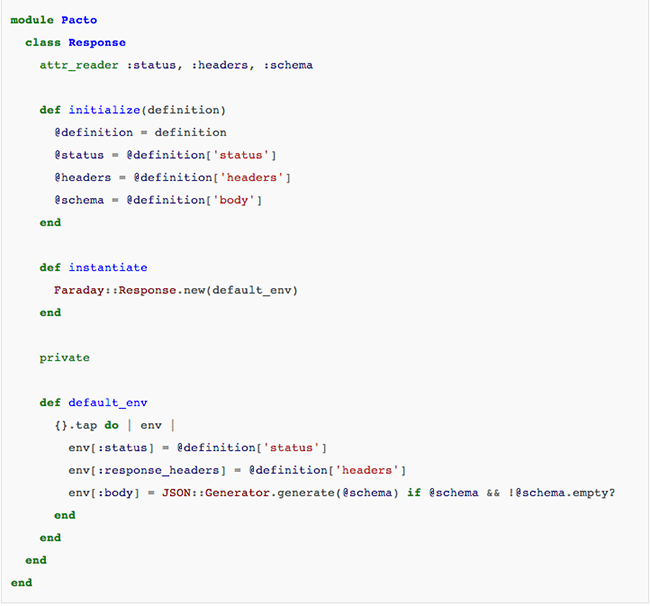
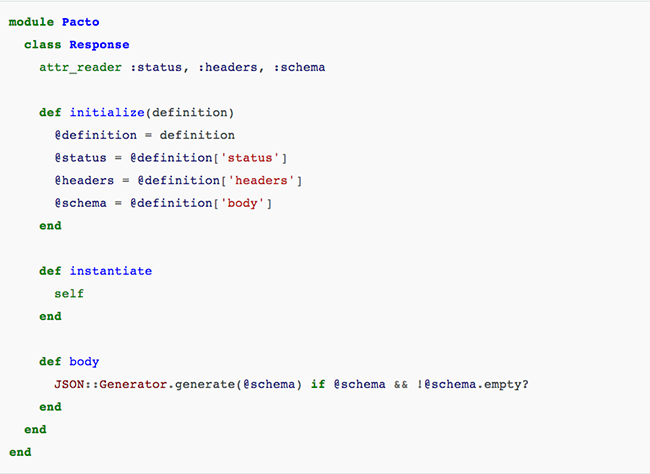
Let’s see how we can refactor some code in a more disciplined manner, keeping the tests always on the green. Instead of working on some contrived User class we are going to use a real example, the class Request from the Pacto project. You don’t need to understand what the class does, just pay attention to the code structure and how we apply the refactorings iteratively.
marcosccm-refactoring-1
This class has many small issues, but the main thing I want to do is to remove theinstatiate method.  This method is forcing the Pacto codebase to deal with instances of a foreign class, Faraday::Response.  The thing is that Faraday::Response is a very simple class, and we can easily implement the interface we need on the Pacto::Response class itself, eliminating the dependency on external code. Step 0 – Check the current tests Before we start to refactor, a very important step is to check if the code in question is actually covered by tests. A quick way to do it is to just do  the refactoring, in our case simply remove the instantiate method and see if anything breaks. If you get zero red tests, that’s not a good thing! That means you have no way to be sure that your refactorings didn’t impacted the codebase, no safety net to catch your mistakes. There’s a famous phrase that says “refactorings without tests is just changing stuff”. If that happens, just rollback your change and start implementing the tests for the behavior you want to change. Luckily for us Pacto has test suite, so we get a precise red spec if we remove theinstantiate method.

Step 1 – Move Method
The failing spec tell us that we need a method body on whatever instantiate returns. We can see the body definition passed on the Faraday::Response initialization. Let’s apply a slightly altered Move Method refactoring to move it from the default_env definition to theResponse class.
marcosccm-refactoring-3
We run the tests to make sure we didn’t break anything. Since we only changed private methods and we kept the original structure, everything runs fine.

Step 2 – Change Faraday::Response to self
It turns out that step one is the only thing we need to do in order to be able to replaceFaraday::Response with self on the instantiate method, so we  change the method.
marcosccm-refactoring-4
That’s probably the most useless method ever, but remember, we want to keep the tests green. By allowing this travesty to live a little longer on the codebase we can be sure that nothing will break and move forward with a few other refactorings before paying attention to other parts of the Pacto codebase.

Step 3 – Remove the unused default_env method
So we have a private method that’s not used anymore. Safest refactoring you can have, we don’t even need to run the tests for this one, right? Well, remember that in Ruby private methods can be called with send (a very bad practice, by the way), so you are never totally sure that’s something is not important just by eyeballing a class. Always run your tests. Thankfully Pacto is not a metaprogramming happy codebase, so our tests still run green after removing the default_env. marcosccm-refactoring-5

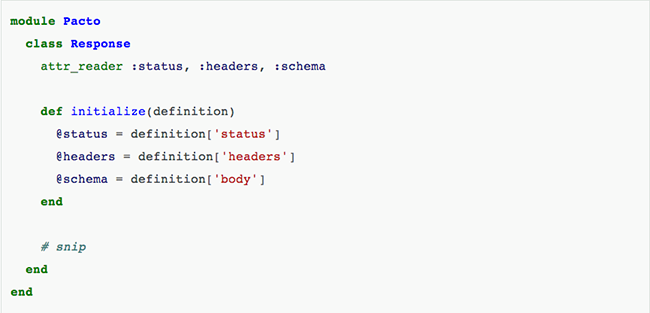
Step 4 – Remove unused @definition field
Another piece of private unused code, same rules as the previous step. marcosccm-refactoring-6

Step 5 – Remove excessive conditionals
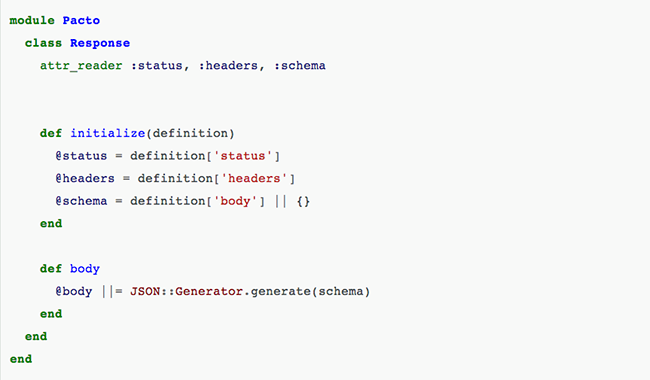
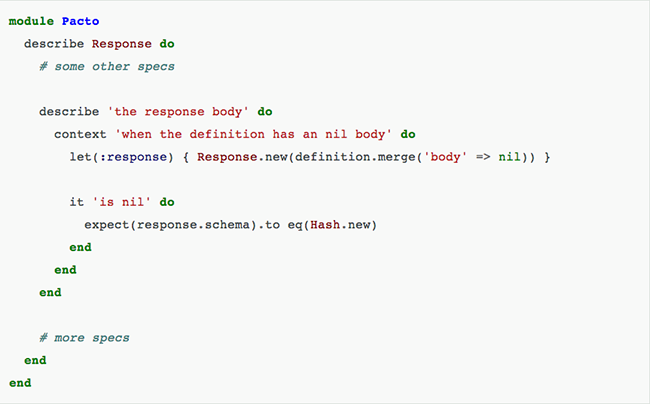
On the Response#body method we have some conditionals that could be easily replaced by a default value for the schema attribute. Doing a “let’s see if something break” trick we discover that this conditionals are not under test, so first we add the relevant specs:   marcosccm-refactoring-7 Then we replace the conditionals with a default value for the schema field: marcosccm-refactoring-8

Step 6 – Remove instantiate method
Finally the class is looking good enough and we can go forward and remove theinstantiate method. Whoever is using that method can just use a Response instance instead. For this step we simply delete the method and fix all the broken specs. Thankfully in this case, the Response class was used only by another class, so it was a very straightforward process. For cases were you have many dependencies, you might let the offending method live for a little longer and replace each use separately on work on each case separately.
marcosccm-refactoring-9
There’s still some things we could do on this class, like turn it into a Struct, but it’s good enough. Knowing when to stop refactoring is as important as knowing how to do it, the world is full of yaks and rabbit holes.


I summarized some parts of the article, but you should read this at least one time in your life. If you don’t know how to do a good refactoring you and your team will be lost. 😦

I know, very extensive article today, but it is very important too! Bye 🙂


Resource: http://www.thoughtworks.com/insights/blog/refactoring-book?utm_campaign=technology&utm_medium=social&utm_source=linkedin

Testing Ajax application with Selenium

Ajax, an acronym for Asynchronous JavaScript and XML, is a web development technique for creating interactive and more responsive web applications. The Ajax application works more like a desktop application, meaning that user’s request will not cause an entire page to reload every time, the web browser makes an asynchronous call to the web server to obtain the required data and update only specific parts of the current web page. As result the user gets more interactive, speedy, and usable web pages, but testing AJAX with Selenium will be challenging.

Selenium’s ‘assert’ and ‘verify’ commands might occasionally fail thanks to the asynchronous nature of the Ajax. It may happened that the result doesn’t come back from the server immediately and while ‘assert’ and ‘verify’ commands already trying to verify a new value immediately.

Not experienced testers would recommend to add a ‘pause’ command for a few seconds before the verification. The ‘pause’ suggestion may work in certain cases, because Ajax call may be not completed after pausing for a specific time due to slow machines or network. If the tester set the long pause time it will make the test unacceptably slow and drastically increase testing time.

In this type of tests you should use waitForCondition function in Selenium for Ajax testing. The waitForCondition command evaluates a JavaScript snippet repeatedly, until the snippet returns true. As soon as Selenium detects that the condition returns true, it will stop waiting and Ajax testing will resume.

It is important to note that the selenium in selenium.waitForCondition is a Java object in your test code and the selenium in selenium.browserbot is a javascript object running in the web browser.

Examples:

selenium.waitForCondition("selenium.browserbot.getCurrentWindow().loading == false", "20000");

> Condition

> Timeout miliseconds

If you are using AJAX you might find there is an AJAX object on your application. In it will be a activeRequestCount. When the AJAX.activeRequestCount goes to zero, all the AJAX calls are done. So you can wait for an AJAX call to complete with:

selenium.waitForCondition("selenium.browserbot.getCurrentWindow().AJAX.activeRequestCount == 0", "30000");

Thank you 🙂


Fontshttp://www.seleniumguide.com/p/testing-ajax-with-selenium.html

http://darrellgrainger.blogspot.co.uk/2010/03/selenium-rc-java-waitforcondition.html

How take a property inside an element in calabash-ios and calabash-android

Hello mate !


I am writing about “How take a property inside an element in calabash-ios”, look the examples:
 

IOS

– This query is taking the property :TextContent for the element in a web page.


 query("WebView css:'#testid'")[1]["textContent"]

 
– This query is taking the property :TextContent for the element.


 query("Label index:1",:textContent)
 

– Look when you want a sub-property:


[

[0] {

     "id" => "login_button",

     "enabled" => true,

     "contentDescription" => nil,

     "class" => "android.widget.Button",

     "text" => "Login",

     "rect" => {

     "center_y" => 545.0,

     "center_x" => 639.5,

     "height" => 64,

     "y" => 513,

     "width" => 195,

     "x" => 542

               },

     }

]

– This query is taking the property inside the group of properties.


 query("Label").first["rect"]["y"]


Android

– This query is taking the property :TextContent for the element in a web page.

 query("WebView css:'#testid'",:textContent)
 
– This query is taking the property :TextContent for the element.


 query("Label index:1",:textContent)
 

– Look when you want a sub-property:


 [

[0] {

     "id" => "login_button",

     "enabled" => true,

     "contentDescription" => nil,

     "class" => "android.widget.Button",

     "text" => "Login",

     "rect" => {

     "center_y" => 545.0,

     "center_x" => 639.5,

     "height" => 64,

     "y" => 513,

     "width" => 195,

     "x" => 542

               },

     }

]


– This query is taking the property inside the group of properties.


 query("Label index:1",:rect,:y)
 

If you need help or have some comment to do, please write below 🙂
 
Thank you !


Swipe and Drag – Calabash iOS and Android

Hi guys !!
I am writing examples of swipe and drag on mobile devices with calabash today. Some methods that you can use to test, these drags have the same action as the swipe. (If for some reason the swipe don’t work)
ANDROID:
  def swipe_page_to_left
    performAction('swipe', 'left')
  end

  def swipe_page_to_right
    performAction('swipe', 'right')
  end

  def scroll_to_right
    performAction('drag', 90, 0, 50, 50, 50)
  end

  def scroll_to_left
    performAction('drag', 0, 90, 50, 50, 50)
  end

def scroll_to_up
   performAction('drag', 88, 80, 90, 90, 5)
 end

 def scroll_to_down
    performAction('drag', 70, 10, 80, 0, 3)
 end

IOS
Change to down, left or right:

 swipe(:up)

If you have some question or suggest just write below !
Thank you 🙂

Simulate turn off wifi/connection on devices and simulators

Simulate disable network


Device/Simulator – Android:

%x(adb shell am start -a android.intent.action.MAIN -n com.android.settings/.wifi.WifiSettings)

(For selecting Next element on the screen)
%x(adb shell input keyevent 20)

(For selecting previous element on the screen)
%x(adb shell input keyevent 19)

(For clicking on the selected element)
%x(adb shell input keyevent 23)

So you have to use select next or select previous key events and then you the click event to toggel the wifi.

Simulator – Android:

def disable_network
%x(adb shell svc wifi disable)
end


def enable_network
%x(adb shell svc wifi enable)
end

Device/Simulator – IOS:

First, setup a WiFi router that you can use for testing.

You can turn on Airplane mode on the phone, then turn WiFi back on. This will prevent the 3G connection from providing data access.

Launch your application. Now you can simply disconnect your WiFi router to simulate a loss of connectivity.

So the only option available is switch on airplane mode on phone and connect it to the wifi. Once you want to disconnect wifi switch off the wifi router itself. You can use any laptop to create the testing wifi access point.

Summarizing you have to connect your device in a wifi connection that you can control with System commands, the problem is that you will lost the connection of your machine.

def disable_network
%x[ifconfig Wi-Fi down]
%x[ifconfig en4 down]
end


def enable_network
%x[ifconfig Wi-Fi up]
%x[ifconfig en4 up]
end

But if you have an android phone you can easily create a portable wifi Hotspot which can be controlled using adb commands.

Fonthttp://stackoverflow.com/questions/1077701/iphone-connectivity-testing-how-do-i-force-it-to-lose-connection

15 Expert Tips for Using Cucumber

Hey guys, I found these excellent tips to who are working with Cucumber and Calabash. Try follow each one to get more performance and use the best practices always 🙂

1. Feature Files Should Actually be Features, Not Entire Portions of an App

One feature per well named file, please, and keep the features focused.

2. Avoid Inconsistencies with Domain Language

You’ll get the most benefit out of using Cucumber when your customers are involved. To that end, make sure you use their domain language when you write stories. The best course of action is to have them involved in writing the stories.

3. Organize Your Features and Scenarios with the Same Thought You Give to Organizing Your Code

One useful way to organize things is by how fast they run. Use 2-3 levels of granularity for this:

  • Fast: scenarios that run very fast, e.g. under 1/10 of a second
  • Slow: scenarios that are slower but not painfully so, maybe under one second each
  • Glacial: scenarios that take a really long time to run

You can do this separation several different ways (and even some combination):

  • Put them in separate features
  • Put them in separate subdirectories
  • Tag them

4. Use Tags

Tags are a great way to organize your features and scenarios in non functional ways. You could use @small, @medium and @large, or maybe @hare, @tortoise, and @sloth. Using tags let you keep a feature’s scenarios together structurally, but run them separately. It also makes it easy to move features/scenarios between groups, and to have a given feature’s scenarios split between groups.

The advantage of separating them this way is that you can selectively run scenarios at different times and/or frequencies, i.e. run faster scenarios more often, or run really big/slow scenarios overnight on a schedule.

Tagging has uses beyond separating scenarios into groups based on how fast they are:

  • When they should be run: on @checkin, @hourly, @daily
  • What external dependencies they have: @local, @database, @network
  • Level: @functional, @system, @smoke
  • Etc.

5. Use Rake Tasks to Run Features

This provides a consistent environment for running features: this way each run uses the same set of options and parameters. This goes a long way toward maintaining deterministic results.

Another benefit is that this makes for easy integration with continuous integration tools. There is a single point of entry into the spec run, with all options/parameters encapsulated.

6. Don’t Get Carried Away with Backgrounds (Stick to Givens)

The larger the background, the greater the load of understanding for each scenario. Scenarios that contain all the details are self-contained and as such, can be more understandable at a glance.

7. Make Scenarios Independent and Deterministic

There shouldn’t be any sort of coupling between scenarios. The main source of such coupling is state that persists between scenarios. This can be accidental, or worse, by design. For example one scenario could step through adding a record to a database, and subsequent scenarios depend on the existence of that record.

This may work, but will create a problem if the order in which scenarios run changes, or they are run in parallel. Scenarios need to be completely independent.

Each time a scenario runs, it should run the same, giving identical results. The purpose of a scenario is to describe how your system works. If you don’t have confidence that this is always the case, then it isn’t doing its job. If you have non-deterministic scenarios, find out why and fix them.

8. Write Scenarios for the Non-Happy-Path Cases As Well

Happy path tests are easy; edge cases and failure scenarios take more thought and work. Here’s where having some good (and yet pathological) testers on the team can reap rewards.

Use rcov with your full Cucumber runs to find holes in coverage.

9. Be DRY: Refactor and Reuse Step Definitions

Especially look for the opportunity to make reusable step definitions that are not feature specific. As a project proceeds, you should be accumulating a library of step definitions. Ideally, you will end up with step definitions that can be used across projects.

10. Use a Library (Such as Chronic) for Parsing Time in Your Step Definitions

This allows you to use time in scenarios in a natural way. This is especially useful for relative times.

Background:
  Given a user signs up for a 30 day account

Scenario: access before expiry
  When they login in 29 days
  Then they will be let in

Scenario: access after expiry
  When they login in 31 days
  Then they will be asked to renew

11. Revisit, Refactor, and Improve Your Scenarios and Steps

Look for opportunities to generalize your steps and reuse them. You want to accumulate a reusable library of steps so that writing additional features takes less and less effort over time.

12. Refactor Language and Steps to Reflect Better Understanding of Domain

This is an extension of the previous point; as your understanding of the domain and your customer’s language/terminology improves, update the language used in your scenarios.

13. Use Compound Steps to Build Up Your Language

Compound steps (calling steps from steps) can help make your features more concise while still keeping your steps general—just don’t get too carried away. For example:

Given /^the user (.*) exists$/ do |name|
  # ...
end

Given /^I log in as (.*)$/ do |name|
  # ...
end

Given /^(.*) is logged in$/ do |name|
  Given "the user #{name} exists"
  Given "I log in as #{name}"
end

14. Use Parallel Step Definitions to Support Different Implementations for Features

For example, running features against Webrat and Selenium. Put these step definitions somewhere where they won’t be auto-loaded, and require them from the command line or rake task.

15. Avoid Using Conjunctive Steps

Each step should do one thing. You should not generally have step patterns containing “and.” For example:

Given A and B

should be split into two steps:

Given A
And B


Bye 🙂

Font: https://blog.engineyard.com/2009/15-expert-tips-for-using-cucumber/

Javascript and CSS – Testing on hybrid apps

Hello everyone 🙂

I am testing a hybrid app these days and I am learning a lot…Ok, but what is a hybrid app ?
Like native apps, run on the device, and are written with web technologies (HTML5, CSS and JavaScript). Hybrid apps run inside a native container, and leverage the device’s browser engine (but not the browser) to render the HTML and process the JavaScript locally. A web-to-native abstraction layer enables access to device capabilities that are not accessible in Mobile Web applications, such as the accelerometer, camera and local storage.

Summarising…. You have to test native elements mixed with web elements… Cool, don’t you think ? HaHa Hard work !

This post have some examples of a query using CSS and an action (click) using Javascript(IOS and Android platform):

Using Javascript to click: (Example)

query("webView index:1", :stringByEvaluatingJavaScriptFromString 'document.getElementsByTagName("iframe")[0].contentWindow.document.getElementByTag("a").click()')

This example, you have to write first the WebView hat contains the HTML and after put that conversor from String to Javascript. Finally, put your code in Javascript 🙂
I don’t know many things about javascript, but you can use the console of the inspector of Chrome or Safari to identify web elements in mobiles (iphone,ipad,tablet).

Examples – CSS:

query("SlidePanelWebView index:2 css:'#articleContainer .currentPanel figure .video-play-button'")

query("SlidePanelWebView index:4 css:'#article_1 .data-copy p strong a'")

element_does_not_exist("WebView css:'.inner a'")

Below the explanation of each part to form a CSS query on Calabash:

query("WebView index:4 css:'#article_1 .data-copy p strong a [style=\'Font:Tahoma\']'")

First: Put the element and the index that contains the element that you want. How you discover this ? You can try each index according with the position where is your element. Like in the end of a page… more chances to be the last index of the element.

Second: Write css:

– Third: Inside each you will choose what properties, class, id or tag you want to use to find the element.

Fourth: When you know the id of the div or the element, you can write here. Put and then the id of the div… If the element that you want was not found until this point, you can use the id of the first div in the hierarchy. Like:

<div id:first>

<div id: second>

<element id: third></element>

</div>

</div>

In this example, you can use the id of the first div instead of the id’s element. And try writing the way to find the element with the tags or classes provided.

Fifth: Class, here you can use the class element. To identify that this is a class you need to put a . before the name of the class… And I used to write only the last name of the class when this has more then one class name. Example:

<div id:first>

<div class: class name second>

</div>

</div>

Sixth: The last thing that you should know it is about the tag name. Like <p>, <a href>, <strong>… When you want to find a tag you just write the tag names separated by space. Like:  div p a , following the example bellow.

<div class: first>

<p>

<a href: third></a>

</p>

</div>

Seventh: When you want to find a property in the middle of the css.You need to put [name of property=value of property] Like when you want to search a specific value for href: [href=https://azevedorafaela.wordpress.com], following the example bellow.

<a href: https://azevedorafaela.wordpress.com></a>


More examples of queries calabash with CSS:

query("WebView index:4 css:'#three .scrollable [data-component=buttonBlock] .sectionList li span'")

query("PanelWebView css:'#article .data-copy p strong a'")

query("View index:3 css:'.viewInactive'")


If you have any suggestion, questions or comments just write below please !

Bye !!