Getting Test Automation right in a DevOps World

Hi guys, today I am here just to share a webinar about Test Automation for Devops. Looks it will be a good one 🙂


Presenter: Danny Crone, Test Practitioner and Technical Director, nFocus

Time: 14 April, 12:30 BST

Background:

DevOps aims to reduce delivery times and achieve greater production stability and reliability, so automated testing is naturally seen as being key to this. While this may be true, just having automated tests is not enough. This webinar will discuss some of the challenges of automating deployment pipelines such as test environments, test data, deployment tools and success/failure metrics.

Presenter:

Danny Crone is a Test Practitioner and Technical Director at the multi-award winning testing consultancy, nFocus. Danny has been in Software engineering for over 20 years and although he is a developer at heart, most of his IT career has been spent in Quality Assurance. He is a regular speaker at Testing events and has a real passion for Automated Testing.

Danny is a thought leader in the field of automated testing and has setup automated frameworks and approaches for many different clients. He has worked extensively with Visual Studio throughout the years and this includes being a Microsoft ALM Ranger, collaborating with other Rangers to produce “out of band” solutions for missing features and guidance in Visual Studio.

He loves challenges and helping others with their challenges, testing is always tough and he enjoys driving efficiencies into the test process to help build better software.

Register here

Exploratory tests as a complement of regression pack

Hey guys, today I will post about a technique to test new/old features when you don’t have a proper regression pack, or when the product is not stable, or the time is really limited.

Why should we perform exploratory tests combined to regression tests when the product is not stable ?

  • Because testers will be involved in minimum planning and maximum test execution (Allowing to find more bugs than just following the regression pack)
  • It will find different approach to test the same scenario, allowing to have a better coverage about the software, so it will have a higher possibility to find a trick bug
  • This is an approach that is most useful when there are no or poor specifications and when time is severely limited


How to perform the exploratory tests ?

The test design and test execution activities are performed in parallel typically without formally documenting the test conditions, test cases or test scripts. This does not mean that other, more formal testing techniques will not be used.

There is too much evidence to test, tools are often expensive, so investigators must exercise judgment. The investigator must pick what to study, and how in order to reveal how, in order to reveal the most needed information. This takes time and you need a huge knowledge of the software, until there you are gaining experience doing exploratory tests on te software.


[When my boss asks how the tests are going]


In this case it’s serving to complement the regression pack, which is a more formal testing, helping to establish greater confidence in the software. Exploratory testing can be used as a check on the formal test process by helping to ensure that the most serious/tricks defects have been found.

Programs fail in many ways:

Screen Shot 2016-02-24 at 23.14.00


Why should you not automate exploratory tests?

  • With a script, you miss the same things every time
  • Automated scripts are completely blind by design, this is more about a human interaction and different approaches
  • Different programmers tend to make different errors. (This is a key part of the rationale behind the PSP). A generic test suite that ignores authorship will overemphasize some potential errors while underemphasizing others
  • The environment in which the software will run ( platform, competition, user expectations, new exploits) changes over time


So, if is not stable what are the types of the defects I am finding?

  • A manufacturing defect appears in an individual instance of the product. This is the type of the defect you are finding on non stable softwares and what you try to find doing exploratory tests.
  • A design defect appears in every instance of the product. The challenge is to find new design errors, not to look over and over and over again for the same design error


To end this post, Exploratory testing is called when you want to go beyond the obvious or when I don’t trust the software, which is most of the time.


Resources:

http://istqbexamcertification.com/what-is-exploratory-testing-in-software-testing/

http://www.kaner.com/pdfs/QAIExploring.pdf

http://www.satisfice.com/articles/what_is_et.shtml

QA Metrics

Hey guys, today I am going to post some metrics for the automation projects. So, let’s start with the percentage automatable, which means how many test cases you can automate and how many you need to test manually.

  • Percent automatable

PA (%) = ATC/TC

PA = Percent automatable
ATC = Number of test cases automatable
TC = Total number of test cases

As part of an AST effort, the project is either basing its automation on existing manual test procedures, or starting a new automation effort from scratch, some combination, or even just maintaining an AST effort. Whatever the case, a percent automatable metric or the automation index can be determined.


  • Automation Progress

AP (%) = AA/ATC


AP = Automation progress
AA = Number of test cases automated
ATC = Number of test cases automatable

Automation progress refers to the number of tests that have been automated as a percentage of all automatable test cases. Basically, how well are you doing against the goal of automated testing? The ultimate goal is to automate 100% of the “automatable” test cases. It is useful to track this metric during the various stages of automated testing development.


  • Test Progress (Manual or automated)

TP = TC/T


TP = Test progress
TC = Number of test cases executed
T = Total number of test cases

ast2

A common metric closely associated with the progress of automation, yet not exclusive to automation, is test progress. Test progress can simply be defined as the number of test cases (manual and automated) executed over time.


  • Percent of Automated Test Coverage

PTC (%) = AC/C

PTC = Percent of automated test coverage
AC = Automation coverage
C = Total coverage (i.e., requirements, units/components, or code coverage)

This metric determines what percentage of test coverage the automated testing is actually achieving. Various degrees of test coverage can be achieved, depending on the project and defined goals. Together with manual test coverage, this metric measures the completeness of the test coverage and can measure how much automation is being executed relative to the total number of tests. Percent of automated test coverage does not indicate anything about the effectiveness of the testing taking place; it is a metric that measures its dimension.


  • Defect Density

DD = D/SS

DD = Defect density
D = Number of known defects
SS = Size of software entity

Defect density is another well-known metric that can be used for determining an area to automate. If a component requires a lot of retesting because the defect density is very high, it might lend itself perfectly to automated testing. Defect density is a measure of the total known defects divided by the size of the software entity being measured. For example, if there is a high defect density in a specific functionality, it is important to conduct a causal analysis. Is this functionality very complex, and therefore is it to be expected that the defect density would be high? Is there a problem with the design or implementation of the functionality? Were the wrong (or not enough) resources assigned to the functionality, because an inaccurate risk had been assigned to it and the complexity was not understood?


  • Defect Trend Analysis

DTA = D/TPE

DTA = Defect trend analysis
D = Number of known defects
TPE = Number of test procedures executed over time

Another useful testing metric in general is defect trend analysis.


  • Defect Removal Efficiency

DRE (%) = DT/DT+DA

DRE = Defect removal efficiency
DT = Number of defects found during testing
DA = Number of defects found after delivery

DRE is used to determine the effectiveness of defect removal efforts. It is also an indirect measurement of product quality. The higher the percentage, the greater the potential positive impact on the quality of the product. This is because it represents the timely identification and removal of defects at any particular phase.


  •  Automation Development
    Number (or %) of test cases feasible to automate out of all selected test cases – You can even replace test cases by steps or expected results for a more granular analysis.
    Number (or %) of test cases automated out of all test cases feasible to automate – As above, you can replace test cases by steps or expected results.
    Average effort spent to automate one test case – You can create a trend of this average effort over the duration of the automation exercise.
    % Defects discovered in unit testing/ reviews/ integration of all discovered defects in the automated test scripts


  • Automation Execution
    Number (or %) of automated test scripts executed out of all automated test scripts
    Number (or %) of automated test scripts that passed of all executed scripts
    Average time to execute an automated test script – Alternately, you can map test cases to automated test scripts and use the Average time to execute one test case.
    Average time to analyze automated testing results per script
    Defects discovered by automated test execution – As common, you can divide this by severity/ priority/ component and so on.


References:

http://www.methodsandtools.com/archive/archive.php?id=94

Testing Mobile Apps under Real User Conditions

Hey guys, so the first post of 2016 will be this webinar that I’ve watched last week about the different conditions (possibilities) you can find when testing mobile apps.

It will help you to create about more scenarios when testing on mobile platform, below the slides:


But if you want to watch the video the link is here.


Thank you !
See you next week 🙂

BDD Best practices

Here I am again talking about BDD  haha 😀

I am trying to implement the best practices of BDD in my company, it’s quite hard because most of them are developers and they have their own way to think which is different for Business and QA professionals. Other day I was discussing with a guy who had read a post about BDD and suddenly he entitled himself as an expert ! Really, this is the most common attitude you will find in IT atmosphere.
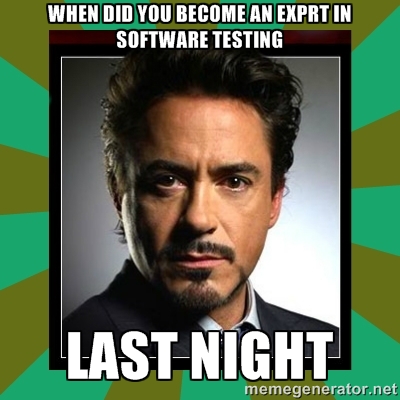
57221765


So, the structure is exactly like this and some people like to write the Given step in the past, but this is the thing, you don’t really need to write the first step in the past, some cases you can write in the present tense.

 Like:

Given I have xxx…
When I do xxx…
Then I should see xxxx…

The first step is a situation you have now like I am logged on the system, you don’t need write always in the past, this is not a rule. You need to write something is evident, this is the aim. So, if you want write in the past the Given, you will have something like:

Given I have logged xxx…
When I do xxx…
Then I should see xxx…

Except the Given that you can choose what is the best option for your scenarios, the When and Then you need to follow the right tenses, When in present Tense and Then in the future tense.

BDD structure:
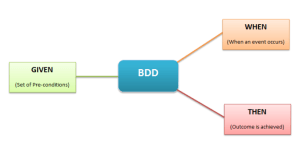
bdd-best-practices-e1433515152640

The features must have .feature as the extension of the file and you need put the features in the correct path, if you don’t do that Cucumber won’t work. If you want to run with Jbehave you don’t need follow the right structure, you can change this on the pom file if you are using Maven.


Where should feature files be kept

Some people don’t like to keep them on git with the project, they would like to see the scenarios on JIRA, but you will need to update and maintain in both of the places, for this reason I always put on github.


How should we write feature files


There are generally two ways of writing feature files – Imperative and Declarative

Imperative style of writing a feature file, is very verbose, contains low level details and too much information.

Pros: person reading the feature file can follow the step-by-step

Cons: Because of too much detail, the reader can lose the point of the story and the tests. The feature file becomes too big, difficult to maintain and likely to fail due to UI updates.

Declarative style of writing a feature file is concise and to the point, contains only relevant information about the story.

Pros: The declarative style is more readable as it contains less steps in the scenario. The reader can easily understand the scope of the test and quickly identify if any key elements are missing.


Independence of Scenarios

Scenarios should be independent of one another. This means that each and every scenario is stand-alone and should not refer to or depend on functionalities/conditions in other scenarios.


Redundancy and Refactoring

  • Avoid repetitions! Repetitions or identical steps indicate the need forrefactoring. Refactoring denotes that a scenario should be split into multiple ones while the original meaning is preserved.
  • How many Givens, Whens and Thens (including Ands andButs) should you use? As a rule of thumb, there should be amaximum of 3 to 4 consecutive Givens and Thens. Otherwise this indicates a need for refactoring. Whens should be used very sparingly! Usually only include one When.
  • Generally, favour many simple scenarios over few complex ones.


Resources
:

http://www.testingexcellence.com/bdd-guidelines-best-practices/

https://blog.grandcentrix.net/gherkin-guidelines-and-best-practices/

Why do we need to have a QA separated environment ?

  • If QA is using a dev environment, that environment is likely changing. It is hard to control the state of the environment with multiple people working against it.
  • Typically, QA environments mimic more closely production environments than do development environments. This helps ensure functionality is valid in an environment that is more production-like.
  • Developers tend to have lots of tools and things running in their environment that could affect QA validation.
  • You usually setup a separate QA environment, because you want to give the testers an isolated environment on which to test, so that developers and testers can work at the same time.
  • This allows reporting on a common revision so developers know whether particular issues found by testers has already been corrected in the development code.
  • Face the distinct possibility of releasing critical defects to customers because it’s not testing in a real-world environment.
  • The test team won’t see the issues when the environment is not the same because the playing field, so to speak, is not even.
  • Testing on a qa environment provides a more accurate measure of performance capacity and functional correctness
  • As Web applications become more mission-critical for customers, it becomes increasingly important to test on environments that exactly mimic production because it’s production where customers use your application


Resourceshttp://stackoverflow.com/questions/2777283/why-should-qa-have-their-own-qa-environment-what-are-the-pros-and-cons

http://searchsoftwarequality.techtarget.com/tip/A-good-QA-team-needs-a-proper-software-staging-environment-for-testing

Get json path from an authentication request


This example I am getting json path from an authentication request and use it in another group thread.
Remember install the json plugin for jmeter (If you don’t have), you can do that with homebrew command :

brew install jmeter --with-plugins


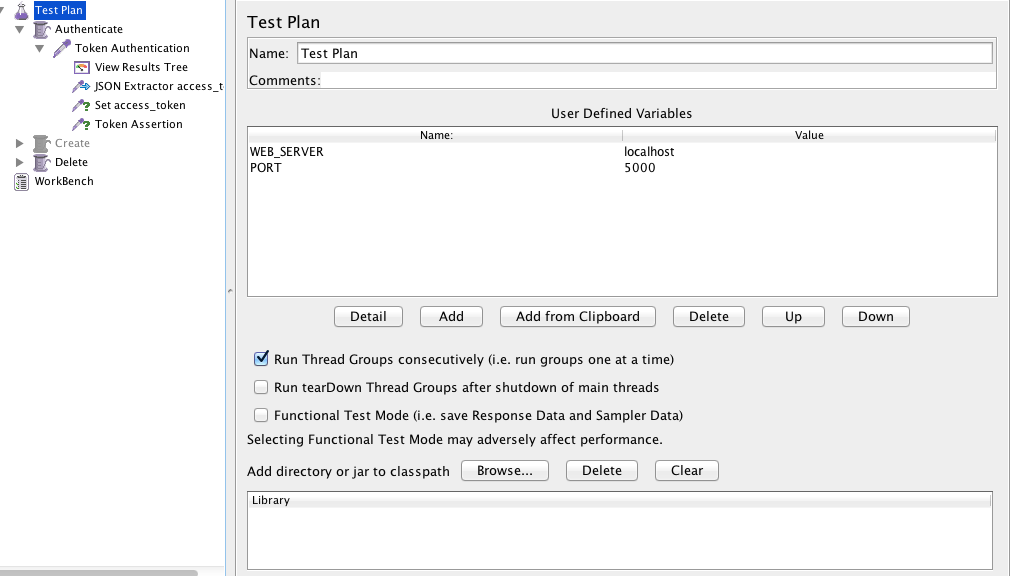
  • Create a test plan and set the web server and the port:


Screen Shot 2015-11-11 at 20.08.27


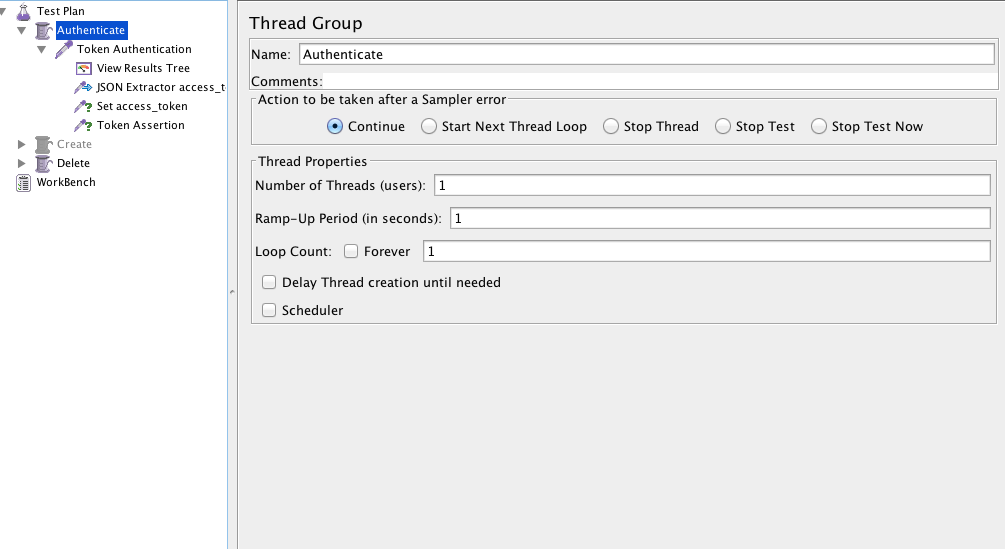
  • Create a Thread Group:


Screen Shot 2015-11-11 at 20.08.44

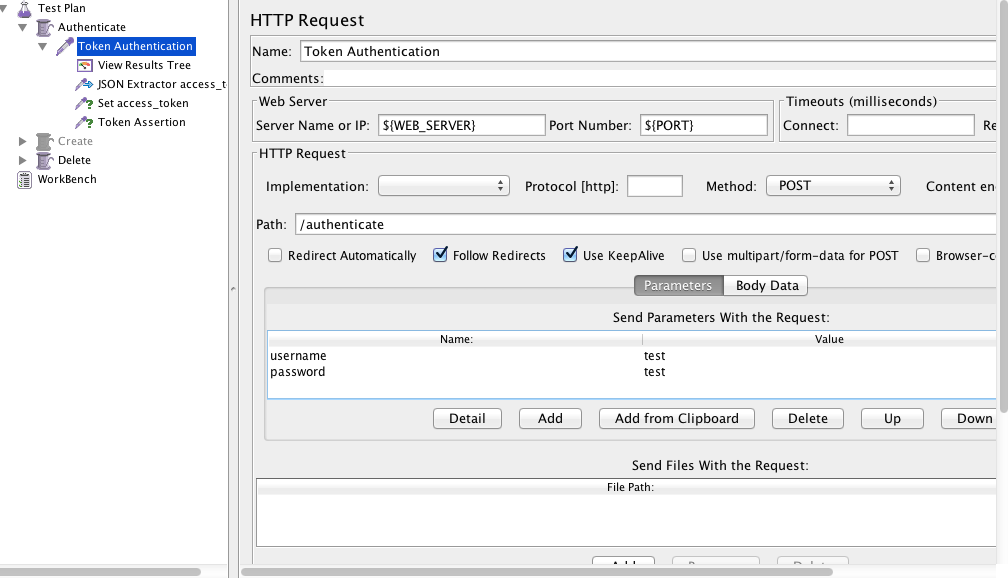
  • Create HTTP Request, use the variables for the server and the password. Put the path of the authentication page, username and the password.


Screen Shot 2015-11-11 at 20.09.09

  • Create Json Path Extractor and put the path Expression and the variable that you will use. You can test if your path is correct here.


Screen Shot 2015-11-11 at 20.10.14


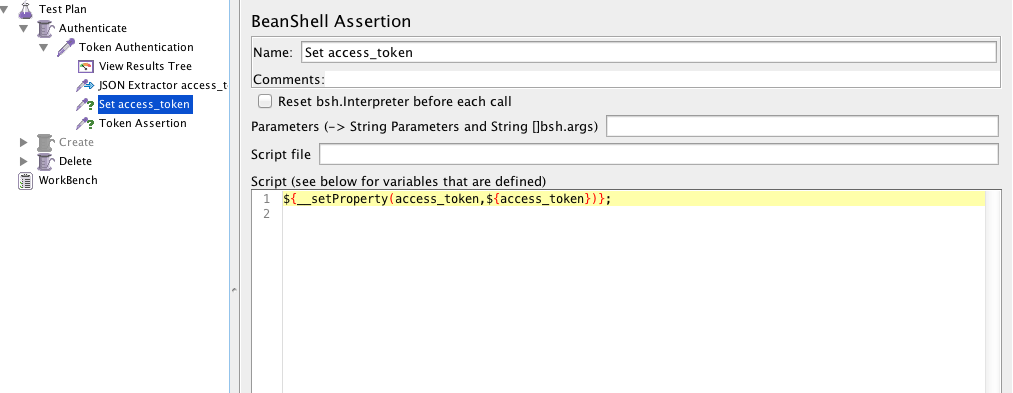
  • Create a beanshell Assertion or Post processor and set the property:


${__setProperty(access_token,${access_token})};

Screen Shot 2015-11-11 at 20.10.27


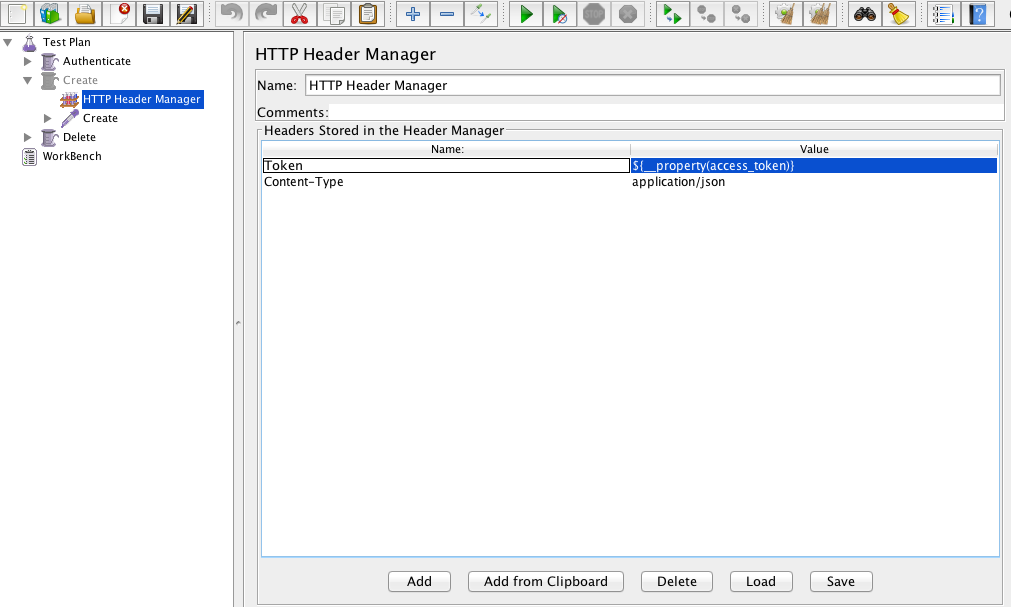
  • Create a new Thread Group and a HTTP Header Manager and use the same variable you used before:


${__property(access_token)}

Screen Shot 2015-11-11 at 20.42.41


  • Create the Listener > View Result Tree and it’s done, you can run the jmeter and see if it’s getting the token and using in the next thread group


See you guys 🙂

Tests Coverage

As a tester you have a different way to think about the scenarios. You know that you need to think beyond the scenarios. So, how do you know when it will be enough ? When will you have 100% of tests coverage ?

You probably already found a bug out of the requirements, and in a specific sequence of steps. I normally find these kind of bugs with exploratory tests, when I have time to free my creative side and start to do different ways to test the same thing. Developers follow the requirements, they don’t do exploratory tests, usually they think even the user has the possibility to do the same step in a different way, they shouldn’t (Because it’s not the right way).

In my humble opinion, if your software allow to do the same function in 1000 different ways, you should be prepare to test every single “invalid” way, because this will increase the trust in your software. If I find a single stupid bug in an application, like an error when I send invalid characters, I start to think what type of software was delivered, like neither the basic simple stupid scenario of invalid characters was tested, imagine the more complex ones… This could be low priority, but if you ignore this, you need to face there are many people like me (critical detail vision), that see these kind of things and lose the confidence on the software and to be honest, the respect too.

Developer-Calls-It-Done-Meme

Imagine you have all the requirements:

requirements

And you have the system software in this another circle:

system

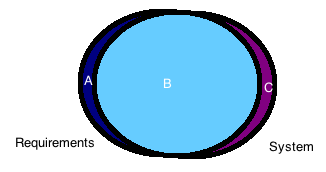
But in the real world, we don’t have every requirement covered by the system, we have something like this:

merge

Which means you will have some parts in your system not covered by your requirements and you have some parts in your requirements not covered by your system. It is exactly in this part that we, testers should start to think about. We need knowledge of both of the parts, and this takes time.

So, you don’t need to worry cover 100% of your tests in the beginning, you need to worry if you know everything about what you are testing, some scenarios you just figure out when you are testing, because you are pretending you are an user. You need a good background, someone to sit next to you, or some good documentation about what you will test, spend some time exploring the app before you start the scenarios. This will create your first impression of the software and you will be more into it and the user experience.

Finally, my advice to know if you have a good test coverage is:

  • Exploratory tests, this will help you to find unknown scenarios between system and requirements. This is a type of test you can’t automate, it involves more about your creativity than objective steps. Sometimes is just a different sequence that you do and you can find a critical bug.
  • Kick-off requirements, this is another thing that helps to reduce the unknown scenarios, like if you have an explanation about what a new function will do, you can raise and think in points which you already know and maybe nobody thought yet. As I said before, it’s better if you have a good background about what is coming.
  • System flow, the last key is try to understand the gaps and the flow of the software, like what is the flow to a function update something in database. It seems very technical, but this will help you to think about scenarios that might crash when you do in a different sequence or if you do many times, or if you don’t wait a specific time, this is quality assurance 🙂

See you next week !