What is Waterfall model ?

It was the first model of tests, is simple to understand and linear-sequential. You can use the waterfall model when the requirements are very well known, clear and fixed; Product definition is stable; No changes in the scope; You understood the technology; There are no ambiguous requirements; Resources with required expertise are available freely; Project is short.

In Royce’s original waterfall model, the following phases are followed in order:

1- Requirements specification resulting in the product requirements document
2- Design resulting in the software architecture
3- Construction (implementation or coding) resulting in the actual software
4- Integration
5- Testing and debugging
6- Installation
7- Maintenance

Model:


Iterative vs. waterfall
One of the differences between agile and waterfall is that testing of the software is conducted at different stages during the software development life-cycle. In the Waterfall model, there is always a separate testing phase near the completion of an implementation phase. However, in agile development and especially extreme programming, testing is usually done concurrently with coding, or at least, testing jobs start in the early days of iteration.

Advantages?

– This model is simple and easy to understand and use.
– It is easy to manage due to the rigidity of the model – each phase has specific deliverables and a review process.
– In this model phases are processed and completed one at a time. Phases do not overlap.
– Waterfall model works well for smaller projects where requirements are very well understood.

Disadvantages?

– Once an application is in the testing stage, it is very difficult to go back and change something that was not well-thought out in the concept stage.
– No working software is produced until late during the life cycle.
– High amounts of risk and uncertainty.
– Not a good model for complex and object-oriented projects.
– Poor model for long and ongoing projects.
– Not suitable for the projects where requirements are at a moderate to high risk of changing.

Sources: http://istqbexamcertification.com/what-is-waterfall-model-advantages-disadvantages-and-when-to-use-it/

http://en.wikipedia.org/wiki/Agile_software_development#Iterative_vs._waterfall
http://en.wikipedia.org/wiki/Waterfall_model

http://www.agilenutshell.com/agile_vs_waterfall

Create xml with shell script

Hi guys,

Today I will post a shell script that I am using to test a webservice. If you need a xml to test the performance of the server/webservice with Jmeter or if you just need generate a lot of xmls to make any type of test, this example can be useful.

In this code you can generate xmls and change some tags as id, date, etc…

#!/bin/bash
# Written by rafazzevedo
# http://www.azevedorafaela.wordpress.com

defaultpath="/User/" #Change this for the path where you want the files stay

echo "What do you want generate ?"
read element

echo "How many files ?"
read filescount
#Creating the subdirectory for each element and removing the existing folder
if [ ! -d $element ]
then
mkdir "$element"
else
rm -r "$element"
mkdir "$element"
fi

defaultpath=$defaultpath$element/

dateformat=$(date +"%m/%d/%YT%H:%M:%S")

for (( i=0;i<$filescount;i++ )) do

exec 3>temp.xml #Creating temporary file

#HEADER (Common for all xmls)
echo '&3'
echo ' xmlns:cpi="http://xml.wordpress.co.uk/types" >' >&3
echo " http://localhost:9999/$element$i" >&3
echo ' Title' >&3
echo " $dateformat" >&3
echo ' ' >&3
echo ' Rafaela Azevedo' >&3
echo ' http://wordpress.com/img.png' >&3
echo ' rafazzevedo@gmail.co.uk' >&3
echo " " >&3

#SPECIFIC TAGS OF EACH ELEMENT
case $element in

'article')
echo ' Content Test' >&3
echo ' ' >&3
;;

'image')
echo '' >&3
echo ' http://weather.gov/images/xml_logo.gif' >&3
echo ' NOAAs National Weather Service' >&3
echo ' http://weather.gov' >&3
echo '' >&3
;;

esac

echo '' >&3
cp ./temp.xml ${element}/$element-$i.xml #Copying the temporary files
rm ./temp.xml #Removing the temp files

done

echo "Created xml files"


It is helping me a lot lately , I do not need spend a lot of time doing some complex code or generate these files manually. I hope this helps you too .

If you have any suggestion or question, write a comment bellow 🙂

Thank you guys !

V-model tests – When use, Pros, Cons and Criticism

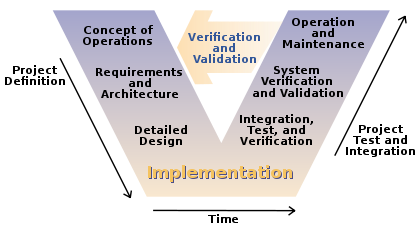
V model is one of the most used software development process. Introduction of V model has proved the implementation of testing right from the requirement phase. V model is also called as verification and validation model.

test

V model is applicable when:

  • Requirement is well defined and not ambiguous
  • Acceptance criteria are well defined.
  • Project is short to medium in size.
  • Technology and tools used are not dynamic.

Pros and Cons of using V model:

PROS

CONS

– Development and progress is very organized and systematic– Works well for smaller to medium sized projects.– Testing starts from beginning so ambiguities are identified from the beginning.

– Easy to manage as each phase has well defined objectives and goals.

– Not suitable for bigger and complex projects– Not suitable if the requirements are not consistent.– No working software is produced in the intermediate stage.

– No provision for doing risk analysis so uncertainty and risks are there.

Criticism
The V-Model has been criticized by Agile advocates and others as an inadequate model of software development for numerous reasons. Including:
  • It is too simple to accurately reflect the software development process, and can lead managers into a false sense of security.
  • Fits the needs of project managers, accountants and lawyers rather than software developers or users. Although it is easily understood by novices
  • If practitioners persist with their naive view of the V-Model they will have great difficulty applying it successfully.
  •   Is inflexible and encourages a rigid and linear view of software development and has no inherent ability to respond to change.
  • Provides only a slight variant on the waterfall model and is therefore subject to the same criticisms as that model.
  • Implicitly promotes writing test scripts in advance rather than exploratory testing.
  • Encourages testers to look for what they expect to find, rather than discover what is truly there.
  • Also encourages a rigid link between the equivalent levels of either leg, rather than encouraging testers to select the most effective and efficient way to plan and execute testing.
  • It lacks coherence and precision.
V-model has the same idea of BDD, you need to share knowledge since the beginning of the project (kick-off), providing greater emphasis on testing, and particularly the importance of early test planning.

Do you want to test/learn how to do automation in Hybrid apps ?

Hello again,

Today I will post 2 projects ios and android, a sample of Hybrid app.

I found this sample project to you download and start do test calabash with them.

Example Hybrid Apphttps://github.com/moovweb-demos/igadget-phonegap

– After download them, you can follow some instructions to install:

https://azevedorafaela.wordpress.com/2013/12/19/cucumber-and-calabash-ios-automation/

&

https://azevedorafaela.wordpress.com/2014/07/09/calabash-android-install-example-project/

– And to find elements inside the webviews:

https://azevedorafaela.wordpress.com/2014/07/28/summary-of-calabash-ios-ruby-api-query/

Just download them and start do/learn automation in hybrid apps 🙂

Thank you, see you next week guys !

Using different emulators with Chrome in C#

Hi guys, Today I will post a sample code that you can use to test different screens/mobile devices/browsers using Google Chrome browser with C#. You will need change the bold words for the devices and sizes that you want to simulate.

private static ChromeOpt SetCapabilities()
{
Map chromeOptions = new HashMap();

DesiredCapabilities capabilities = DesiredCapabilities.chrome();  capabilities.setCapability(ChromeOptions.CAPABILITY, chromeOptions);


switch (whichCase) {


case "byDevice":
Map mobileEmulation = new HashMap();
mobileEmulation.put("deviceName", "Apple iPhone 4"); //Should be the same name showing in the Chrome Device Emulator
chromeOptions.put("mobileEmulation", mobileEmulation);
break;

case "CustomScreen":
Map deviceMetrics = new HashMap();
deviceMetrics.put("width", 900);
deviceMetrics.put("height", 600);
deviceMetrics.put("pixelRatio", 3.0);


Map mobileEmulation = new HashMap();
mobileEmulation.put("deviceMetrics", deviceMetrics);
mobileEmulation.put("userAgent", "Mozilla/5.0 (Linux; Android 4.2.1; en-us; Nexus 5 Build/JOP40D) AppleWebKit/535.19 (KHTML, like Gecko) Chrome/18.0.1025.166 Mobile Safari/535.19");
chromeOptions.put("mobileEmulation", mobileEmulation);


break;

}

}
IWebDriver driver =new ChromeDriver(capabilities);
return driver;
}

You can look the list of user agents here:

http://www.useragentstring.com/pages/useragentstring.php

If you have any thoughts/suggestions please leave your comment here 🙂

Thank you guys !

How to install SafariLauncher to run appium ?

Hi guys,

I am going to write about “How you can install the framework of safari to run appium tests”. If you need run tests in safari of real devices with Appium, you can use this framework for ios devices (Android it is more easier as always). So, you need to have an apple developer account.

-> Plug your device

-> Git clone this project: https://github.com/budhash/SafariLauncher

-> Add your device in your developer apple register.

https://developer.apple.com/account/ios/device/deviceList.action

-> Download your certificate and your mobile provisioning profile after

https://developer.apple.com/account/ios/certificate/certificateList.action

&

https://developer.apple.com/account/ios/profile/profileList.action

-> Install your mobile provision in your device (or double touch on the file)

-> Put in blundle id com.safariLauncher.safariLauncher -> inside of the general properties of the project

-> Check if you are deploying in the right version of ios.

-> Run the project

-> Don’t forget to set the capabilities in your automation project:

DesiredCapabilities capabilities = new DesiredCapabilities();
capabilities.setCapability("appium-version", "1.3.1");
capabilities.setCapability("platformName", "iOS");
capabilities.setCapability("deviceName", "Tahir's iPhone");
capabilities.setCapability("udid", "your_udid");
capabilities.setCapability("bundleId", bundle);
capabilities.setCapability("browserName", "safari");
driver = new AppiumDriver(new URL("http://127.0.0.1:4723/wd/hub"), capabilities);    

driver.get("http://www.google.com");
Thread.sleep(20000);

Once you have deployed the safari launcher to the device, everything should be configured correctly so that the next time you run ./reset.sh on appium, the installation of the safari launcher app should succeed.

See you next week !

Test your app and raise your chances to keep in the market

Hi guys, today I will summarise and translate a slide of Elias Nogueira, who is a Tester Consultancy in Brazil.

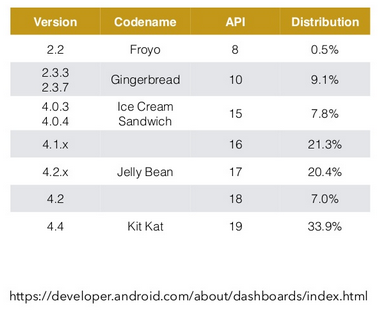
– Only in android there are 18,798 devices and it is growing…

– You can see the most used android devices of your country in 2014 on this link: http://opensignal.com/reports/2014/android-fragmentation/

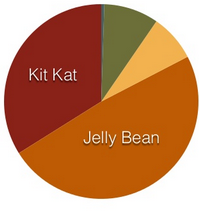
– 7 different platforms (android only): 

graph table


CHALLENGES ?

Simulators: Many apps can be test in simulators without need spend money buying real devices. Most of them are free, but this is the most far option from the real environment. Examples: Genymotion, Developer tools inside Chrome, XCode Simulator.

Cloud Testing: You can test the apps thought the web. The application can be tested, managed and installed. They are safer for the tests and you can simulate in real devices, but normally they are expensive. Examples: Xamarin, Testdroid, Appthwack.

Real Devices: It will bring realistic results and you can manage the device physically if you need, but you will spend lots of money if you need test in many devices and versions of Android. (It is impossible you test all devices)


WHAT TEST ?

– Compatibility: all restrictions of the device

– Operational: installation, update, backup, access to the resources

– Functional: business rules and input of data

– Usability: locale, navigation off/on line, navigation of tables

– Performance: network, exchange files, battery usage

– Available: restrictions in the utilization of resources


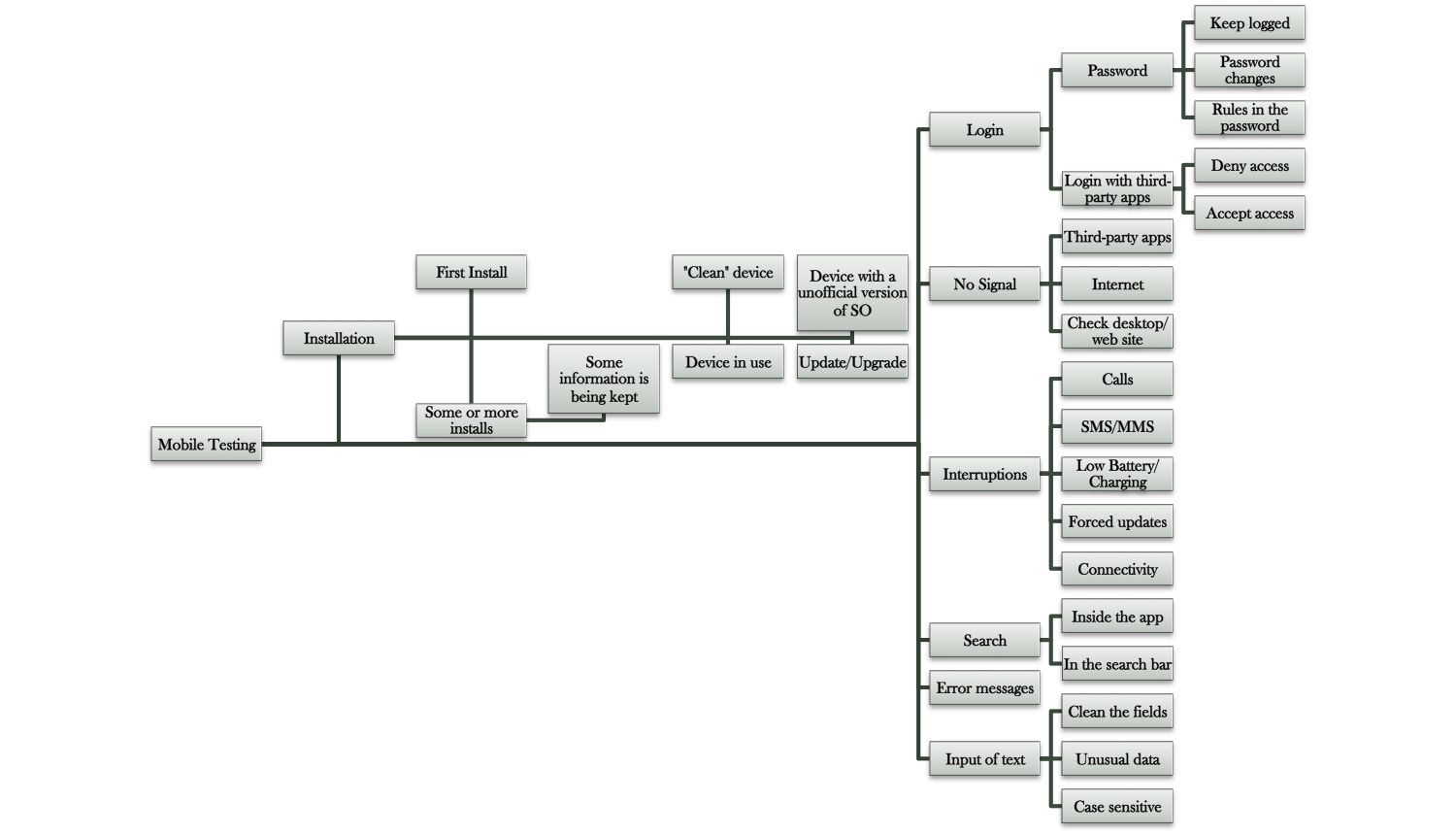
SOME IDEAS

graph

HOW TEST?

– Manual: Straight on devices, simulators and Crowdtest.

– Automated: Straight on devices, simulators and the cloud.


TECHNOLOGIES

– Appium, Calabash, Robotium, Selendroid, MonkeyRunner, MonkeyTalk, UIAutomator, Espresso


Thank you 🙂


Resourceshttp://www.slideshare.net/elias.nogueira/teste-sua-app-e-aumente-as-chances-de-mantla-no-mercado

http://opensignal.com/reports/2014/android-fragmentation/

How choose the order of the browsers that I will be testing ?

By testing your web application using a variety of web browser types, you better emulate the UI experience of your users who may run different browsers. For example, your application might include a control or code in Internet Explorer that is not compatible with other web browsers. By running your coded UI tests across other browsers, you can discover and correct any issue before it impacts your customers.

To discover what is the priority that you should test the browsers is simple, but you have a lot of points to worry.

– Hardware differences

– Monitor resolution settings

– Browser and computer preferences

Usage of each browser 

What is the time that you have ?

When you will be the release ?


top 10 browsers to test?

  1. Chrome 39
  2. Internet Explorer 11
  3. Firefox 35
  4. Internet Explorer 10
  5. Chrome 38


Usage share of desktop browsers for December 2014
Source Chrome Internet
Explorer
Firefox Safari Opera Other
Stat Counter 49.7% 24.6% 18.0% 4.7% 1.5% 1.6%
W3Counter 42.5% 17.6% 15.6% 14.6% 3.2% 6.5%
Wikimedia 48.1% 17.5% 16.7% 4.8% 1.5% 11.4%
Net Applications 22.7% 59.1% 11.9% 5.0% 0.9% 0.4%


How to measure the order of the browsers ?

The ideal is you focus in the most usage browser first and after you can think about the others. So, let’s imagine that you have 4 weeks to test all browsers and you take 1 week to test all the scenarios in one browser. You need to choose the first week to test in the most used browser for your end user, and the second week for the second most used and so on.

This is the ideal in the most of cases, but of course everything depends of how many people you have to help you with the tests, the date of the release, and the other points I already told.

 StatCounter-browser-ww-monthly-200807-201412


Tips: 

– Don’t Overestimate neither Underestimate a browser version.

– If you are looking for just mainstream use, StatCounter has a really nice graph to show you what browser you should test.


Tools & emulators that you can use:

  • The Browser Sandbox
  • BrowserShots.org
  • CrossBrowserTesting.com
  • SauseLabs


Thank you guys ! See you next week 🙂


Source
http://crossbrowsertesting.com/browsers-to-test/

http://en.wikipedia.org/wiki/Usage_share_of_web_browsers

https://msdn.microsoft.com/en-us/library/jj835758.aspx

http://www.digitalfamily.com/tutorials/test-your-website-in-differen-web-browsers/

http://gs.statcounter.com/#desktop-browser-ww-monthly-200807-201412

Basics gestures for calabash-android

Hi guys, today I will post just some basics and very basics commands from the Calabash android API (0.5.5):

– tap_mark(“query”)

– touch(“query”)

– double_tap(“query”)

– perform_action(“touch_coordinate”, center_x, center_y)

– perform_action(“double_tap_coordinate”, center_x, center_y)

– long_press(“query”, options)

– drag (“query”)

– pan_left(options)

– pan_right(options)

– pan_up(options)

– pan_down(options)

– pan (“query”)

– flick_left (options)

– flick_right (options)

– flick_up (options)

– flick_down (options)

– flick (“query”)

– flash(“query”)

– pinch_out (options)

– pinch_in (options)

– pinch (“query”)

– find_coordinate (“query”)

– tap_when_element_exists (“query”)

– long_press_when_element_exists (“query”)

– query_result? (“query”)


See you on Wednesday !

Font: https://github.com/calabash/calabash-android/blob/master/ruby-gem/lib/calabash-android/touch_helpers.rb

What is the difference between an interface and abstract class?

Hi guys, I am without internet in my house until 19th 😦
Because of this, I will post some interesting things, but nothing that I wrote. (Because I am without time/internet). Sorry, for this !

Interface

An interface is a contract: the guy writing the interface says, “hey, I accept things looking that way“, and the guy using the interface says “OK, the class I write looks that way“.

An interface is an empty shell, there are only the signatures (name / params / return type) of the methods. The methods do not contain anything. The interface can’t do anything. It’s just a pattern.

E.G (pseudo code):

// I say all motor vehicles should look like this:
interface MotorVehicle
{
void run();


int getFuel();
}

// my team mate complies and writes vehicle looking that way
class Car implements MotorVehicle
{


int fuel;


void run()
{


print("Wrroooooooom");
}


int getFuel()
{
return this.fuel;
}
}

Implementing an interface consumes very little CPU, because it’s not a class, just a bunch of names, and therefore there is no expensive look-up to do. It’s great when it matters such as in embedded devices.

Abstract classes

Abstract classes, unlike interfaces, are classes. They are more expensive to use because there is a look-up to do when you inherit from them.

Abstract classes look a lot like interfaces, but they have something more : you can define a behavior for them. It’s more about a guy saying, “these classes should look like that, and they have that in common, so fill in the blanks!”.

e.g:

// I say all motor vehicles should look like this :
abstract class MotorVehicle
{

int fuel;

// they ALL have fuel, so why not let others implement this?
// let's make it for everybody


int getFuel()
{

return this.fuel;
}


// that can be very different, force them to provide their
// implementation
abstract void run();

}

// my team mate complies and writes vehicle looking that way
class Car extends MotorVehicle
{
void run()
{
print("Wrroooooooom");
}
}

Implementation

While abstract classes and interfaces are supposed to be different concepts, the implementations make that statement sometimes untrue. Sometimes, they are not even what you think they are.

In Java, this rule is strongly enforced.

See you next week !

Font: http://stackoverflow.com/questions/1913098/what-is-the-difference-between-an-interface-and-abstract-class